
A CRM can look simple on paper: store customer information, manage leads, track deals, and keep teams organized.
The real value becomes easier to understand when you look at CRM case studies.
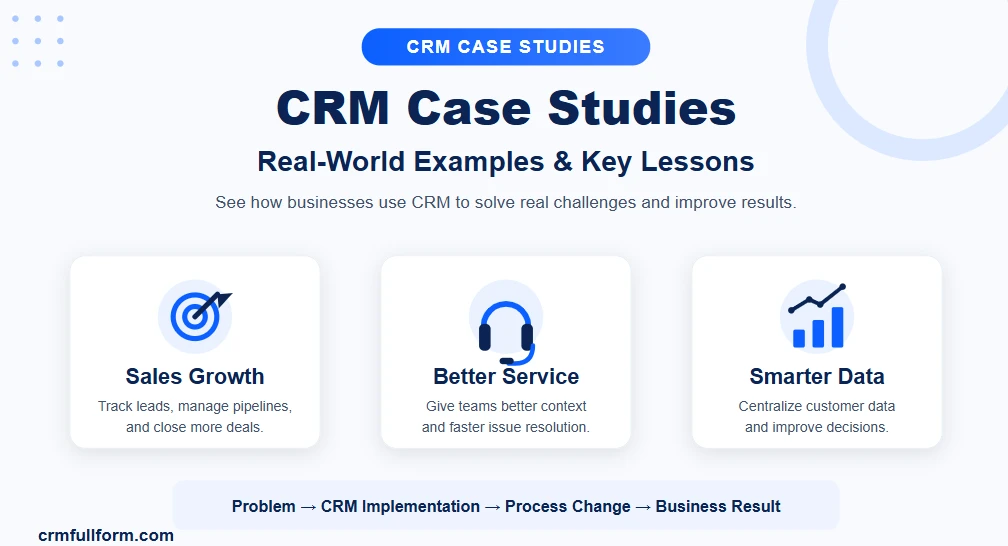
A good CRM case study shows what a business was struggling with before implementation, what it changed, and how the new system affected its sales, marketing, customer service, or internal processes.
For example, Salesforce currently highlights customer stories involving companies such as Siemens, while HubSpot publishes case studies covering businesses in industries ranging from software and healthcare to financial services and real estate.
These examples also show an important point: companies do not use CRM simply because they need a place to store contacts. They use it to solve specific business problems.
If you are new to CRM, start with our guide to CRM and what it means before looking at the examples below.
What Is a CRM Case Study?
A CRM case study is a real-world example showing how a company uses customer relationship management software, processes, or strategies to solve a business problem.
A typical CRM case study covers:
- The company’s original problem
- Existing sales or customer-management processes
- The CRM system or platform used
- Changes made during implementation
- How employees used the system
- Business results or improvements
- Lessons other companies can apply
For example, a company may have customer information spread across spreadsheets, emails, and separate applications.
After implementing a CRM, it may centralize customer records, create a structured sales pipeline, automate follow-ups, and give managers better visibility into sales activity.
That is the basic story behind many CRM implementation case studies.
Why CRM Case Studies Matter
CRM features are easy to list.
Contact management. Lead tracking. Automation. Reporting. Sales pipelines.
But a feature list does not necessarily explain why a business needs those features.
Case studies provide that missing context.
They show how CRM technology is connected to actual business problems.
A company may implement CRM because:
- Leads are being missed
- Sales representatives lack visibility
- Customer information is scattered
- Follow-ups are inconsistent
- Marketing and sales teams work separately
- Customer support cannot see account history
- Managers lack reliable reporting
- Employees spend too much time entering data manually
- The business needs to scale its customer operations
Looking at these situations can help businesses identify problems that may also exist in their own operations.
CRM Case Study #1: Siemens and Sales Lead Management
One example highlighted by Salesforce is Siemens, whose sales organization had sellers, resellers, and partners operating across multiple business units.
The company was also dealing with a large volume of unqualified leads, making it difficult for sales teams to focus their time effectively.
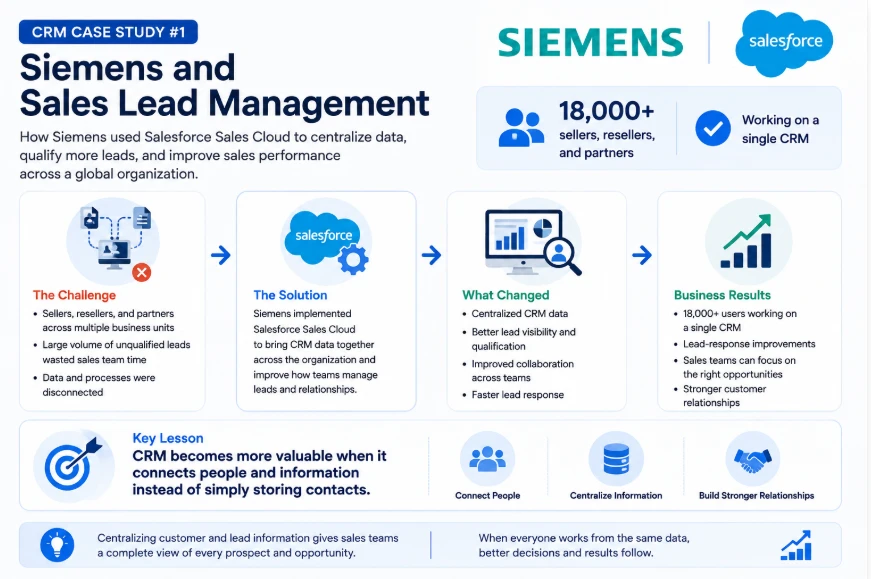
Salesforce says Siemens used Sales Cloud to bring CRM data together across its organization and improve how teams handled leads and customer relationships. The Salesforce case study reports 18,000 sellers, resellers, and partners working on a single CRM and describes lead-response improvements.
The important lesson is not simply that Siemens used Salesforce.
The bigger lesson is centralization.
When customer and lead information exists across disconnected systems, sales teams can struggle to understand what has already happened with a prospect.
A centralized CRM can give teams a shared view of customer information and sales activity.
Key lesson
CRM becomes more valuable when it connects people and information instead of simply storing contacts.
CRM Case Study #2: Myzone and HubSpot
HubSpot’s CRM case-study directory includes Myzone, a sports and fitness company whose case study focuses on improving conversions using HubSpot. HubSpot lists Myzone as a full-CRM customer and reports a 20% increase in conversions.
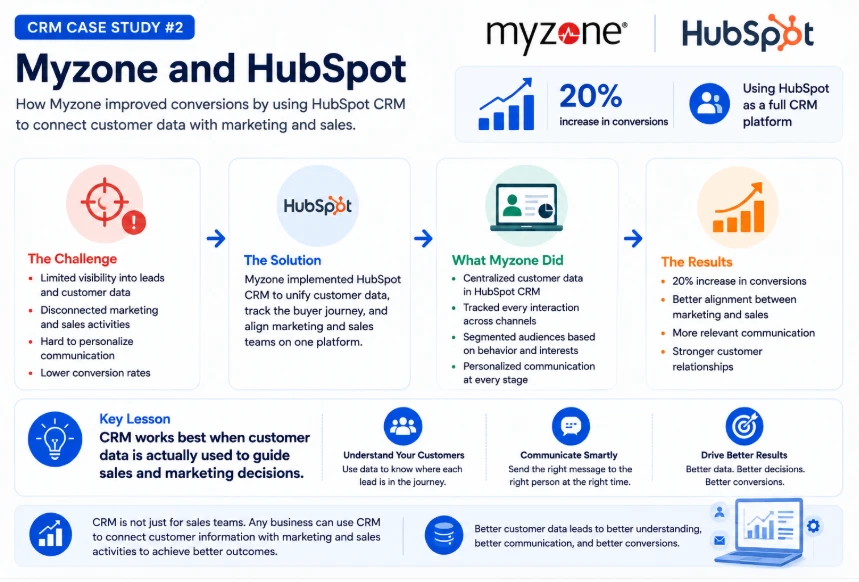
This is a useful example because CRM is not limited to traditional sales teams.
A business selling products or services can use CRM to connect customer information with marketing and sales activities.
The underlying idea is straightforward:
Better customer data can support better decisions.
Instead of treating every customer or lead in exactly the same way, teams can use available information to understand where someone is in the buying journey and what type of communication may be relevant.
Key lesson
CRM works best when customer data is actually used to guide sales and marketing decisions.
CRM Case Study #3: MedicAlert Foundation Canada
Another HubSpot case study focuses on MedicAlert Foundation Canada, a healthcare organization that used HubSpot to improve efficiency and integrate company data.
HubSpot describes the organization as achieving significant efficiency gains through its CRM implementation.
This example demonstrates another common CRM problem: disconnected information.
When customer or organizational data is spread across multiple systems, employees may spend unnecessary time searching for information or moving data between tools.
CRM integration can help create a more connected workflow.
That does not mean every company needs to put everything inside one platform.
It means important customer information should be accessible to the people who need it, when they need it.
Key lesson
CRM integration can be just as important as CRM features.
CRM Case Study #4: Pleo and Consolidating Multiple Tools
HubSpot’s case-study directory also features Pleo, a financial services company that consolidated more than four tools with the HubSpot CRM platform.
HubSpot reports that the company saved $350,000 per year after the consolidation.
This highlights a problem that many growing businesses eventually face.
At the beginning, using separate tools may seem perfectly reasonable.
One application handles contacts.
Another handles email.
Another manages sales.
Another stores customer information.
Another produces reports.
The problem appears when employees have to constantly move information between these systems.
A CRM can reduce this fragmentation when the platform provides the functionality and integrations the business actually needs.
Key lesson
The goal is not to collect more software. The goal is to create a workflow that employees can actually manage.
CRM Case Study #5: Real Estate CRM Implementation
CRM case studies are also common in industries such as real estate.
Real estate businesses often deal with large numbers of leads, property inquiries, follow-ups, appointments, and customer conversations.
A real estate CRM can help organize:
- Buyer and seller information
- Property interests
- Lead sources
- Follow-up dates
- Sales stages
- Viewing appointments
- Agent activity
- Customer communication
For example, CRM implementation case studies in real estate frequently focus on problems such as leads arriving through multiple channels, inconsistent follow-up, and customer information being difficult to access.
The solution is usually not simply “more leads.”
It is creating a process where leads are captured, assigned, followed up, and tracked consistently.
Key lesson
Industry-specific workflows matter when choosing and implementing CRM software.
CRM Case Study #6: Moving From Spreadsheets to CRM
One of the most common CRM implementation stories starts with spreadsheets.
A small business may initially manage customer information in Excel or Google Sheets.
That can work when the customer base is small.
But as the business grows, the spreadsheet can become difficult to maintain.
Problems may include:
- Duplicate customer records
- Missing follow-up dates
- Multiple versions of the same file
- Limited visibility into sales activity
- Manual reporting
- Poor collaboration
- Customer information being stored in different places
Moving to CRM does not automatically solve these problems.
The business still needs a clear process.
The difference is that CRM software can provide dedicated tools for customer records, sales pipelines, tasks, communication history, reporting, and automation.
You can learn more about the underlying workflow in our guide to the CRM process.
Key lesson
A CRM should improve the process, not simply replace a spreadsheet with another database.
What Do Successful CRM Case Studies Have in Common?
Although businesses and industries differ, many CRM success stories have similar patterns.
1. They Start With a Specific Problem
Successful CRM projects usually have a clear reason for implementation.
For example:
“Our sales team cannot see which leads need follow-up.”
is a better starting point than:
“We need CRM because everyone uses CRM.”
The first statement identifies a business problem that can be measured and addressed.
2. They Centralize Important Customer Information
A CRM becomes more useful when teams can access reliable customer information from one place.
This may include:
- Contact information
- Communication history
- Sales activity
- Deals
- Support requests
- Notes
- Tasks
- Customer preferences
The exact information depends on the business.
3. They Build Around Existing Workflows
A CRM should fit the way a business operates.
For example, a B2B company may need:
Lead → Qualified → Demo → Proposal → Negotiation → Won/Lost
An e-commerce business may need a completely different workflow.
This is why CRM implementation should begin with understanding business processes rather than immediately configuring software.
4. They Focus on Employee Adoption
Even a powerful CRM can fail if employees do not use it properly.
If sales representatives continue maintaining private spreadsheets, managers cannot rely on CRM reports.
Adoption therefore matters just as much as technology.
Businesses need clear processes, training, and simple workflows that employees can realistically follow.
5. They Measure the Results
A CRM implementation should have measurable objectives.
Depending on the business, these might include:
- Faster lead response
- Higher conversion rates
- Shorter sales cycles
- Better customer retention
- Reduced manual work
- More accurate reporting
- Higher CRM adoption
- Fewer duplicate records
- Better customer service
Not every CRM project will produce dramatic numbers.
Sometimes the biggest improvement is simply giving employees reliable information and a consistent process.
CRM Implementation Case Studies: Common Problems and Solutions
| Business Problem | CRM Solution | Potential Improvement |
|---|---|---|
| Customer data is scattered | Centralized customer records | Better visibility |
| Leads are missed | Lead capture and assignment | Faster follow-up |
| Follow-ups are inconsistent | Tasks and reminders | More consistent sales activity |
| Sales pipeline is unclear | Pipeline management | Better forecasting |
| Teams use separate systems | CRM integrations | Better data flow |
| Reports take too long | Automated dashboards | Faster reporting |
| Repetitive work takes time | Workflow automation | Less manual work |
| Support lacks customer history | Shared customer records | Better service |
The exact results depend on implementation, data quality, employee adoption, and the business process.
How CRM Helps Different Departments
CRM case studies also demonstrate that CRM is not only a sales tool.
Sales
Sales teams can use CRM to manage:
- Leads
- Opportunities
- Deals
- Follow-ups
- Sales activities
- Customer communication
Our guide to CRM features covers the main capabilities businesses commonly look for.
Marketing
Marketing teams can use customer data to understand audiences, manage campaigns, and coordinate with sales.
The value increases when marketing and sales work from connected information instead of separate databases.
Customer Service
Support teams can access customer history and previous interactions, making it easier to understand the context behind a request.
Management
Managers can use CRM reporting to monitor pipeline activity, sales performance, customer trends, and other business metrics.
What Can Businesses Learn From CRM Case Studies?
The biggest value of a case study is not copying another company’s CRM setup.
It is understanding the reasoning behind the implementation.
A business should ask:
- What problem did the company have?
- Why was the existing process not working?
- What changed after CRM implementation?
- Which CRM features actually mattered?
- How did employees use the system?
- What results were measured?
- Could the same approach work in our business?
For example, a large enterprise may use a complex CRM with dozens of integrations.
That does not mean a small business needs the same setup.
The underlying lesson might simply be:
Keep customer information centralized and make follow-up consistent.
CRM Case Studies vs. CRM Examples
These two terms are often confused.
CRM examples usually refer to CRM software or examples of how CRM can be used.
For example, Salesforce, HubSpot, Zoho CRM, Pipedrive, and Microsoft Dynamics 365 are CRM platforms.
You can see more examples in our guide to CRM examples.
A CRM case study, however, focuses on a real business situation.
It explains:
Problem → CRM implementation → Process change → Result
That makes case studies particularly useful for businesses evaluating CRM software.
How to Choose a CRM After Reading Case Studies
Reading case studies can help narrow down your requirements, but you should not choose software simply because another company achieved good results with it.
Start by identifying your own requirements.
Consider Your Team Size
A small team may need simple contact and pipeline management.
A larger organization may require advanced permissions, integrations, automation, reporting, and multiple departments working from the same CRM.
Identify Your Main Problem
Are you trying to solve:
- Lead management?
- Customer service?
- Sales pipeline visibility?
- Marketing coordination?
- Data management?
- Reporting?
- Automation?
The answer should influence your CRM choice.
Consider Integrations
If your business already depends on accounting software, email platforms, communication tools, websites, or other systems, check whether the CRM can integrate with them.
Think About Adoption
A CRM with hundreds of features is not necessarily better.
If employees find it difficult to use, adoption can suffer.
The best CRM is often the one that provides the functionality your business needs without making everyday work unnecessarily complicated.
You can compare different options in our guide to best CRM software.
How to Create Your Own CRM Case Study
Businesses can also create internal CRM case studies after implementation.
A simple structure is enough.
1. Describe the Problem
Explain what was not working before CRM.
2. Explain the Old Process
Show how employees were managing customers, leads, sales, or support.
3. Explain the CRM Solution
Describe the platform, integrations, workflows, and features introduced.
4. Measure the Change
Compare relevant metrics before and after implementation.
5. Document the Lessons
Explain what worked, what did not, and what should be improved.
This creates useful documentation for management and future CRM projects.
Common Mistakes in CRM Implementation
CRM case studies also reveal that technology alone is rarely enough.
Common mistakes include:
Choosing CRM Before Defining the Problem
Businesses sometimes choose software first and try to figure out the workflow later.
The better approach is to identify the business requirements first.
Migrating Poor-Quality Data
Moving duplicate or outdated customer records into a new CRM simply creates a larger database of bad information.
Data should be cleaned before migration where possible.
Adding Too Much Automation
Automation is useful for repetitive work, but unnecessary automation can make processes confusing.
Start with workflows that solve a clear problem.
Ignoring Employees
Employees are the people using the CRM every day.
If the system makes their work harder, adoption will suffer.
Measuring the Wrong Things
The number of contacts in a CRM does not necessarily show whether the implementation was successful.
Measure business outcomes that actually matter.
Frequently Asked Questions About CRM Case Studies
What is a CRM case study?
A CRM case study is a real-world example showing how a business uses CRM software, processes, or strategies to solve customer-management, sales, marketing, or service problems.
What are some examples of CRM case studies?
Examples include Salesforce’s customer stories involving Siemens and HubSpot case studies involving companies such as Myzone, MedicAlert Foundation Canada, and Pleo. These cases cover different CRM challenges, including sales management, data integration, efficiency, and conversions.
Why are CRM case studies important?
CRM case studies help businesses understand how CRM works in real situations. They show the problems companies faced, the solutions they implemented, and the lessons that can be applied to other organizations.
What can you learn from a CRM implementation case study?
You can learn how a company identified its CRM requirements, selected or configured a platform, changed its workflows, managed data, trained employees, and measured results.
Do CRM case studies prove that a CRM will produce the same results for another company?
No. Results depend on factors such as business processes, implementation quality, data, employee adoption, integrations, and the specific CRM setup. A case study should be used as a learning example rather than a guarantee.
What is the difference between a CRM example and a CRM case study?
A CRM example may simply identify a CRM platform or use case. A CRM case study provides a detailed real-world story showing a business problem, implementation, and outcome.
Final Thoughts
CRM case studies make it easier to understand what CRM software actually does in a business.
The strongest examples are not really about software features. They are about problems.
A company has scattered customer data.
A sales team misses follow-ups.
Managers cannot see the pipeline.
Employees spend hours moving information between systems.
Customer support lacks the context needed to help customers.
CRM becomes valuable when it addresses these problems with a clear process.
The examples from Salesforce and HubSpot show how CRM can be applied across sales, marketing, customer service, data management, and broader business operations.
Before choosing a platform, focus on your own workflow first. Define the problem, decide what information your teams need, identify the processes that should be improved, and then evaluate CRM software against those requirements.
That approach is much more useful than choosing a CRM simply because it appears in someone else’s success story.
For more CRM guides, definitions, processes, software examples, and practical resources, visit CRM Full Form.