
CRM full form is Customer Relationship Management and ERP full form is Enterprise Resource Planning. CRM looks outward at customers, sales and service. ERP looks inward at stock, accounts, purchase and production. Most companies eventually run both, and connect them.
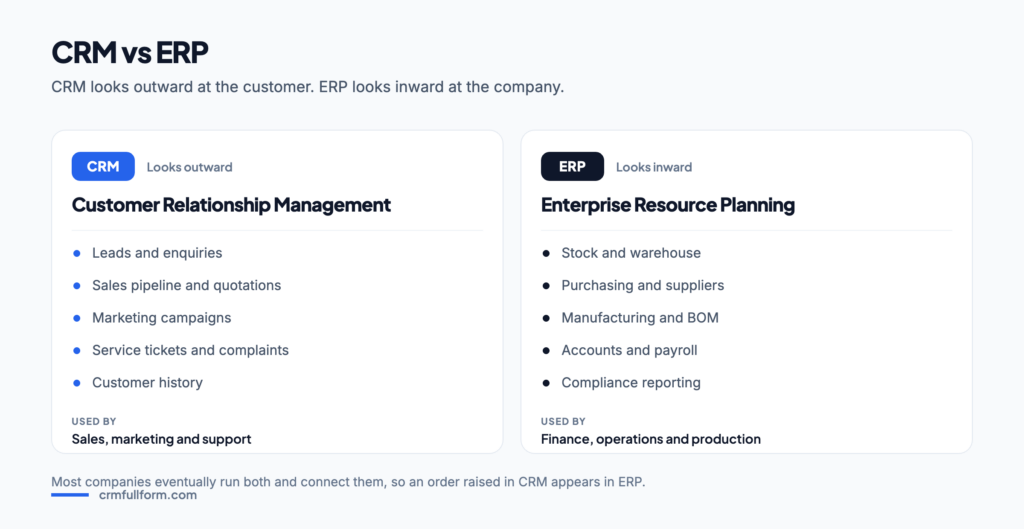
CRM and ERP full forms
| Abbreviation | Full form | In one line |
|---|---|---|
| CRM | Customer Relationship Management | Software for managing customers, leads, sales and support |
| ERP | Enterprise Resource Planning | Software for managing the company’s own resources — money, materials and people |
People often search for “CRM and ERP full form” together because both appear on the same job descriptions and the same software proposals. They are not versions of each other. They solve different problems for different departments. For every other meaning of the abbreviation, see the CRM full form page.
What is CRM?
CRM is the system that holds everything about the people who buy from you. One record per customer, carrying contact details, past orders, open deals, complaints and every conversation. It is used by the teams who face the customer: sales, marketing and support.
Its purpose is revenue. A CRM helps a business win more deals, lose fewer customers and see which marketing actually worked. Typical questions it answers: who should I call today, why did we lose that deal, which customers are due for renewal.
What is ERP?
ERP is the system that runs the inside of the company. One database shared by finance, purchase, stores, production, and often HR and payroll. When the warehouse issues material, the accounts entry and the stock reduction happen in the same transaction rather than in three separate registers.
Its purpose is control and cost. Typical questions it answers: how much stock do we have, what is our cost per unit, which supplier bills are pending, is this month’s production on plan.
CRM vs ERP: full comparison
| Point | CRM | ERP |
|---|---|---|
| Full form | Customer Relationship Management | Enterprise Resource Planning |
| Looks at | The customer, outside the company | Resources, inside the company |
| Main users | Sales, marketing, support | Finance, purchase, stores, production, HR |
| Core records | Leads, contacts, deals, tickets | Items, stock, vouchers, purchase orders, bills of material |
| Main goal | Earn more revenue | Cut cost and waste, keep control |
| Measures | Conversion rate, pipeline value, churn | Inventory turns, cost per unit, working capital |
| Usually bought | Early, often by a small business | Later, once operations get complex |
| Typical cost | Lower, per user per month | Higher, with a longer implementation |
| Setup time | Days to weeks | Months, sometimes longer |
| Examples | Salesforce, Zoho CRM, HubSpot, Pipedrive | SAP S/4HANA, Oracle NetSuite, Microsoft Dynamics 365, Tally, Odoo |
Where CRM and ERP overlap
The line is blurrier than the table suggests. Most ERP suites include a sales module with customers and orders, and most large CRM platforms can raise quotations and track invoices. Vendors sell both, which adds to the confusion — Microsoft Dynamics 365, Odoo, Oracle and SAP all appear on both sides.
The practical difference is depth. An ERP sales module records the order; it does not help a salesperson chase a lead that has not ordered yet. A CRM manages the chase but cannot tell you whether the stock exists or whether the customer has paid. That is exactly why the two are usually connected.
| Stage of the journey | Handled by |
|---|---|
| Enquiry, lead, follow-up | CRM |
| Quotation and negotiation | CRM, sometimes ERP |
| Confirmed sales order | The handover point between the two |
| Stock allocation, production, despatch | ERP |
| Invoice, payment, accounting | ERP |
| Complaint, service, renewal | CRM |
Which one should a business buy first?
There is no universal answer, but there is a useful test: whichever problem is currently costing you more.
- Buy CRM first if leads go unanswered, follow-ups depend on memory, or nobody can say why deals were lost. This is the common case for service businesses, agencies, real estate, education and consultancies.
- Buy ERP first if stock figures never match the physical count, costing is guesswork, or accounts and stores keep separate records. This is the common case for manufacturers, distributors and traders.
- Buy both together only if you have the budget and someone to own the project. Two large implementations at once is how both end up half-finished.
Most small businesses start with CRM because it is cheaper, faster to see value from, and easier to abandon if it does not suit. If you are at that stage, see the best CRM software →
Connecting CRM and ERP
Once both exist, the same data lives in two systems and drift begins. Companies connect them so that customers, items and prices stay in step, so that a won deal in CRM creates a sales order in ERP, and so that the salesperson can see stock availability and outstanding payments without leaving the CRM.
Three approaches are common: buying both from one vendor so the link is built in, using a ready connector between two popular products, or building a custom integration through APIs. The first is simplest, the third is the most flexible and the most expensive to maintain.
One rule saves a lot of pain: decide which system is the master for each type of record before the integration is built. Customers usually master in CRM, items and prices usually master in ERP.
A worked example: one order through both systems
Take a mid-size furniture manufacturer that sells to retailers. A retailer fills the enquiry form on the website. The CRM creates a lead, tags the source, and assigns it to the regional sales executive with a call reminder for the next morning. Over three weeks the executive logs four calls, sends a quotation from the CRM and records the discount the retailer asked for.
The retailer accepts. That is the handover point. The won deal creates a sales order in the ERP, which checks whether the stock exists, reserves it, and — where it does not — raises a production plan and a purchase requisition for the timber and hardware. The ERP issues the material, books the production cost, generates the invoice and posts the accounting entries. Delivery and payment status flow back into the CRM so the salesperson can answer questions without calling the accounts department.
Six months later the retailer reports a damaged consignment. That becomes a CRM support ticket, linked to the original order, with the warranty terms visible on the same screen. One journey, two systems, one handover point in the middle.
Frequently asked questions
What is the full form of CRM and ERP?
CRM full form is Customer Relationship Management and ERP full form is Enterprise Resource Planning. CRM manages customers, sales and service; ERP manages the company’s own resources such as stock, accounts, purchase and production.
What is the difference between CRM and ERP?
CRM faces outward at customers and exists to increase revenue. ERP faces inward at operations and exists to control cost. CRM is used by sales, marketing and support; ERP is used by finance, purchase, stores and production.
Is CRM part of ERP?
Not exactly. Most ERP suites include a sales module that stores customers and orders, but it does not manage leads and follow-ups the way a dedicated CRM does. Many vendors sell both products separately and connect them.
Which should a business buy first, CRM or ERP?
Buy whichever solves the more expensive problem. If leads go unanswered and follow-ups depend on memory, start with CRM. If stock never matches the physical count and costing is guesswork, start with ERP. Small businesses usually start with CRM because it is cheaper and faster to implement.
Can CRM and ERP be integrated?
Yes, and they usually are. A won deal in CRM creates a sales order in ERP, while stock availability and outstanding payments flow back into CRM. Decide which system is the master for each record type before building the integration.
What are examples of CRM and ERP software?
Common CRM examples are Salesforce, Zoho CRM, HubSpot and Pipedrive. Common ERP examples are SAP S/4HANA, Oracle NetSuite, Microsoft Dynamics 365, Tally and Odoo. Some vendors appear on both lists.
And the other acronyms in the same diagram? ERP and CRM rarely appear alone. SCM is Supply Chain Management, SRM is Supplier Relationship Management, CMS is a Content Management System and DMS can be a Dealer or a Document Management System — all decoded side by side on CRM vs SRM, SCM, CMS and other acronyms. If you have seen EPR next to CRM, it is almost always ERP mistyped.
Related pages
- CRM full form — the main meaning and every industry in one table.
- SAP CRM full form — SAP’s own CRM module.
- Types of CRM — operational, analytical and collaborative.
- Best CRM software — top CRM tools compared.