
The best CRM for a small B2B sales pipeline is not necessarily the CRM with the most features. For a small sales team, the better choice is usually the platform that makes it easy to see every active deal, know the next action, follow up on time, and keep customer information in one place.
For most sales-led small businesses, Pipedrive, HubSpot, Zoho CRM, Freshsales, Close, and Salesforce are worth considering. They solve the pipeline problem in different ways.
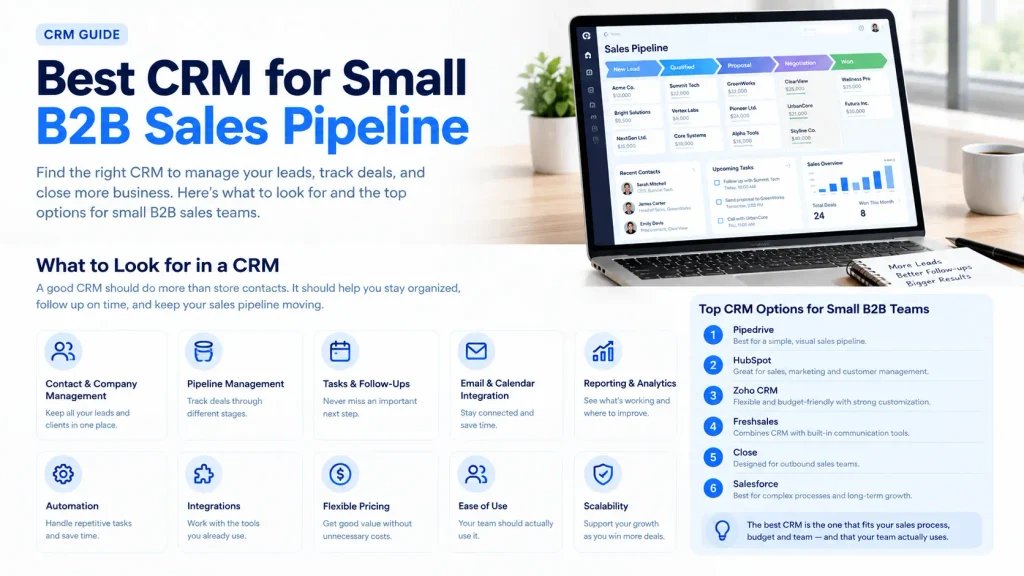
If your main priority is a simple visual sales pipeline, Pipedrive is a strong fit. If you want sales, marketing, and service connected in one system, HubSpot is more suitable. Zoho CRM focuses heavily on breadth and value, while Freshsales combines CRM functions with communication and AI features. Close is designed around outbound sales activity, and Salesforce makes more sense when a small business expects more complex processes as it grows.
The right decision depends on how your team actually sells.
What Makes a CRM Good for a Small B2B Sales Pipeline?
A small B2B team usually does not need dozens of complicated CRM modules.
It needs a reliable way to answer five questions:
- Which leads are worth pursuing?
- What stage is each opportunity in?
- Who owns the deal?
- What should happen next?
- Which opportunities are being neglected?
A useful B2B CRM should therefore provide:
- Contact and company management
- Lead and opportunity tracking
- Customizable sales stages
- Deal values and expected close dates
- Tasks and follow-up reminders
- Email and calendar integration
- Basic sales reporting
- Automation where it actually saves time
- Integrations with the tools your team already uses
- Pricing that remains manageable as the team grows
The most important feature is often the simplest one: your salespeople need to use the CRM consistently.
A sophisticated CRM with incomplete data is less useful than a simpler system that accurately reflects the pipeline.
Best CRM for Small B2B Sales Pipeline: Quick Comparison
| CRM | Best fit | Pipeline strength | Main consideration |
|---|---|---|---|
| Pipedrive | Sales-focused small teams | Visual, pipeline-first workflow | Advanced features require higher plans |
| HubSpot | Inbound and marketing-led B2B | Strong CRM plus broader customer platform | Costs and complexity can increase as needs grow |
| Zoho CRM | Budget-conscious teams | Flexible pipeline and customization | More configuration may be required |
| Freshsales | Teams wanting CRM plus communication tools | Strong pipeline, contact and activity management | Advanced capabilities sit on higher tiers |
| Close | Outbound sales teams | Sales activity closely connected to deals | More expensive if you only need basic pipeline management |
| Salesforce | Businesses expecting complex growth | Powerful opportunity management | More platform than many very small teams need |
These aren’t six versions of the same CRM. They represent different approaches to managing a B2B sales process.
1. Pipedrive: Strong Choice for a Pipeline-First Sales Team
Pipedrive is particularly well suited to teams that want the sales pipeline to be the center of their CRM.
Its current Lite plan includes lead, calendar, and pipeline management, along with reporting and integrations. Pipedrive lists the Lite plan at $14 per seat per month when billed annually, with higher tiers adding capabilities such as email synchronization, automation, nurturing sequences, forecasting, and additional sales tools. Pipedrive
Why small B2B teams may choose Pipedrive
The main advantage is focus.
A sales manager can look at the pipeline and quickly understand:
- How many opportunities are open
- Which stage each deal has reached
- Which deals need attention
- What is expected to close
- Where opportunities are getting stuck
That makes it useful for consultancies, agencies, B2B service companies, SaaS sales teams, and other businesses with a defined sales process.
Where Pipedrive may not be the best fit
If your business wants extensive marketing automation, customer service functionality, or a broad business platform, a more comprehensive CRM may make more sense.
There is also an important pricing consideration. The basic plan is inexpensive, but features such as full email synchronization and advanced automation are available in higher tiers. Pipedrive
Best fit: A small B2B sales team where pipeline visibility and sales activity are the priority.
2. HubSpot: Better When Sales and Marketing Need the Same Customer Record
HubSpot takes a broader approach.
Instead of focusing only on the sales pipeline, HubSpot connects CRM data with sales, marketing, service, content, and other customer-facing functions.
Its free tools provide a way to start with CRM capabilities at no cost for up to two users, while Sales Hub has paid tiers for businesses that need additional sales functionality. HubSpot’s current product catalog lists Sales Hub Starter from $20 per month per seat, while its pricing page may display promotional pricing for eligible new customers. HubSpot
Why HubSpot can work well for B2B
Consider a SaaS company generating leads through:
- Organic search
- Website forms
- Content marketing
- Paid campaigns
- Sales outreach
If marketing and sales both need access to the same prospect information, having those activities connected can be useful.
A lead can move from marketing activity to sales qualification and eventually become a deal without forcing the team to maintain separate systems.
The trade-off
HubSpot can become more complicated as a company adds more functionality.
A small company that only needs a basic deal pipeline may not need a large collection of marketing, service, automation, and data-management capabilities.
Best fit: Small B2B businesses where inbound marketing, sales, and customer management need to work together.
3. Zoho CRM: A Flexible Option for Cost-Conscious Teams
Zoho CRM is worth considering when price and customization both matter.
Zoho’s current pricing calculator lists Standard at $14 per user per month, with Professional at $23, Enterprise at $40, and Ultimate at $52. Zoho
The platform supports core CRM functions while providing room for businesses that need more customized processes.
Why Zoho can work for small B2B teams
B2B sales processes are not always identical.
One company may use:
New Lead → Qualified → Discovery → Proposal → Negotiation → Won
Another might use:
Prospect → Demo Booked → Trial → Procurement → Contract → Won
A CRM needs to reflect the actual sales process rather than forcing the business into a generic workflow.
Zoho can be useful for companies that want more control over CRM structure and expect their requirements to become more sophisticated.
The trade-off
More flexibility can also mean more configuration.
If your team wants to sign up today and immediately understand the entire system without spending much time setting it up, a more focused sales CRM may be easier.
Best fit: Small B2B companies that want strong functionality and customization without immediately moving into a high-cost CRM environment.
4. Freshsales: Useful for Teams That Want CRM and Communication Together
Freshworks Freshsales combines CRM functionality with communication and sales engagement features.
Freshworks currently lists a free plan for up to three users. Its Growth plan is $9 per user per month when billed annually and includes features such as Kanban views, contact lifecycle stages, chat, email, phone, custom fields, and basic workflows. Higher plans add capabilities such as contact scoring, sales sequences, territory management, and more advanced reporting. Freshworks
Why Freshsales deserves consideration
For a small sales team, switching between CRM records, email, phone tools, and other sales applications can create unnecessary friction.
Freshsales brings several of those activities closer together.
That can be useful for businesses where salespeople spend a significant amount of time communicating directly with prospects.
The trade-off
Not every company needs built-in communication features.
If your main problem is simply understanding the pipeline, a pipeline-focused CRM may be easier to manage.
Best fit: Small B2B teams that want contact management, pipeline tracking, communication, and sales activities in one environment.
5. Close: Built for Outbound-Heavy Sales Teams
Close takes a sales-activity-first approach.
Its platform combines CRM functionality with calling, email, SMS, workflows, and AI capabilities. Close currently lists its Essentials plan at $35 per user per month when billed annually, while the higher Growth and Scale plans add more automation and sales capabilities. Close
Why Close can make sense for B2B outbound
Imagine a small team where representatives spend most of their day:
- Calling prospects
- Sending sales emails
- Following up
- Qualifying leads
- Booking meetings
- Updating deal stages
For that type of sales motion, having communication and pipeline activity closely connected can be valuable.
The trade-off
Close may be more than you need if your business only wants basic CRM functionality.
If your sales process is primarily relationship-based and involves relatively few opportunities, paying for an outbound-focused platform may not provide enough additional value.
Best fit: B2B companies with active outbound prospecting and sales-development workflows.
6. Salesforce: Consider It When Complexity Is Part of the Growth Plan
Salesforce is one of the broadest CRM platforms in this comparison.
Its current small-business offering includes a Free Suite with lead, opportunity, and customer case management for two included user licenses. Salesforce’s Starter Suite is listed at $25 per user per month and adds capabilities across sales, marketing, and service. Salesforce
Why a small B2B company might choose Salesforce
The reason is usually not that the company needs a basic pipeline.
It is that the company expects its processes to become more complex.
For example, a growing B2B company may eventually need:
- Multiple sales teams
- Detailed opportunity management
- Lead routing
- Custom reporting
- Sales forecasting
- Marketing workflows
- Customer service processes
- Extensive integrations
Salesforce is designed to support that type of environment.
The trade-off
A small team with a straightforward sales process may not need that level of functionality.
The question should therefore be less about whether Salesforce can manage your pipeline and more about whether your business needs its broader platform capabilities.
Best fit: Small businesses with more complex processes or a clear plan to build a larger, more structured sales operation.
How to Choose the Right CRM for Your B2B Sales Pipeline
Instead of comparing every feature, start with your sales process.
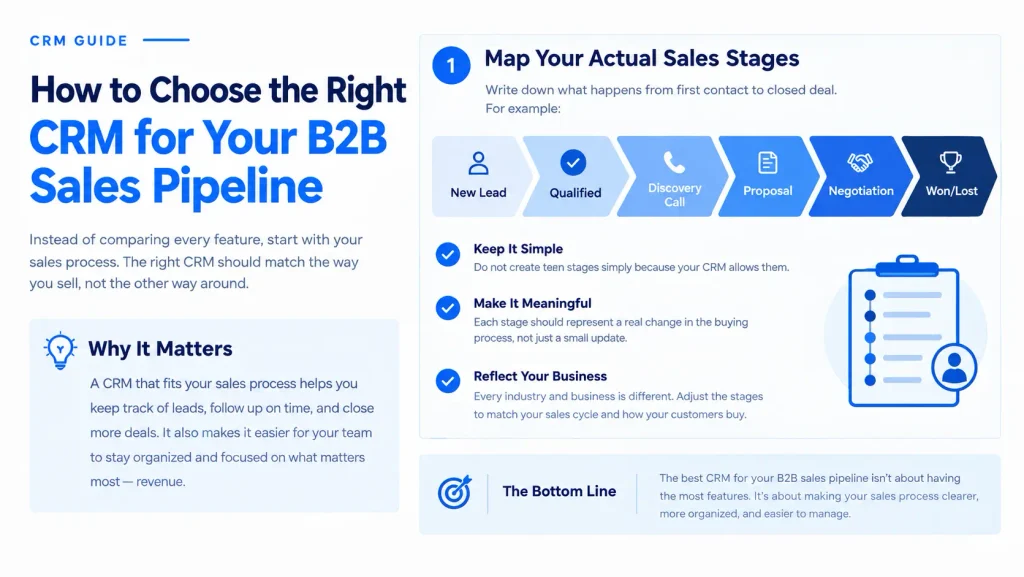
Step 1: Map your actual sales stages
Write down what happens from first contact to closed deal.
For example:
New Lead → Qualified → Discovery Call → Proposal → Negotiation → Won/Lost
Do not create ten stages simply because your CRM allows them.
Each stage should represent a meaningful change in the buying process.
Step 2: Identify what currently gets lost
Look at your existing workflow.
Are leads being lost in email?
Are follow-ups forgotten?
Does nobody know which deals are active?
Are sales forecasts based on guesswork?
Is customer information spread across spreadsheets?
The CRM should solve those specific problems.
Step 3: Decide how much automation you actually need
Automation can be useful for repetitive tasks such as:
- Creating follow-up tasks
- Assigning leads
- Sending reminders
- Updating fields
- Moving records between stages
- Triggering email sequences
But automation should support the sales process, not replace a poorly designed process.
A complicated workflow built around a messy pipeline will usually produce complicated problems.
Step 4: Check the pricing beyond the entry plan
A low starting price can be misleading if the features you actually need are only available on a higher tier.
Compare the cost of the plan you would realistically use.
For example, Pipedrive’s entry plan starts at $14 per seat per month annually, but full email synchronization and automation are listed under Growth at $39. Pipedrive
Freshsales starts at $9 per user per month annually for Growth, while features such as sales sequences and contact scoring are included at higher levels. Freshworks
The cheapest CRM on day one is not necessarily the cheapest CRM after your team starts using it seriously.
Step 5: Test it with real deals
Do not evaluate a CRM only by watching a product demo.
Put several real opportunities into the trial account.
Test whether you can quickly:
- Add a company.
- Add the relevant contact.
- Create an opportunity.
- Move it through your actual sales stages.
- Schedule the next activity.
- Record an interaction.
- Find stalled deals.
- Generate a basic pipeline report.
If those actions feel unnecessarily difficult, the CRM may create adoption problems later.
What Should a Small B2B Sales Pipeline Look Like?
A simple pipeline could look like this:
| Stage | What it means |
|---|---|
| New Lead | A potential buyer has entered the sales process |
| Qualified | The prospect appears to match your target customer |
| Discovery | Sales is learning about the prospect’s needs |
| Proposal | A commercial proposal has been presented |
| Negotiation | Pricing, terms, or scope are being discussed |
| Won | The deal has been successfully closed |
| Lost | The opportunity will not move forward |
The exact stages depend on the business.
A SaaS company selling annual subscriptions may need a trial or security-review stage. A B2B agency may need discovery, proposal, and approval stages. A consulting company might need procurement or contract review.
The CRM should mirror the buying journey.
Common CRM Mistakes Small B2B Teams Make
Choosing based on feature count
More features do not automatically create a better sales process.
If your team only needs contact management, pipeline visibility, tasks, email integration, and reporting, dozens of additional modules may create unnecessary complexity.
Creating too many pipeline stages
A pipeline with 12 or 15 stages can make reporting difficult if the stages do not represent meaningful buyer actions.
Keep the process understandable.
Treating every lead as an opportunity
Not every contact deserves a place in the active sales pipeline.
Separating leads from qualified opportunities can help salespeople focus on deals with genuine potential.
Failing to define the next action
A deal sitting in “Proposal” for 30 days tells you less than a deal with a clear next step such as “Follow up with procurement on Thursday.”
A useful CRM should help the salesperson answer:
What happens next?
Ignoring lost deals
Lost opportunities contain useful information.
Track why deals are lost when practical. Common reasons might include:
- Budget
- Timing
- No decision
- Competitor selected
- Poor fit
- Missing feature
- Internal priority changed
Over time, this data can reveal where the sales process needs attention.
Which CRM Should You Choose?
There is no single CRM that is automatically right for every small B2B sales pipeline.
Use the sales model as the starting point:
- Choose Pipedrive if the main requirement is a clear, sales-focused pipeline.
- Choose HubSpot if marketing, sales, and customer information need to work together.
- Choose Zoho CRM if flexibility, broad functionality, and cost control are major considerations.
- Choose Freshsales if your team wants CRM and communication tools closely connected.
- Choose Close if outbound calls, emails, SMS, and sales activity are central to the workflow.
- Choose Salesforce if you expect more complex processes, customization, and broader CRM requirements as the business grows.
The best CRM for a small B2B sales pipeline is ultimately the one that fits your sales process, budget, technical requirements, and team’s willingness to use it consistently.
Frequently Asked Questions
What is the best CRM for a small B2B sales pipeline?
There is no universal best choice. Pipedrive is a strong option for teams that primarily need a clear visual sales pipeline, while HubSpot is better suited to businesses that want CRM, marketing, and service capabilities connected. Zoho CRM, Freshsales, Close, and Salesforce address different sales and operational requirements.
What should a small B2B CRM track?
At minimum, track companies, contacts, leads, opportunities, deal values, pipeline stages, owners, expected close dates, recent activities, and next actions. Depending on the business, you may also track lead source, products, competitors, lost-deal reasons, and customer lifecycle information.
Is a free CRM enough for a small B2B sales team?
It can be. A free CRM may be sufficient when the team mainly needs contact management, basic deal tracking, and simple sales activities. The limitation usually appears when the business needs more automation, reporting, integrations, sales sequences, or customization.
How many stages should a B2B sales pipeline have?
There is no fixed number. A small B2B team should use enough stages to represent meaningful changes in the buying process without making the pipeline difficult to understand. Six or seven stages can be enough for many sales processes, but the correct structure depends on how customers actually buy.
Should a small B2B company use a CRM instead of a spreadsheet?
A spreadsheet can work when the sales process is extremely small and simple. A CRM becomes more useful when multiple people manage leads, follow-ups need to be tracked, deals move through defined stages, or management needs reliable pipeline visibility.
Final Thoughts
Choosing CRM software is easier when you stop asking which platform has the most features and start asking which system fits the way your team sells.
For a straightforward sales pipeline, prioritize visibility, adoption, follow-up, and reporting. For a marketing-led business, consider how the CRM connects acquisition and sales. For an outbound team, communication and sales activity may matter more. And if your processes are becoming increasingly complex, scalability and customization deserve more weight.
Before committing, build your real sales stages, enter real opportunities, test the daily workflow, and calculate the cost of the plan your team will actually need.
That is a much more reliable way to find the best CRM for a small B2B sales pipeline than choosing from a feature checklist alone.