
A CRM works by turning every enquiry into a record and every record into a next action. It captures the lead, assigns an owner, reminds that person to follow up, moves the deal through stages, keeps service history after the sale, and reports the numbers back to the manager.
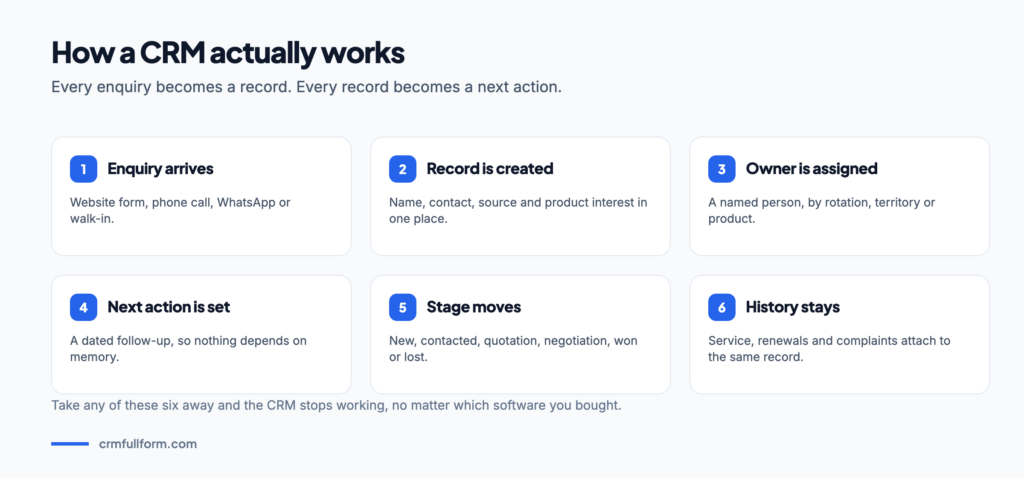
The idea in one paragraph
Before CRM, customer information lives in three places at once: a salesperson’s phone, a WhatsApp thread and an Excel file that somebody updates on Fridays. A CRM replaces all three with one record per customer that everyone can see. The CRM full form — Customer Relationship Management — describes exactly that: managing the relationship, in one place, on purpose.
How CRM works, step by step
Step 1: A lead enters the system
Someone fills the website form, calls the office number, messages on WhatsApp or walks into the shop. The CRM creates a lead record with the name, contact number and — importantly — a source tag saying where it came from. If the form is connected properly, no human types anything.
Step 2: The lead gets an owner
An assignment rule sends the lead to a salesperson — in rotation, by territory, by product or by language. This single step removes the most common failure in small businesses, which is an enquiry that everyone assumes somebody else is handling.
Step 3: Follow-up becomes a dated task
The owner sees the lead on today’s list. Every call, email and note is logged against the record. When the customer says “call me after the holidays”, that becomes a task with a date rather than a promise someone hopes to remember.
Step 4: The deal moves through stages
Once there is a real opportunity, the lead becomes a deal with an amount and an expected close date. It then moves along a pipeline — New, Contacted, Quotation Sent, Negotiation, Won or Lost. Anyone can look at the board and see where every deal stands.
| Stage | What it means | Typical next action |
|---|---|---|
| New | Enquiry received, nobody has spoken to them | First call within a few hours |
| Contacted | Requirement understood | Send details or arrange a visit |
| Quotation Sent | Price is with the customer | Follow up after two or three days |
| Negotiation | Discussing price or terms | Get approval, revise, close |
| Won / Lost | Decision made | Hand over to delivery, or record the reason lost |
Step 5: Service continues on the same record
After the sale, complaints become tickets with owners and deadlines, and renewals and warranties get reminders. Because all of it sits on the same customer record, the support agent can see what sales promised without calling to ask.
Step 6: The numbers come back out
Because every step was recorded, reports become possible: leads by source, conversion rate by person, average days to close, and the reasons that keep appearing on lost deals. This is the part owners value most, and it only works if steps one to five were done honestly.
What happens behind the screen
Technically a CRM is a database with rules on top. Three pieces do the work:
- Records and relationships. Contacts belong to accounts, deals belong to contacts, tickets belong to deals. That linking is why one screen can show the whole story.
- Automation rules. If a lead comes from the website, assign in rotation. If a deal has no activity for five days, notify the manager. If a ticket misses its deadline, escalate it.
- Integrations. Email, calling systems, WhatsApp, website forms and accounting software push data in and pull data out, so the CRM is not another place to type things twice.
A worked example
A training institute gets an enquiry at 10 p.m. from its website. The CRM creates the lead, tags the source as Website, assigns it to the counsellor on rotation and sends the parent an automatic acknowledgement. At 10 a.m. the counsellor sees the task, calls, notes the class and budget discussed, and sets a follow-up for Friday.
On Friday the parent asks for a fee concession. That becomes a note and the deal moves to Negotiation. The centre head approves, the deal is marked Won, and the admission team takes over. Three months later the parent complains about a batch timing — a ticket opens on the same record, and the person handling it can see the entire history from that first 10 p.m. form.
Why CRMs stop working
The mechanism above only works if records are updated. The usual failures are leads entered without a source, stages nobody moves, and a team that keeps a private spreadsheet “just in case”. Fix those three and the reporting fixes itself. For a fuller view of the cycle, read the CRM process, and see the types of CRM for how different systems emphasise different steps.
Two related guides go deeper on the parts this article touches: what a CRM database is covers where all these records actually live, and what a CRM dashboard is covers how the numbers come back out at the end.
Frequently asked questions
How does a CRM system work?
A CRM captures every enquiry as a record with a source tag, assigns it to an owner, turns follow-ups into dated tasks, moves the deal through pipeline stages, keeps service history on the same record after the sale, and then reports the resulting numbers back to management.
What is a pipeline in CRM?
A pipeline is the set of stages a deal passes through, such as New, Contacted, Quotation Sent, Negotiation and finally Won or Lost. Each deal carries a value and an expected close date, which is what makes a forecast possible.
Does a CRM work automatically?
Partly. Lead capture, assignment, acknowledgement emails, reminders and escalations can all run on rules. Calls, notes and stage changes still depend on people updating the record.
What data does a CRM store?
Contact details, the company a contact belongs to, deals with values and dates, every call, email and note, quotations and orders, support tickets, and the source that produced the lead in the first place.
Do small businesses need a CRM?
Once enquiries arrive through more than one channel or more than two people handle customers, yes. Below that a shared spreadsheet can cope, though it will not remind anyone to follow up.
Related pages
- CRM full form — the meaning behind the system.
- CRM process — the five-step cycle in detail.
- Types of CRM — operational, analytical and collaborative.
- Best CRM software — tools that do all of this.
- What is a CRM database? — the structure underneath
- What is a CRM dashboard? — turning records into decisions