
A CRM database is the structured store of customer information underneath a CRM system. It is not one long list of names. It is several linked record types — contacts, companies, deals, activities and tickets — connected so that one customer’s entire history can be assembled from many rows. That linking is the whole point.
What a CRM database really is
Most people picture a CRM database as a very large address book. That picture causes almost every problem businesses later have with their data, because it suggests one row per person and nothing else.
What actually sits underneath a CRM is a relational structure. There is a row for the person, a separate row for the company they work for, separate rows for every deal in progress, a row for every call and email that ever happened, and rows for support tickets raised after the sale. Those rows point at each other. When a colleague opens a customer record and sees three years of history on one screen, they are looking at a query across five tables, not a single entry.
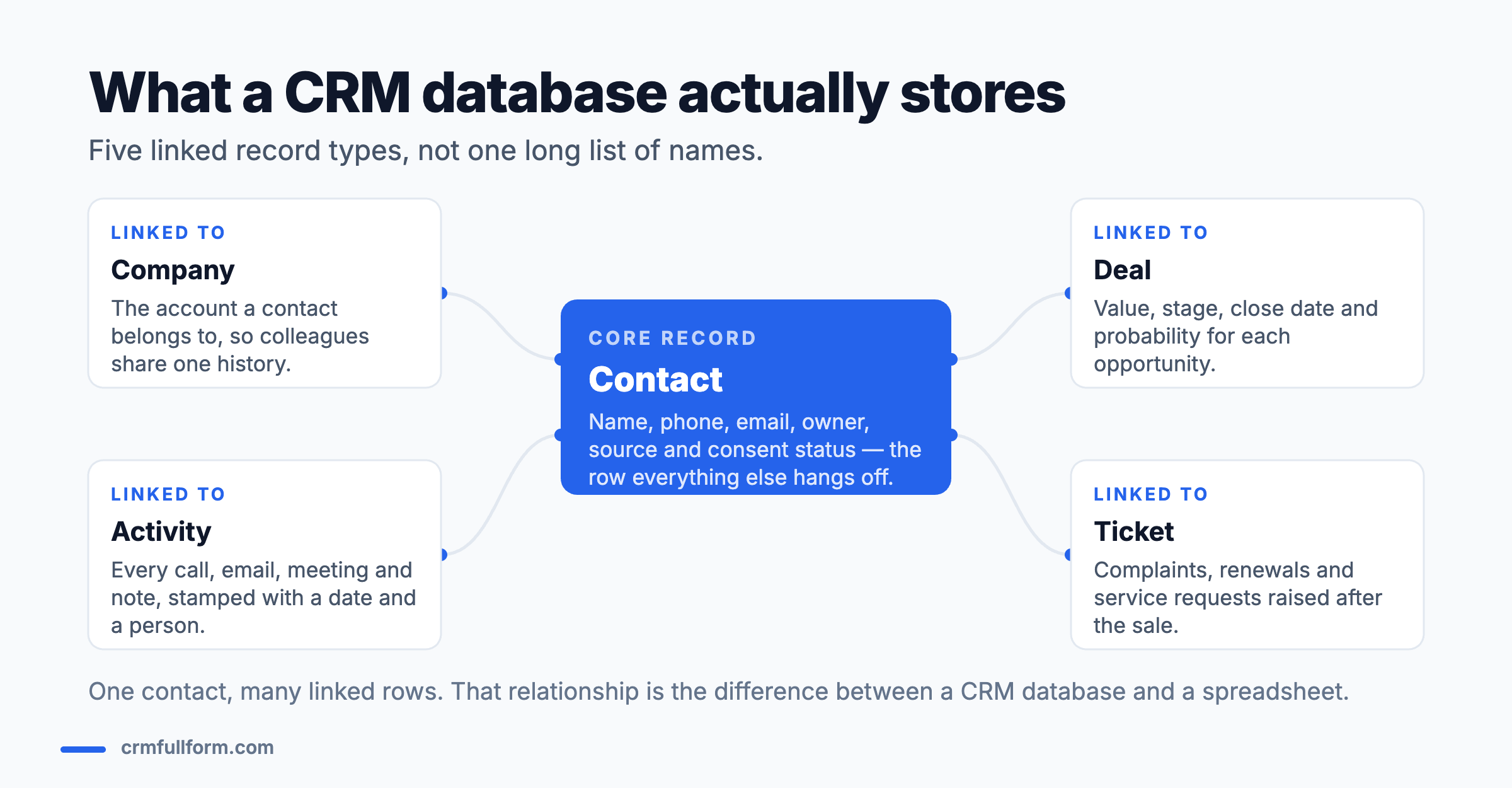
This is why a CRM can answer questions a contact list cannot: which lead source produced the most closed revenue last quarter, which customers have an open complaint and a renewal due in the same month, which deals have had no activity for six weeks. Every one of those questions is a join between record types. If you want the wider context, how a CRM works step by step covers the process that fills this database in the first place.
The five record types and how they link
1. Contact — the person
Name, phone, email, job title, owner, lead source and consent status. The owner field matters more than people expect: a record with nobody responsible for it is the single most common cause of an enquiry going unanswered.
2. Company or account — the organisation
In B2B, contacts belong to a company, and the company holds the shared history: contract terms, account manager, industry, billing entity. This link is why one colleague picking up a call can see what a different colleague agreed with someone else at the same organisation. In pure B2C, this record type is often unused.
3. Deal or opportunity — the money
Value, currency, stage, expected close date, probability and the products involved. Deals are what make forecasting possible, and they are the record type most often abandoned mid-flight. A pipeline full of deals nobody has updated is worse than no pipeline, because it produces a confident forecast that is wrong.
4. Activity — the history
Every call, email, meeting, note and task, each stamped with a date, a person and a link to the record it belongs to. Activities are what turn a database into an audit trail. They are also the first thing to be skipped when a team is busy.
5. Ticket or case — life after the sale
Complaints, service requests, renewals and returns. Keeping these on the same customer record as the sales history is what stops a salesperson cheerfully upselling someone who has had a fault open for three weeks.
The fields that actually matter
A default CRM ships with dozens of fields and teams add more. Most are never used. These are the ones that repay the effort of filling in, and the reason each earns its place.
| Field | Sits on | Why it earns its place |
|---|---|---|
| Lead source | Contact | The only way to know which marketing spend produced revenue |
| Record owner | Contact / Deal | Unowned records are the main cause of unanswered enquiries |
| Created date | All records | Makes response time and ageing measurable |
| Stage | Deal | Drives every pipeline report and the forecast |
| Expected close date | Deal | Turns a list of deals into a forecast |
| Last activity date | Contact / Deal | Exposes stale records faster than any other single field |
| Consent / marketing opt-in | Contact | A legal requirement, not a nice-to-have |
| Status or lifecycle stage | Contact | Separates a cold lead from a customer in every list you build |
A useful test before adding a new field: name the report it will appear in. If nobody can, the field will be blank within a month and will make every list view slightly harder to read. The same logic applies to CRM features generally — capability that nobody uses still costs attention.
CRM database vs spreadsheet vs plain database
“Is Excel a CRM database?” is one of the most common questions on this topic, and the honest answer is: it can hold the same information, but it cannot do the same job.
| Spreadsheet | CRM database | General-purpose database | |
|---|---|---|---|
| Links between record types | Manual, fragile | Built in | Possible, must be built |
| History of interactions | Not really | Automatic | Must be built |
| Reminds someone to act | No | Yes | No |
| Multiple people editing safely | Risky | Yes, with permissions | Yes |
| Reporting | Manual pivot tables | Built in | Requires queries |
| Reasonable for | Under ~100 contacts, one person | A team selling or servicing | Custom products |
A spreadsheet is a perfectly sensible starting point for a sole trader with fifty customers. It stops working the moment two people need to edit it, or the moment anyone needs to be reminded to follow up — because a spreadsheet stores information but does not create obligations. Why CRM is important goes through the specific failures that follow.
Where the data comes from
A CRM database is filled from more places than most people realise, and each source has its own failure mode.
- Website forms. Clean, if the form fields map to CRM fields correctly. The classic bug is a form that writes everything into the notes field.
- Phone and email integration. Automatic activity logging. The failure mode is calls logged against the wrong record when a number is shared.
- Manual entry. Unavoidable and the biggest source of duplicates and typos.
- Imports. Bulk CSV loads from events, purchased lists or an old system. This is where most large-scale mess originates.
- Integrations. Billing, e-commerce, support desk and marketing tools syncing both ways. Powerful, and the hardest to debug when two systems disagree about the truth.
Keeping it clean
Data quality is not housekeeping. In the UK and EU it is a legal obligation: the accuracy principle in UK GDPR requires personal data to be accurate and, where necessary, kept up to date, and requires inaccurate data to be erased or corrected without delay. A CRM full of stale records is a compliance problem as well as a sales one.
Four practices do most of the work:
- Prevent duplicates at entry. Turn on duplicate rules for email and phone. It is far cheaper than merging later, and merging loses history.
- Validate at the source. Required fields, picklists instead of free text, and format rules on phone numbers. Every free-text field becomes twelve spellings of the same thing.
- Give every record an owner. Then run a monthly list of records with no owner or no activity in 90 days. That single report finds most of the rot.
- Agree what a field means. Most “bad data” is not wrong, it is inconsistent — two teams using “qualified” to mean different things. Write the definitions down.
Someone has to be accountable for all of this, which in larger organisations is exactly what a CRM manager is hired to do.
Examples of CRM databases
In practice you rarely choose a database — you choose a CRM and inherit its data model. The common ones and what their underlying structure is like:
- Salesforce. Highly customisable object model with custom objects and relationships. The most flexible, and the easiest to over-complicate. See what Salesforce CRM is.
- HubSpot. Contacts, companies, deals and tickets, with a deliberately opinionated structure that is quick to start on.
- Zoho CRM. Similar core modules with custom modules available on paid tiers — covered in what Zoho CRM is.
- Microsoft Dynamics 365. Built on Dataverse, so the database is genuinely separable from the application.
- Open-source options such as EspoCRM or SuiteCRM. Self-hosted on MySQL, so you can query the tables directly — useful if you need full control.
If you are choosing between them, our comparison of the best CRM software covers what each is genuinely strong at, and the types of CRM explains the operational, analytical and collaborative split that determines which data you will end up storing.
Frequently asked questions
What is a CRM database?
A CRM database is the structured store of customer data behind a CRM system. It holds several linked record types — contacts, companies, deals, activities and support tickets — connected so that a single customer’s full history can be assembled across them. The relationships between records, not the list of names, are what make it a CRM database.
What is a CRM database example?
A simple example: a contact record for Priya Sharma, linked to the company record for her employer, linked to two open deals worth £4,000 and £11,000, linked to forty logged calls and emails, and linked to one open support ticket. Opening her contact record shows all of it on one screen, because each of those rows points back to the contact.
Is Excel a CRM database?
Not really. A spreadsheet can hold the same fields, but it cannot reliably link record types, keep an automatic history of interactions, or remind anyone to follow up. It works for a single person managing under about a hundred contacts, and it starts failing as soon as two people need to edit it or anything needs chasing.
What are some popular CRM databases?
Most businesses inherit a data model rather than choosing a database. The common ones are Salesforce, with a highly customisable object model; HubSpot, with a deliberately simple contacts, companies, deals and tickets structure; Zoho CRM; and Microsoft Dynamics 365, built on Dataverse. Open-source options such as EspoCRM and SuiteCRM run on MySQL and can be queried directly.
How do you keep a CRM database clean?
Prevent duplicates at the point of entry rather than merging later, validate data with required fields and picklists instead of free text, give every record a named owner, and run a monthly report of records with no owner or no activity in 90 days. Also write down what each status actually means, because most bad data is inconsistent rather than wrong.
Related pages
- CRM full form — what customer relationship management means
- How CRM works — the process that fills this database
- Types of CRM — operational, analytical and collaborative
- Features of CRM — what the software does with the data
- What is a CRM dashboard? — getting the data back out
- CRM vs ERP — which system owns which data