
How much does a CRM system cost?
In 2026, CRM software can cost anywhere from $0 to more than $150 per user per month, depending on the platform, pricing plan, features, number of users, and level of customization required.
But the monthly subscription is only one part of the calculation.
A small business might spend less than $100 per month on CRM software, while a growing company could spend several hundred or several thousand dollars per month once additional users, advanced features, integrations, implementation, and support are included.
The most useful way to think about CRM pricing is therefore not simply “What does the software cost?” but “What will the complete CRM system cost my business?”
How Much Does a CRM System Cost?
A practical CRM pricing range looks like this:
| CRM pricing level | Typical software cost | Best suited for |
|---|---|---|
| Free CRM | $0 | Individuals and very small teams |
| Entry-level CRM | Around $10–$25/user/month | Small businesses |
| Mid-range CRM | Around $25–$75/user/month | Growing sales teams |
| Advanced CRM | $75–$150+/user/month | Larger or complex teams |
| Enterprise CRM | $150+/user/month or custom | Large organizations |
| Custom CRM | Varies significantly | Businesses needing specialized systems |
These figures are budgeting ranges rather than fixed industry prices. CRM vendors use different pricing structures, and some charge by user while others combine seats, features, usage, contacts, or additional products.
For example, HubSpot currently offers free CRM tools, while its Sales Hub has paid tiers. Its current pricing page lists Sales Hub Starter from $7 per seat with annual billing, Professional from $90 per seat, and Enterprise from $150 per seat. Professional and Enterprise also have required onboarding fees.
Zoho also uses a per-user subscription model, with different editions designed for different levels of functionality.
That difference in pricing structures is why businesses should compare the total cost of ownership, rather than choosing a CRM based only on its advertised starting price.
What Does CRM Software Cost Per User?
Many cloud-based CRM systems use a per-user, per-month pricing model.
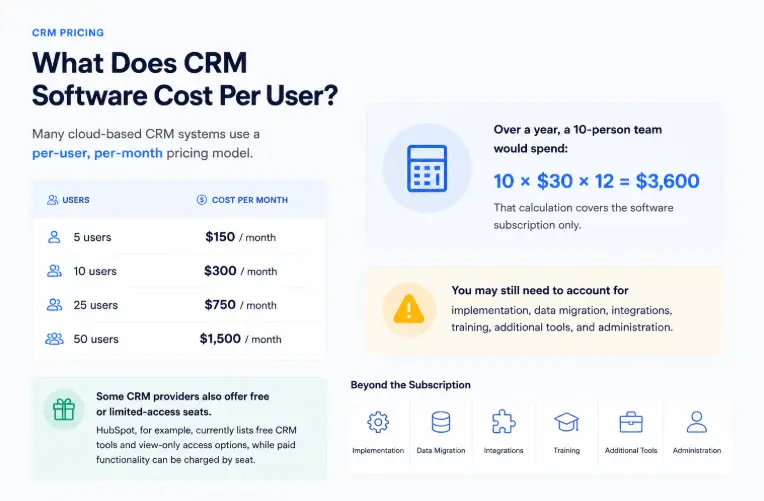
For example, if a CRM costs $30 per user per month:
- 5 users = $150/month
- 10 users = $300/month
- 25 users = $750/month
- 50 users = $1,500/month
Over a year, a 10-person team would spend:
10 × $30 × 12 = $3,600
That calculation covers the software subscription only.
You may still need to account for implementation, data migration, integrations, training, additional tools, and administration.
Some CRM providers also offer free or limited-access seats. HubSpot, for example, currently lists free CRM tools and view-only access options, while paid functionality can be charged by seat.
What Determines the Cost of a CRM System?
Several factors can change the final price substantially.
1. Number of Users
The number of people using the CRM is often one of the biggest recurring costs.
A five-person sales team and a 50-person sales organization may use the same CRM platform, but their annual software bills can be dramatically different.
Before buying, check:
- How many seats are included?
- Are additional users charged separately?
- Are there free or limited-access users?
- Are different types of seats available?
- Is there a minimum number of paid users?
This becomes especially important as your company grows.
2. Features and Pricing Tier
Most CRM platforms divide their software into multiple plans.
A basic plan may include:
- Contact management
- Lead management
- Deal pipelines
- Tasks and reminders
- Email integration
- Basic reporting
Higher tiers may add:
- Workflow automation
- Advanced reporting
- Sales forecasting
- Custom objects
- Advanced permissions
- AI features
- Lead scoring
- Advanced integrations
- Customization
- Enterprise security controls
The cheapest plan isn’t necessarily the lowest-cost solution if your team needs features available only on a higher tier.
Before comparing prices, identify your must-have features.
You can use the features of CRM guide to understand the core capabilities you should expect from a CRM system.
3. Implementation Requirements
Buying CRM software and implementing a CRM system are two different things.
A simple CRM may be configured internally within a few hours.
A more complex implementation could involve:
- Sales process design
- Custom fields
- Pipeline configuration
- Automation
- Data migration
- User permissions
- Integrations
- Reporting
- Testing
- Employee training
If you need external consultants or developers, implementation can become a significant first-year expense.
CRM Software Cost vs. CRM Implementation Cost
The distinction is simple:
CRM software cost is the recurring amount you pay to use the CRM platform.
CRM implementation cost is what you spend to configure the system and make it work for your business.
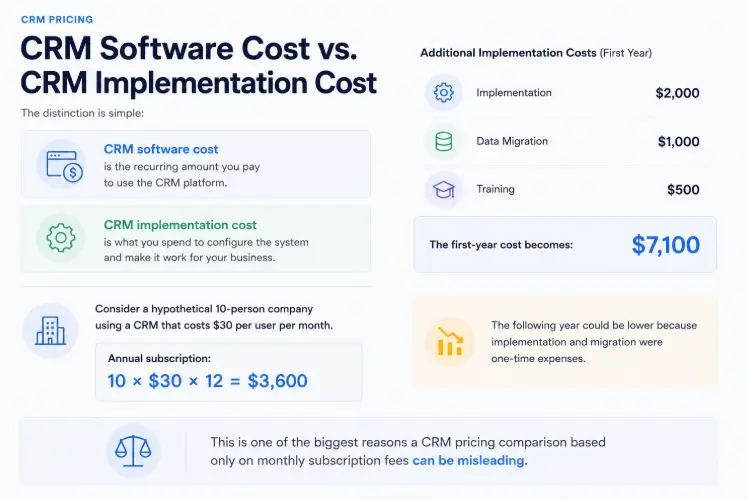
Consider a hypothetical 10-person company using a CRM that costs $30 per user per month.
Annual subscription:
10 × $30 × 12 = $3,600
Now assume the company spends:
- $2,000 on implementation
- $1,000 on data migration
- $500 on training
The first-year cost becomes:
$7,100
The following year could be lower because implementation and migration were one-time expenses.
This is one of the biggest reasons a CRM pricing comparison based only on monthly subscription fees can be misleading.
What Other CRM Costs Should You Consider?
A CRM budget should include more than licenses.
Data Migration
If customer information currently exists in spreadsheets, another CRM, accounting software, email systems, or multiple databases, you may need to move that information into the new platform.
Migration can involve:
- Exporting records
- Cleaning data
- Removing duplicates
- Mapping fields
- Formatting information
- Importing records
- Checking data accuracy
A clean spreadsheet with a few hundred contacts may be relatively easy to migrate.
Thousands of inconsistent records across several systems can require considerably more work.
Integrations
Your CRM may need to connect with other business applications.
Common integrations include:
- Calendar
- Accounting software
- Marketing automation
- Customer support
- Ecommerce
- Forms
- Telephony
- Payment systems
- Business intelligence tools
Some integrations are included in the CRM subscription. Others may require a higher plan or a separate third-party service.
Customization
Basic customization may involve creating fields, changing pipeline stages, or configuring dashboards.
Advanced customization can require developers or CRM consultants.
This is particularly relevant when a business has unusual sales processes or needs the CRM to exchange data with internal systems.
Training
Employees need to understand how the CRM fits into their daily work.
Training may cover:
- Creating contacts
- Managing leads
- Updating deals
- Recording communication
- Following sales stages
- Using dashboards
- Creating reports
- Working with automation
A small company can often train employees internally.
A larger implementation may require formal training sessions.
CRM Administration
Someone has to maintain the system after launch.
Ongoing administration can include:
- Adding users
- Removing users
- Managing permissions
- Cleaning records
- Updating fields
- Maintaining automation
- Managing integrations
- Creating reports
- Monitoring CRM adoption
Even when there is no separate administration invoice, employee time still represents a cost.
How Much Does a CRM Cost for a Small Business?
Small businesses have some of the widest choices in CRM pricing.
A company with five employees could use a free CRM, an entry-level system, or a more advanced platform depending on its sales process.
For example:
Budget Scenario
5 users × $15/month = $75/month
Annual subscription:
$900
If the business handles implementation internally, the software could remain its main CRM expense.
Mid-Range Scenario
10 users × $30/month = $300/month
Annual subscription:
$3,600
Add $1,500 for implementation and training.
First-year cost:
$5,100
Advanced Scenario
10 users × $75/month = $750/month
Annual subscription:
$9,000
Add $3,000 for implementation, migration, and training.
First-year cost:
$12,000
These are examples for budgeting rather than fixed market prices.
For a small company, the right CRM is usually the one that provides the required functionality without forcing the business to pay for features it will not use.
If you are comparing specific platforms, see this CRM software comparison for an overview of popular CRM options and who they are designed for.
How Much Does an Enterprise CRM Cost?
Enterprise CRM pricing is more difficult to summarize with a single number.
A large organization may have:
- Hundreds or thousands of users
- Multiple departments
- Several sales pipelines
- Complex approval processes
- Custom integrations
- Advanced security requirements
- Large-scale data migration
- Dedicated CRM administrators
- Custom reporting
- Multiple geographic regions
At this level, the software subscription may be only one part of the overall budget.
For example, HubSpot currently lists Sales Hub Professional at $90 per seat and Enterprise at $150 per seat on its pricing page, with additional onboarding requirements for those plans.
The important lesson is not that every enterprise needs an expensive CRM. It is that enterprise CRM pricing has to be evaluated against the organization’s requirements and total implementation cost.
What Is CRM Total Cost of Ownership?
Total cost of ownership (TCO) is the complete amount a business expects to spend on the CRM over a defined period.
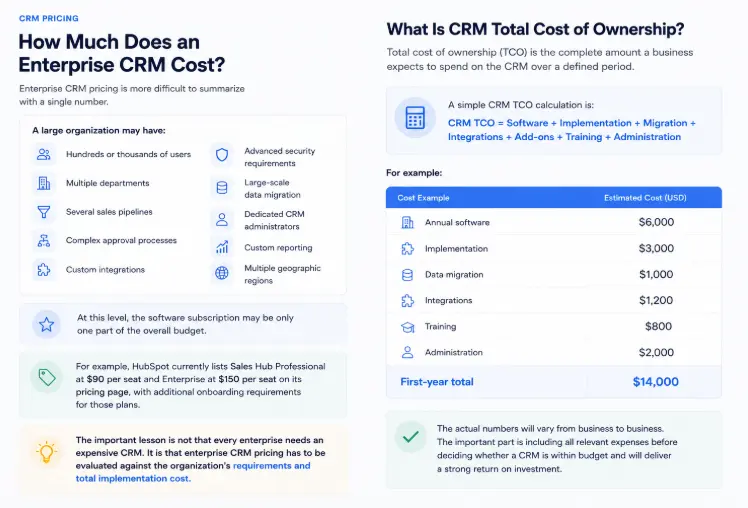
A simple CRM TCO calculation is:
CRM TCO = Software + Implementation + Migration + Integrations + Add-ons + Training + Administration
For example:
| Cost | Example |
|---|---|
| Annual software | $6,000 |
| Implementation | $3,000 |
| Data migration | $1,000 |
| Integrations | $1,200 |
| Training | $800 |
| Administration | $2,000 |
| First-year total | $14,000 |
The actual numbers will vary from business to business.
The important part is including all relevant expenses before deciding whether a CRM is affordable.
CRM Pricing Models Explained
CRM providers use several different pricing models.
Per-User Pricing
You pay according to the number of users or seats.
This is common with cloud CRM platforms.
Advantage: Costs are relatively easy to understand.
Disadvantage: Your bill generally increases as your team grows.
Flat-Rate Pricing
The business pays a fixed amount for a particular package.
Advantage: Costs can be easier to predict.
Disadvantage: A package may become expensive if your team doesn’t use all the included functionality.
Usage-Based Pricing
Some CRM products or features can charge based on usage.
Examples include:
- API usage
- AI credits
- Emails
- Automation runs
- Storage
- Phone minutes
This means you should check both the base subscription and usage limits.
For example, HubSpot’s current pricing includes HubSpot Credits for certain AI-powered functionality, with additional credits available separately.
Free or Freemium Pricing
A free CRM can be useful for:
- Testing the platform
- Solo businesses
- Small teams
- Basic contact management
- Businesses with limited requirements
But free plans often restrict advanced features, automation, reporting, integrations, users, or usage.
A free plan should therefore be evaluated based on what it can actually do for your workflow.
A Realistic CRM Budget by Business Size
Business size alone doesn’t determine CRM cost, but it provides a useful starting point.
| Business situation | Possible monthly software budget | What to prioritize |
|---|---|---|
| Solo business | $0–$50 | Contacts, leads, tasks |
| 2–10 employees | $0–$500 | Pipeline, follow-ups, email integration |
| 10–50 employees | $200–$2,500+ | Automation, reporting, integrations |
| 50–200 employees | $1,000–$10,000+ | Administration, permissions, reporting |
| Enterprise | Custom | Scalability, security, customization |
These are planning ranges, not standard industry prices.
A 20-person company with simple requirements could spend less than a 10-person company with complex automation and premium CRM seats.
How to Calculate Your CRM Budget
Before choosing a platform, work through these six steps.
Step 1: Count Your Users
Determine who needs full access and who needs limited or view-only access.
Step 2: List Your Required Features
Separate your requirements into three groups:
Must have
Features the business cannot operate without.
Useful
Features that would improve productivity but aren’t essential.
Optional
Features that sound useful but don’t currently solve a major problem.
This prevents feature-heavy CRM plans from consuming your budget unnecessarily.
Step 3: List Required Integrations
Write down every system that needs to connect with the CRM.
Don’t assume every integration is included in the base plan.
Step 4: Estimate Implementation Work
Ask:
- Who will configure the CRM?
- Who will migrate the data?
- Who will create workflows?
- Who will train employees?
- Who will test the system?
Step 5: Calculate the First-Year Cost
Use:
Annual subscription + implementation + migration + integrations + training + add-ons
Step 6: Calculate the Three-Year Cost
A CRM that looks inexpensive during the first few months may become considerably more expensive as the company adds users or requires additional functionality.
A longer-term calculation helps reveal the real financial commitment.
Common CRM Pricing Mistakes
Choosing the Cheapest CRM Without Checking Features
A low subscription price doesn’t help if your team needs functionality available only on a more expensive plan.
Looking Only at Monthly Pricing
Always calculate annual and first-year costs.
Ignoring Additional Users
A CRM that works for five users may become expensive at 25 or 50 users.
Forgetting Implementation
Configuration and migration can create significant upfront costs.
Paying for Unused Features
More features don’t automatically mean more value.
If your team only needs contacts, deals, tasks, and basic reporting, paying for advanced enterprise functionality may not make financial sense.
Ignoring Data Quality
Poor-quality customer data can make migration harder and reduce the value of the new CRM.
Forgetting Usage Limits
AI credits, automation runs, emails, API calls, storage, and other limits can create additional costs depending on the platform.
Is an Expensive CRM Worth It?
Sometimes.
A more expensive CRM can be worthwhile if it:
- Automates repetitive work
- Improves lead follow-up
- Reduces manual data entry
- Gives managers better visibility
- Supports complex sales processes
- Replaces several separate tools
- Improves customer handoffs
- Provides reporting the business actually needs
But price alone does not determine CRM quality.
A small business with a straightforward sales process may get better results from an affordable CRM that employees consistently use than from a highly complex platform that nobody maintains properly.
The goal should be the right functionality at the right total cost, not the largest feature list.
How to Choose a CRM Based on Cost
The best CRM pricing decision usually comes down to five questions:
- How many people will use it?
- Which features are genuinely required?
- What systems need to integrate with it?
- How much implementation and migration work is required?
- What will the CRM cost as the business grows?
You can also compare the different types of CRM to understand whether your business needs operational, analytical, collaborative, or more strategic CRM capabilities.
If your requirements are simple, start with the lowest plan that can reliably support your workflow.
If your requirements are complex, calculate the total cost before comparing vendors.
Frequently Asked Questions
How much does a CRM system cost per month?
CRM software can cost from $0 for free plans to more than $150 per user per month for advanced plans. Many small businesses can find suitable options in the $10–$50 per-user range, but actual pricing varies by vendor, plan, users, and features.
How much does a CRM cost for a small business?
A small business may spend anywhere from $0 to several hundred dollars per month on CRM software. The final cost depends mainly on the number of users, required features, integrations, and whether professional implementation is needed.
Is CRM software free?
Yes. Several CRM providers offer free plans. Free versions can be useful for individuals and small teams, but they usually have limitations compared with paid plans.
Does CRM implementation cost extra?
It can. Some businesses can configure a CRM internally with little additional spending. More complex implementations involving data migration, integrations, customization, and training can require additional budget.
What is the biggest CRM cost?
For many businesses, recurring user licenses are a major cost. However, implementation, integrations, add-ons, and administration can become equally important depending on the complexity of the CRM deployment.
How should I compare CRM pricing?
Compare the total cost of ownership, not just the advertised monthly price. Include licenses, users, required features, implementation, migration, integrations, training, add-ons, usage limits, and expected growth.
Conclusion
So, how much does a CRM system cost?
The answer can range from $0 for a free CRM to hundreds of dollars per user per month for advanced software, with enterprise implementations potentially costing much more once customization, integrations, migration, onboarding, and administration are included.
For most businesses, the best starting point is not the cheapest CRM. It’s the CRM that covers the required workflow at a sustainable total cost.
Calculate your user count, required features, implementation work, integrations, and expected growth. Then compare the first-year and long-term cost of each option.
That gives you a much clearer answer than looking at the monthly subscription price alone.