
If you work in real estate, you probably deal with a lot of names, phone numbers, property inquiries, follow-ups, appointments, and conversations every week.
Keeping all of that in your head or across spreadsheets, WhatsApp chats, email, and notes can work for a while. Eventually, something gets missed.
That is where a CRM in real estate becomes useful.
A real estate CRM is software that helps agents, brokers, and real estate teams organize leads, contacts, client information, property interests, follow-ups, and sales activities in one place.
Instead of asking, “Who was that buyer looking for a three-bedroom house?” or searching through old messages to remember what a seller said, you can open the contact record and see the information you need.
What Does CRM Stand for in Real Estate?
CRM stands for Customer Relationship Management.
In real estate, CRM refers to the software and process used to manage relationships with potential buyers, sellers, renters, landlords, investors, and past clients.
A CRM can keep information such as:
- Name and contact details
- Property preferences
- Budget
- Buying or selling timeline
- Previous conversations
- Follow-up dates
- Property inquiries
- Appointments and meetings
- Sales stage
- Notes from calls or property visits
The basic idea is simple: keep the relationship and its history organized so the next step is easier to manage.
If you want to understand CRM more broadly, our guide to what CRM means and how it works covers the concept from a general business perspective.
What Is a CRM in Real Estate?
A CRM in real estate is a system designed to help real estate professionals manage their leads and client relationships throughout the buying, selling, or renting process.
For example, imagine an agent receives a new inquiry from someone looking for a house.
Without a CRM, the agent might save the number in their phone, write some notes in WhatsApp, and put a reminder on their calendar.
A few days later, another lead comes in.
After a few weeks, it becomes difficult to remember who wanted what, who needs a follow-up, and which prospects are actually close to making a decision.
A CRM puts those details into a structured system.
The agent can see:
New Lead → Contacted → Property Matched → Viewing Scheduled → Negotiation → Closed
The exact stages can vary depending on the business, but the purpose is the same: make the sales process easier to track.
Why Do Real Estate Agents Use CRM Software?
Real estate is heavily dependent on relationships and follow-up.
Someone may contact an agent today but not be ready to buy for several months. A seller might say they are thinking about listing their property and ask the agent to check back later.
Those opportunities can easily disappear if nobody remembers to follow up.
A CRM helps create a system around those relationships.
1. Keep All Leads in One Place
Real estate leads can come from many sources:
- Website forms
- Property portals
- Social media
- Phone calls
- Referrals
- Open houses
- Online advertisements
- Existing clients
A CRM can bring these contacts into one system instead of leaving them scattered across different tools.
This gives the agent a clearer picture of the current pipeline.
2. Track Buyer and Seller Information
A real estate CRM can store information about what a person actually wants.
For example:
Buyer: Ahmed
Budget: $250,000
Preferred area: Downtown
Property type: 3-bedroom house
Timeline: Within 3 months
Last contact: Monday
Next follow-up: Friday
That information becomes much more useful than simply having Ahmed’s phone number saved in a contact list.
3. Manage Follow-Ups
Follow-up is one of the most important parts of real estate sales.
A potential buyer may not respond to the first call. A seller may need several conversations before deciding to list a property.
A CRM can create tasks and reminders so agents know who needs attention.
Instead of relying completely on memory, the system can show the next action.
For example:
- Call buyer after property viewing
- Send listings to new lead
- Follow up with seller next Tuesday
- Confirm Saturday appointment
- Check whether previous client needs assistance
This is one of the biggest practical differences between a CRM and a simple contact list.
What Does a Real Estate CRM Do?
Different CRM platforms offer different features, but most real estate CRM systems focus on a few core jobs.
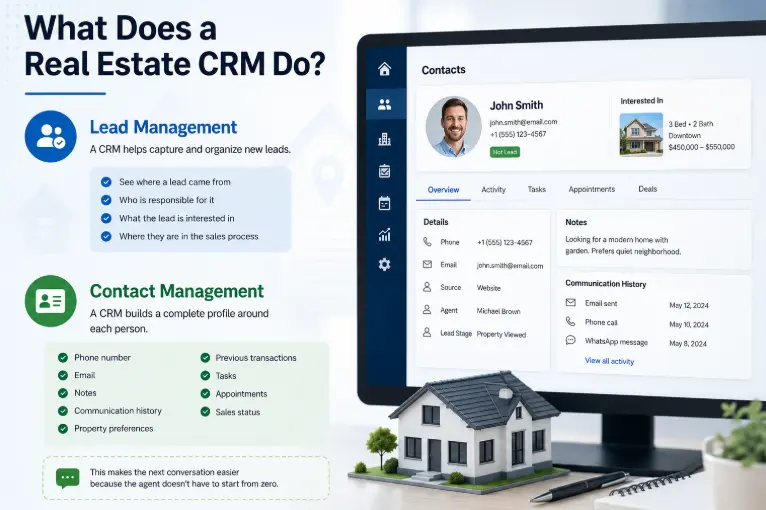
Lead Management
A CRM helps capture and organize new leads.
You can usually see where a lead came from, who is responsible for it, what the lead is interested in, and where they are in the sales process.
For a deeper explanation of the overall CRM process, see our guide on how CRM moves a prospect from initial contact toward a sale.
Contact Management
Instead of having basic contact details only, a CRM can build a fuller profile around each person.
The record may include:
- Phone number
- Notes
- Communication history
- Property preferences
- Previous transactions
- Tasks
- Appointments
- Sales status
This makes the next conversation easier because the agent doesn’t have to start from zero.
Sales Pipeline Management
A pipeline shows where different prospects currently stand.
For example:
| Stage | Example |
|---|---|
| New Lead | Someone submitted an inquiry |
| Contacted | Agent has spoken with the person |
| Qualified | Buyer has a clear budget and requirement |
| Property Viewing | Viewing has been scheduled |
| Negotiation | Buyer and seller are discussing terms |
| Closed | Deal has been completed |
A visual pipeline makes it easier to identify which opportunities need attention.
Follow-Up Reminders
Real estate deals don’t always happen quickly.
A CRM can remind agents about future actions so a promising lead doesn’t disappear simply because the agent became busy.
Communication History
A CRM can keep records of calls, emails, notes, meetings, and other interactions depending on the platform and integrations being used.
This becomes particularly useful when more than one person works with the same client.
Reporting and Performance Tracking
A CRM can also help managers understand what is happening across the sales pipeline.
For example, a brokerage might want to know:
- How many leads came in this month?
- Which sources generated the most leads?
- How many leads were contacted?
- How many property viewings were scheduled?
- How many opportunities were closed?
- Which agents have the most active deals?
These reports can turn a collection of customer records into useful business information.
What Are the Main Benefits of a Real Estate CRM?
The main benefit isn’t simply having another piece of software.
The real benefit is having a reliable system for managing relationships.
Better Organization
Instead of keeping information in multiple places, agents can have one central system for their leads and clients.
Fewer Missed Follow-Ups
Reminders and task management make it easier to stay in contact with prospects at the right time.
Faster Access to Client Information
An agent can quickly review a client’s history before making a call or meeting them.
Better Team Collaboration
When several agents or staff members work with the same clients, shared information makes handoffs easier.
More Consistent Sales Processes
A CRM can help a brokerage create a repeatable process instead of letting every agent manage leads differently.
Better Visibility
Managers can see what is happening with leads and deals without asking every salesperson for a manual update.
These benefits are closely related to the broader benefits of CRM across different types of businesses.
Real Estate CRM vs. a Spreadsheet
A spreadsheet can be useful for a small real estate operation.
If you have a handful of clients and a simple process, you may not need a sophisticated CRM immediately.
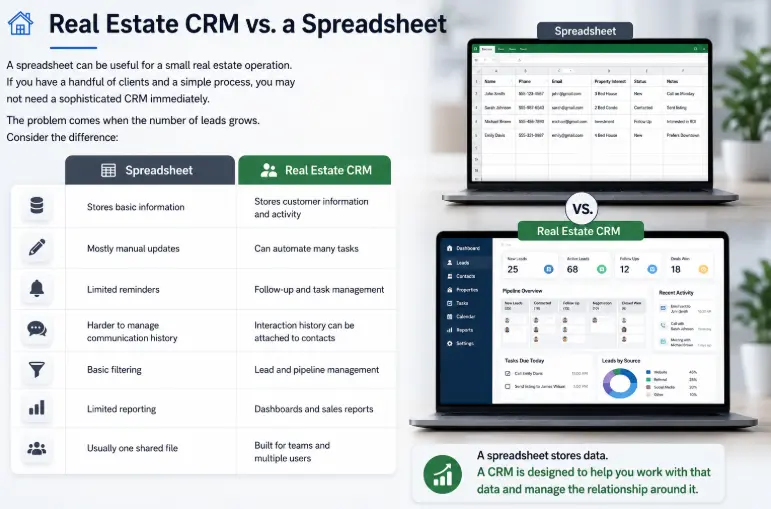
The problem comes when the number of leads grows.
Consider the difference:
| Spreadsheet | Real Estate CRM |
|---|---|
| Stores basic information | Stores customer information and activity |
| Mostly manual updates | Can automate many tasks |
| Limited reminders | Follow-up and task management |
| Harder to manage communication history | Interaction history can be attached to contacts |
| Basic filtering | Lead and pipeline management |
| Limited reporting | Dashboards and sales reports |
| Usually one shared file | Built for teams and multiple users |
A spreadsheet stores data.
A CRM is designed to help you work with that data and manage the relationship around it.
Is a Real Estate CRM Different From a Regular CRM?
Sometimes.
A general CRM can manage contacts, leads, sales pipelines, tasks, and communication for many industries.
A real estate-focused CRM may add features that are more relevant to property businesses, such as:
- Property listings
- Buyer requirements
- Property matching
- Viewing schedules
- Listing management
- Real estate lead sources
- Agent assignment
- Transaction-related workflows
However, not every real estate CRM has all of these features.
Some businesses use a general CRM and customize it for their workflow, while others prefer software specifically built for real estate.
This is why it’s important to look at the actual features rather than choosing a product simply because it has “real estate CRM” in its name.
How Does a CRM Help With Real Estate Leads?
Lead management is one of the strongest reasons for using CRM software in real estate.
Imagine an agency receives 50 inquiries during a week.
Some people are ready to buy immediately.
Others are just researching.
Some are sellers.
Some want to rent.
Some stop responding but may become interested later.
A CRM can help the team categorize these leads and decide what should happen next.
For example:
New inquiry → Qualification → Property recommendation → Viewing → Follow-up → Negotiation → Closed
This gives the team a process to work from instead of treating every lead as a separate conversation.
Can a CRM Track Property Interests?
Yes, depending on the CRM.
A real estate-focused system may allow agents to record information such as:
- Preferred location
- Property type
- Price range
- Number of bedrooms
- Size requirements
- Buying timeline
- Rental or purchase preference
- Specific property interests
This information can then be used to make conversations more relevant.
For example, if a buyer previously said they only wanted properties below a certain budget, the agent doesn’t need to keep asking the same question every time.
Can a CRM Help Real Estate Agents Follow Up With Old Clients?
Yes.
A real estate business doesn’t only depend on new leads.
Past clients can become valuable sources of repeat business and referrals.
An agent might want to stay connected with:
- Previous buyers
- Previous sellers
- Landlords
- Investors
- Referral partners
- Long-term prospects
A CRM can help organize those relationships and create reminders for future communication.
That turns the CRM from a tool for chasing new leads into a system for managing relationships over time.
What Features Should You Look for in a Real Estate CRM?
You don’t necessarily need the CRM with the longest feature list.
Start with the things your team actually needs.
Important features may include:
Contact and Lead Management
You should be able to create, organize, search, and update contact records easily.
Pipeline Management
The CRM should make it clear where every active lead or opportunity stands.
Tasks and Reminders
Your team should be able to schedule follow-ups and see upcoming activities.
Communication Tracking
Look for useful integrations with email, calling, messaging, or other communication tools your business already uses.
Property Management
If property information is important to your workflow, check whether the CRM supports listings and property-related data.
Automation
Automation can handle repetitive actions such as assigning leads, creating follow-up tasks, or sending certain messages.
Reporting
A good reporting system can help you understand lead sources, conversion rates, pipeline value, and team performance.
Our detailed guide to CRM features covers the main capabilities you will find in modern CRM platforms.
Do Individual Real Estate Agents Need a CRM?
Not necessarily.
A solo agent with a small number of active clients may be able to manage everything with a spreadsheet, calendar, phone, and email.
The need for CRM usually becomes clearer when things start getting difficult to track.
For example:
- You’re receiving more leads than before.
- You regularly forget follow-ups.
- You have hundreds of contacts.
- You are managing multiple properties.
- More than one agent is handling clients.
- You need to know where every lead stands.
- You spend too much time searching through old messages.
- You want a repeatable sales process.
At that point, a CRM can move from being “nice to have” to being genuinely useful.
How a Real Estate CRM Works: A Simple Example
Let’s say Sarah is a real estate agent.
A potential buyer submits a website form saying they are looking for a two-bedroom apartment.
The CRM creates a new lead.
Sarah calls the buyer and learns that the budget is $180,000 and the buyer wants to move within two months.
Sarah adds those details to the contact record.
She then recommends three properties and schedules a viewing.
The CRM records the activity and creates a reminder for the next follow-up.
After the viewing, Sarah updates the lead’s status.
The buyer likes one property and starts discussing the price.
Sarah moves the opportunity to the negotiation stage.
Eventually, the deal is closed.
Now, if Sarah needs to review the relationship later, she can see the journey from the original inquiry to the completed transaction.
That’s the practical value of a CRM in real estate.
Examples of CRM Software Used for Real Estate
Real estate professionals can choose between general-purpose CRM platforms and systems designed specifically for the property industry.
Some well-known CRM platforms include:
- Salesforce
- HubSpot CRM
- Zoho CRM
- Pipedrive
- Microsoft Dynamics 365
The right choice depends on the size of the business, sales process, integrations, budget, and real estate-specific features required.
You can compare different platforms in our guide to CRM software examples or see our broader list of best CRM software.
For example, Salesforce describes its real estate CRM as a centralized system for managing client and prospect information across the customer lifecycle, while HubSpot describes a real estate CRM as a platform for managing and nurturing relationships with existing and potential customers.
What Is the Difference Between CRM and Property Management Software?
These two types of software can overlap, but they are not necessarily the same thing.
A CRM is primarily concerned with people and relationships.
Property management software is generally more focused on managing properties and related operational activities.
For example:
CRM:
Who is this buyer?
What are they looking for?
When did we last speak?
What should we do next?
Property management:
Which property is available?
Who is renting it?
What is the rent?
When is maintenance due?
Some real estate platforms combine both areas, while others specialize in one.
Common Mistakes When Choosing a Real Estate CRM
Buying a CRM doesn’t automatically improve a real estate business.
The system still needs to fit the team’s actual workflow.
Choosing Too Many Features
More features don’t necessarily mean a better CRM.
If agents find the software difficult to use, they may stop updating it.
Ignoring Mobile Access
Real estate professionals are often away from their desks.
If the CRM is difficult to use on a phone, adoption can become a problem.
Not Checking Integrations
Before choosing a CRM, check whether it works with the tools your business already uses.
Focusing Only on Price
A cheap CRM that nobody uses isn’t really cheap.
Ease of use, reliability, integrations, and the time saved by the system all matter.
Not Defining the Sales Process First
Before configuring a CRM, decide how your real estate business actually handles a lead.
For example:
New → Contacted → Qualified → Viewing → Negotiation → Closed
Once the process is clear, it becomes easier to configure the CRM around it.
Frequently Asked Questions
What is a CRM in real estate?
A CRM in real estate is software used to manage leads, clients, communication, follow-ups, property interests, and sales activities in one organized system.
What does CRM stand for in real estate?
CRM stands for Customer Relationship Management. In real estate, it refers to the process and software used to manage relationships with buyers, sellers, renters, investors, and other contacts.
Why do real estate agents use CRM?
Real estate agents use CRM software to organize leads, track conversations, schedule follow-ups, manage sales pipelines, and keep important client information in one place.
Is CRM useful for a small real estate business?
Yes, but not every small business needs one immediately. If an agent has few clients and can easily manage follow-ups with existing tools, a CRM may not be necessary yet. As the number of leads and relationships grows, it can become much more valuable.
Can a real estate CRM manage property listings?
Some real estate CRMs can manage property information and listings, while general-purpose CRMs may require customization or integration with another property system. Always check the specific CRM’s features before choosing it.
What is the best CRM for real estate agents?
There is no single best CRM for every real estate agent. The right option depends on team size, budget, lead volume, required integrations, sales process, and whether property-specific features are needed.
Final Thoughts
So, what is a CRM in real estate?
It is a system that helps real estate professionals keep track of the people, conversations, leads, properties, and follow-ups involved in their business.
The biggest value isn’t simply storing contact information.
It’s knowing who needs attention, what happened previously, and what should happen next.
For a solo agent with a small client list, a spreadsheet may be enough.
But when leads increase, multiple agents become involved, and follow-ups start becoming difficult to manage, a CRM can give the business a much more organized way to handle relationships and sales.
And that’s ultimately what a real estate CRM is designed to do: help agents spend less time trying to remember what happened and more time moving the right relationships forward.
Authoritative external resources
For additional information, you can also review Salesforce’s current Real Estate CRM guide and HubSpot’s Real Estate CRM guide.