
If you are searching for CRM software examples, you will quickly find a long list of platforms. Sale
But simply knowing the names is not very helpful.
The important question is: What does each CRM actually do, and which type of business is it suitable for?
A CRM system helps a business keep customer information, leads, conversations, sales activities, and deals organized in one place. Some CRMs are designed for large enterprises, while others are much simpler and work well for small sales teams.
In this guide, we will look at 10 popular CRM software examples and explain what makes each one different.
What Are CRM Software Examples?
CRM software examples are simply different applications that businesses can use for customer relationship management.
A CRM can help a company:
- Store customer and contact information
- Manage leads
- Track sales opportunities
- Follow up with prospects
- Manage sales pipelines
- Record emails and calls
- Automate repetitive tasks
- Generate reports
- Manage customer relationships
The exact features depend on the CRM.
For example, a small business may only need contact management and a simple sales pipeline. A large company may need advanced reporting, automation, custom workflows, permissions, integrations, and multiple sales teams.
You can also learn more about the basics in our guide to CRM software features.
10 CRM Software Examples
Here are 10 CRM platforms worth knowing:
| CRM Software | Best Known For | Good Fit For |
|---|---|---|
| Salesforce | Customization and enterprise features | Large businesses |
| HubSpot CRM | Sales, marketing and service together | Startups and growing businesses |
| Zoho CRM | Broad features and flexibility | Small and mid-size businesses |
| Pipedrive | Simple visual sales pipeline | Sales teams |
| Microsoft Dynamics 365 | Microsoft ecosystem | Medium and large organizations |
| Freshsales | Sales automation and communication | Growing sales teams |
| monday CRM | Flexible workflows | Small and mid-size teams |
| Odoo CRM | CRM within a wider business suite | Businesses wanting an all-in-one system |
| Copper CRM | Google Workspace integration | Google-focused teams |
| Close | Calling and sales communication | Inside sales teams |
These aren’t ranked from best to worst. The right CRM depends on what your business actually needs.
1. Salesforce
Salesforce is one of the best-known CRM platforms and is particularly strong for companies with complex sales operations.
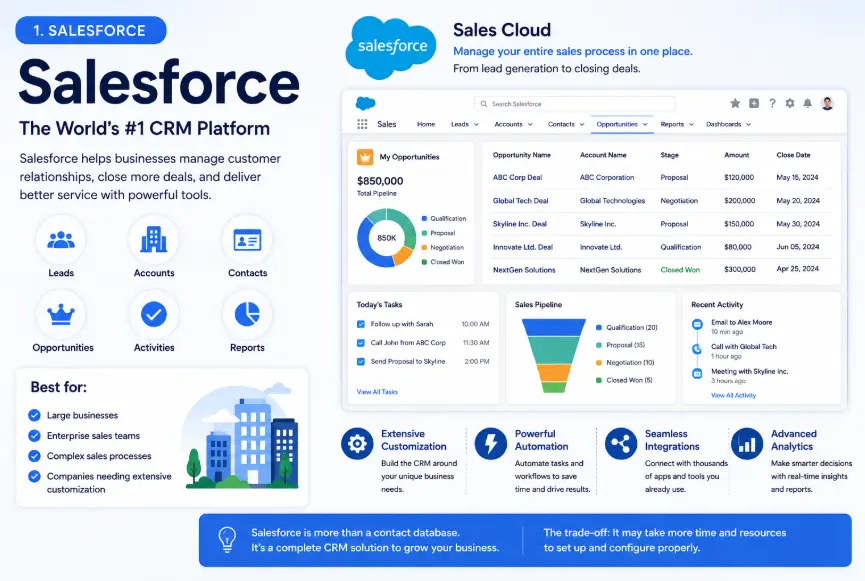
Its sales tools are designed around leads, accounts, contacts, opportunities, activities, and sales pipelines. Salesforce also provides extensive customization and automation options.
Best for:
- Large businesses
- Enterprise sales teams
- Complex sales processes
- Companies needing extensive customization
Salesforce can be more than a basic contact database. A business can build detailed sales processes around it, connect other applications, and create customized workflows.
The trade-off is that a powerful CRM can also take more time and resources to configure properly.
Salesforce Sales Cloud official guide
2. HubSpot CRM
HubSpot is another popular example of CRM software.
One reason businesses consider HubSpot is that it connects CRM functionality with sales, marketing, customer service, and other customer-facing activities.
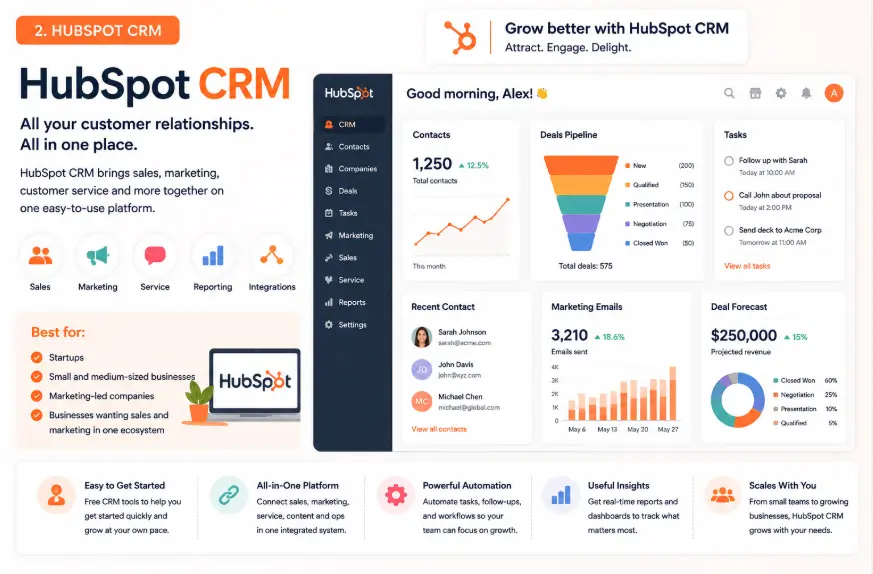
It can be useful for companies that don’t want their customer information sitting in separate systems.
Best for:
- Startups
- Small and medium-sized businesses
- Marketing-led companies
- Businesses wanting sales and marketing in one ecosystem
HubSpot is also commonly considered by businesses looking for a CRM with an accessible starting point.
3. Zoho CRM
Zoho CRM is a popular choice for businesses that want a broad range of CRM features without moving immediately toward an enterprise-focused platform.
It can be used for lead management, sales processes, customer information, automation, reporting, and more.
Best for:
- Small businesses
- Mid-size companies
- Sales teams
- Businesses looking for flexibility
One of Zoho CRM’s strengths is the wider Zoho ecosystem. Businesses already using other Zoho applications may find it easier to connect their workflows.
4. Pipedrive
Pipedrive takes a more sales-focused approach.
Its visual pipeline is one of the main reasons sales teams choose it. Instead of making users work through a complicated interface, the system puts deals and their stages at the center of the workflow.
Best for:
- Sales teams
- Small businesses
- B2B sales
- Businesses focused heavily on deal management
For example, a salesperson might have pipeline stages such as:
New Lead → Contacted → Meeting → Proposal → Negotiation → Won
The team can then see where its current deals are and what needs attention.
This makes Pipedrive a good example of a CRM built around the practical day-to-day work of salespeople.
5. Microsoft Dynamics 365
Microsoft Dynamics 365 is another major CRM option, particularly for organizations already working heavily with Microsoft products.
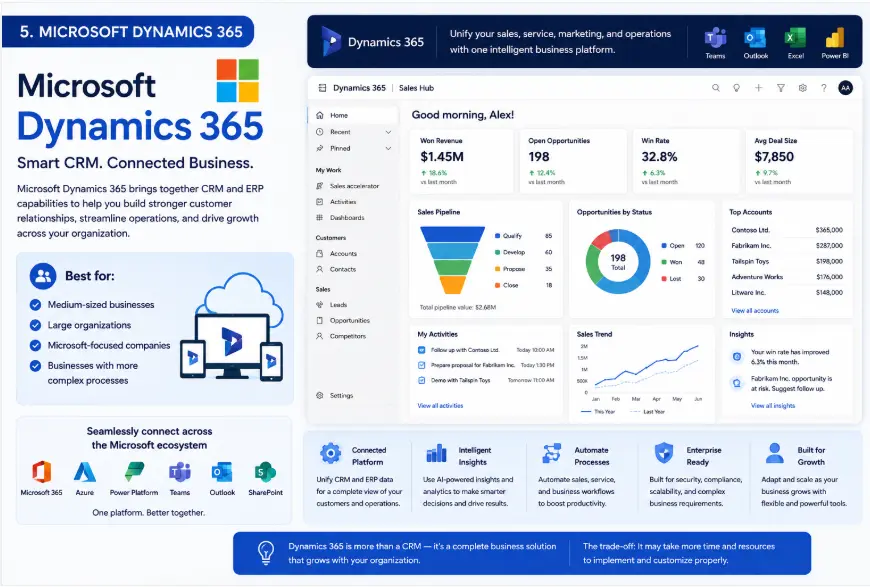
It can connect customer and sales information with other parts of the Microsoft business ecosystem.
Best for:
- Medium-sized businesses
- Large organizations
- Microsoft-focused companies
- Businesses with more complex processes
It is generally more suitable for organizations that need a broader business platform rather than a very simple CRM.
If your company already relies on Microsoft tools, Dynamics 365 may be worth considering as part of that wider setup.
6. Freshsales
Freshsales is the CRM product from Freshworks and is designed around sales teams and customer communication.
It is particularly relevant for companies that want sales automation and communication features in the same environment.
Best for:
- Growing sales teams
- Inside sales
- Lead management
- Businesses already using Freshworks products
Freshsales can make sense when the main goal is to help sales representatives manage leads and move opportunities through the pipeline without relying on several disconnected tools.
7. monday CRM
monday.com offers CRM functionality through monday CRM.
Its approach is different from traditional CRM software because it emphasizes customizable workflows and visual work management.
Best for:
- Small and medium-sized businesses
- Teams that want customizable workflows
- Businesses already using monday.com
- Teams managing sales alongside other projects
A team can customize its CRM setup around its own process instead of being forced into one fixed workflow.
That flexibility can be useful, particularly for businesses with sales processes that don’t fit neatly into a traditional CRM structure.
8. Odoo CRM
Odoo CRM is part of the wider Odoo business software ecosystem.
This is useful for businesses that want CRM functionality alongside other business applications instead of buying completely separate systems.
Best for:
- Businesses wanting an integrated business suite
- Companies using Odoo
- Small and medium-sized organizations
- Businesses with multiple operational requirements
For example, a company may want customer management, sales, accounting, inventory, and other business functions connected through one broader platform.
9. Copper CRM
Copper CRM is designed with a strong focus on Google Workspace users.
For businesses that spend most of their working day inside tools such as Gmail and Google Calendar, this approach can be attractive.
Best for:
- Google Workspace users
- Small and medium-sized businesses
- Relationship-driven sales teams
- Companies wanting CRM inside their existing workflow
Instead of making the CRM feel like a completely separate environment, Copper is designed to work closely with the tools teams already use.
10. Close
Close is a sales-focused CRM designed particularly around communication with prospects.
It is worth considering for teams where calling, emailing, and following up with leads are central parts of the sales process.
Best for:
- Inside sales teams
- Sales development teams
- High-volume prospecting
- Businesses focused on phone and email outreach
For these teams, having communication and sales activity closely connected to customer records can reduce the need to switch between multiple applications.
CRM Software Examples by Business Type
There is no single CRM that makes sense for every business.
Here is a simpler way to narrow down the options.
For a small business
A small company may not need dozens of advanced features.
The priority is usually:
- Contact management
- Lead tracking
- Follow-up reminders
- Simple sales pipeline
- Basic reporting
HubSpot CRM, Zoho CRM, Pipedrive, and monday CRM can all be worth investigating.
For a sales-focused company
If salespeople spend most of their day managing deals, leads, calls, and follow-ups, a sales-focused CRM may be a better fit.
Pipedrive, Salesforce, Freshsales, and Close are examples worth looking at.
For a large organization
Larger organizations usually have more complicated requirements.
They may need:
- Multiple teams
- Custom permissions
- Advanced reporting
- Automation
- Complex sales processes
- Integrations
- Custom fields and workflows
Salesforce and Microsoft Dynamics 365 are examples commonly considered for this type of environment.
For a company already using Microsoft
Microsoft Dynamics 365 may be worth considering if the business already depends heavily on the Microsoft ecosystem.
For a company using Google Workspace
Copper can be an interesting option if Gmail, Google Calendar, and other Google Workspace tools are already central to the team’s workflow.
What Should You Look for in CRM Software?
Comparing CRM software only by the number of features can lead you in the wrong direction.
Instead, start with your actual workflow.
At minimum, check whether the CRM can handle the following:
Contact management
Can your team store customer details and see the history of interactions?
Lead management
Can you capture new leads, assign them to the right person, and track their progress?
Sales pipeline
Can salespeople clearly see which deals are new, active, delayed, or close to being won?
Follow-ups
Can the CRM remind your team about calls, emails, meetings, and other tasks?
Reporting
Can managers see sales activity and pipeline performance without manually creating spreadsheets?
Automation
Can repetitive tasks be automated?
These are some of the basic CRM capabilities explained in more detail in our guide to CRM features.
CRM Software vs. Spreadsheet: Which Is Better?
A spreadsheet can work when you have only a handful of customers.
The problem usually starts when the business grows.
Imagine a sales team of five people managing hundreds of leads in spreadsheets.
One salesperson updates a customer’s phone number. Another keeps an old email address. Someone forgets to update the deal stage. Another employee doesn’t know when the next follow-up is due.
The problem isn’t the spreadsheet itself.
The problem is that it wasn’t designed to manage an entire customer relationship process.
A CRM gives the team a shared system for customer information, sales activities, and follow-ups.
If you are still deciding whether your business actually needs one, you can also read about the benefits of CRM.
Are All CRM Software Examples the Same?
No.
This is one of the most important things to understand when comparing CRM systems.
Some CRMs are primarily designed for sales.
Others combine sales with marketing.
Some focus on enterprise customization.
Others prioritize simplicity.
For example:
Pipedrive makes sense when the sales pipeline is the main priority.
HubSpot can make sense when a company wants connected sales, marketing, and service tools.
Salesforce is more suitable when customization and complex processes are important.
Zoho CRM can be attractive to businesses looking for a broad feature set and flexibility.
So, instead of asking:
“Which CRM is the best?”
A better question is:
“Which CRM fits the way my business actually works?”
How to Choose the Right CRM Software
Before signing up for a CRM, answer these questions:
1. How many people will use it?
A CRM for one person can be very different from a CRM for a 200-person sales organization.
2. What is your main problem?
Are you losing leads?
Forgetting follow-ups?
Losing track of deals?
Spending too much time updating spreadsheets?
Start with the problem rather than the software.
3. Do you need sales or a complete customer platform?
If you only need sales pipeline management, a focused sales CRM may be enough.
If you need marketing, customer service, automation, and other functions, a broader platform may make more sense.
4. What tools do you already use?
Check whether the CRM integrates with your email, calendar, accounting software, communication tools, website, and other systems.
5. Will your team actually use it?
This is often overlooked.
A CRM with 100 features is not useful if salespeople find it too complicated and stop updating it.
A simpler CRM that your team uses every day can be much more valuable.
A Simple CRM Example
Imagine a small web design agency receives a new enquiry through its website.
Without a CRM, the process might look like this:
Website enquiry → Email inbox → Spreadsheet → WhatsApp → Follow-up reminder
Information can easily get lost.
With a CRM, the same process could look like:
New lead → Contact record → Qualification → Proposal → Follow-up → Won/Lost
The team can see who owns the lead, what was discussed, what stage the opportunity is in, and what should happen next.
That’s the real purpose of CRM software.
It isn’t simply a place to store names and phone numbers. It helps turn customer information into an organized process.
For a broader explanation, see our guide to CRM process.
Frequently Asked Questions
What are some examples of CRM software?
Popular CRM software examples include Salesforce, HubSpot CRM, Zoho CRM, Pipedrive, Microsoft Dynamics 365, Freshsales, monday CRM, Odoo CRM, Copper, and Close.
Which CRM is best for a small business?
There isn’t one universal answer. Small businesses should usually prioritize ease of use, essential sales features, integrations, and total cost. HubSpot, Zoho CRM, Pipedrive, and monday CRM are examples worth comparing.
What is the most popular CRM software?
Salesforce, HubSpot, Microsoft Dynamics 365, Zoho CRM, and Pipedrive are among the most widely recognized CRM platforms. Their strengths and target customers are different, so popularity alone shouldn’t determine your choice.
Is CRM software only for sales?
No. CRM software can support sales, marketing, customer service, lead management, account management, and other customer-facing activities.
Can a small business use CRM software?
Yes. Small businesses can use CRM software to organize contacts, track leads, manage follow-ups, and keep sales information in one place. The key is choosing a system that isn’t unnecessarily complicated.
What is the difference between CRM and CRM software?
CRM stands for Customer Relationship Management and can refer to the overall approach a company uses to manage customer relationships. CRM software is the technology used to organize and automate that process.
You can read more about the different types of CRM to understand how CRM systems are commonly categorized.
Final Thoughts
There are plenty of CRM software examples available, but they are not interchangeable.
Salesforce is built for organizations that need depth and customization. HubSpot is a strong option for businesses that want sales and marketing connected. Zoho CRM offers a broad set of tools, while Pipedrive puts the sales pipeline front and center. Other platforms such as Microsoft Dynamics 365, Freshsales, monday CRM, Odoo, Copper, and Close target different workflows.
The best approach is to start with your own process.
What are you trying to organize? How many people will use the CRM? Which tools are already part of your business? And how much complexity can your team realistically handle?
Answer those questions first, and the list of suitable CRM software examples becomes much smaller.
For a broader comparison, you can also check our guide to the best CRM software.