
Running a business involves more than just tracking sales.
It entails sending invoices, recording expenses, paying bills, reconciling bank transactions, and reviewing financial reports. When these tasks are performed manually, even a small business can quickly find itself overwhelmed by a mountain of spreadsheets, receipts, emails, and scattered financial records.
Zoho Books is designed to consolidate all these accounting tasks into a single platform.
But is it merely an invoicing tool, or can it also meet the broader financial needs of a growing business?
In this guide, we will explore what Zoho Books is, how it works, and examine its key features, pricing, free plan, limitations, and how it compares to Zoho CRM.
What Is Zoho Books?
Zoho Books is cloud-based accounting software that helps businesses manage their financial affairs online.
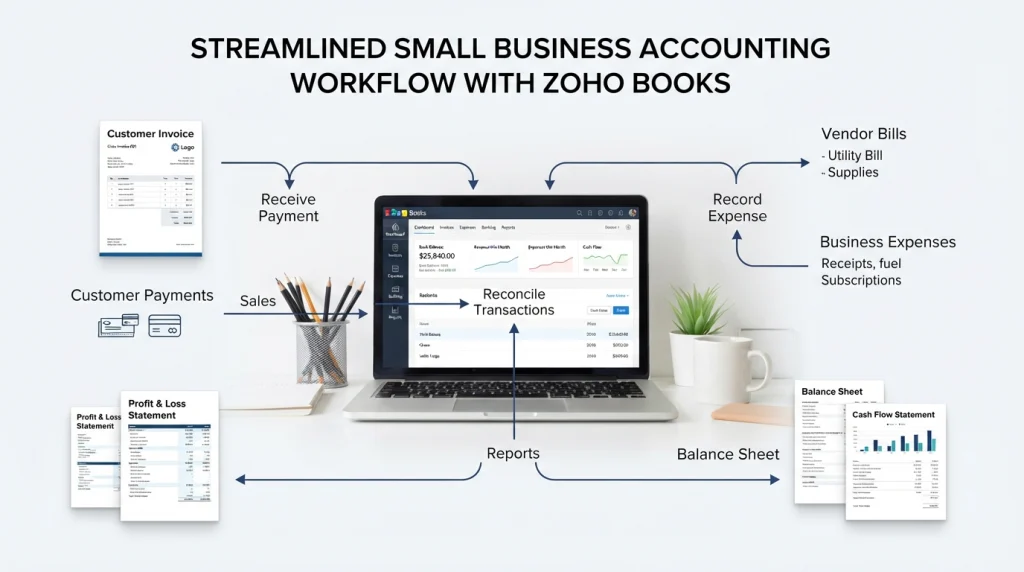
It cCommon accounting activities such as:
Invoicing
Quotes
Expense tracking
Bill and vendor payments
Bank reconciliation
Inventory management
Project and time tracking
Financial reporting
Automation
Multi-currency transactions
Zoho Books is described as an end-to-end accounting platform capable of handling activities ranging from invoicing and expenses to inventory and reporting.
The key point to understand is that Zoho Books is primarily accounting software.
It is not a CRM.
CRMs are typically used to manage leads, contacts, deals, customer interactions, and sales activities. If you want to understand this aspect of business software, check out our guide on how a CRM works.
Zoho Books manages the financial side of the business.
What Is Zoho Books Used For?
The easiest way to understand Zoho Books is to look at a typical business transaction.
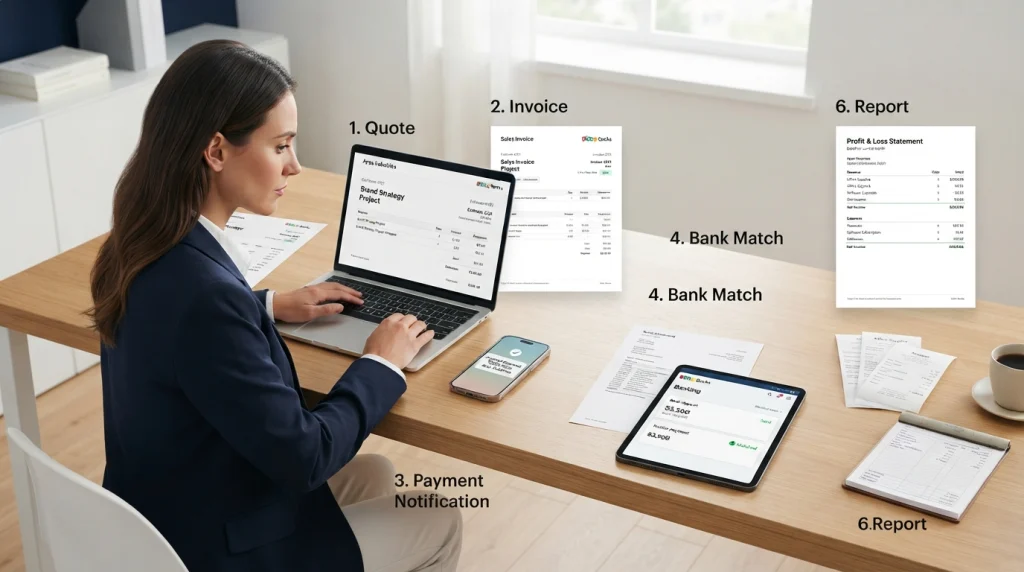
Imagine a small consulting company gets a new client.
The business might:
- Create a quote for the client.
- Convert the quote into an invoice.
- Send the invoice online.
- Receive the payment.
- Match the payment with the bank transaction.
- Record any related expenses.
- Include billable expenses where appropriate.
- Review the resulting revenue and expenses in financial reports.
Instead of managing each step in a different spreadsheet or application, Zoho Books can keep these financial activities connected.
That is where accounting software becomes more useful than a simple invoice generator.
Zoho Books Features
Zoho Books offers a fairly extensive set of features, but not every business will need every feature.
Here are the areas that matter most.
1. Invoicing and Payments
Invoicing is one of the primary reasons a small business might look for accounting software.
Zoho Books enables businesses to create professional invoices, send them to clients, set up recurring invoices, accept online payments via supported methods, and automate payment reminders.
For instance, a marketing agency that bills clients monthly can create recurring invoices instead of manually generating the same invoice each time.
This becomes especially useful when a business has dozens of clients rather than just a few.
2. Expense Tracking
Knowing how much money has come into the business is just one aspect of the overall picture.
You also need to know where that money was spent.
Zoho Books allows businesses to record expenses and categorize them, enabling a clearer understanding of their spending.
For a small company, this might include:
Software subscriptions
Advertising costs
Office expenses
Travel expenses
Professional services
Equipment
Other business-related purchases
Maintaining organized records of these transactions simplifies the financial reporting process later on.
3. Bills and Vendor Management
Businesses do not merely collect payments from customers; they also need to make payments to suppliers and service providers.
Zoho Books provides tools for managing bills and accounts payable. The bill-related features available depend on the chosen plan; based on Zoho’s current US pricing, bill management capabilities are included in the ‘Professional’ plan and higher-tier plans.
This helps businesses track the amounts owed, payments already made, and which vendor transactions require further attention.
4. Bank Reconciliation
Bank reconciliation is one of those accounting tasks that can be frustrating when handled manually.
Zoho Books supports bank and credit card accounts, transaction imports, bank feeds (on applicable plans), and bank reconciliation.
The basic concept is simple:
Your accounting records should match what actually occurred in your bank account.
Instead of checking every transaction manually, accounting software can help match and organize transactions, making it easier to identify discrepancies.
This is also an area frequently highlighted by users in independent reviews. Current review data from Capterra includes feedback from users stating that bank feed connections have reduced the time spent matching transactions.
5. Inventory Management
Zoho Books is not limited to service-based businesses alone.
Businesses selling physical products can utilize its inventory functionality to track stock and related transactions. Zoho states that inventory information can be updated in real-time, as reorder alerts are included within its inventory capabilities.
This can be useful for:
Retail businesses
E-commerce stores
Wholesalers
Product-based companies
However, inventory requirements can become complex.
6. Project and Time Tracking
Service-based businesses often need to maintain records of matters beyond just financial transactions.
They may also need to know:
How much time did we spend on this client?
Relevant Zoho Books plans include project management and time-tracking features. According to Zoho, businesses can set project budgets, assign tasks, invoice clients, and assess project profitability.
For agencies or consultants who bill clients based on time, this system can integrate the work performed with billing and financial reporting.
7. Financial Reports
Raw accounting data is not particularly useful if you cannot understand what it means.
Reports transform transactions into information that business owners can actually use.
Zoho Books provides reports covering areas such as:
Profit and Loss
Cash Flow
Tax
Sales
Expenses
Accounts Receivable
Accounts Payable
Zoho also offers options to schedule reports and share them with relevant team members.
This is where accounting software can become part of the decision-making process, rather than just a place to store transactions.
Zoho Books Pricing
Pricing is one of the initial aspects that most businesses want to know about.
It is important to note that Zoho Books pricing varies by region; therefore, the price displayed for the US market should not be assumed to apply automatically to every country.
At the time of writing, six plans are listed on Zoho’s US pricing page:
| Plan | Monthly price | Annual billing price |
|---|---|---|
| Free | $0 | $0 |
| Standard | $20/month | $15/month |
| Professional | $50/month | $40/month |
| Premium | $70/month | $60/month |
| Elite | $150/month | $120/month |
| Ultimate | $275/month | $240/month |
Zoho states that these prices are per organization on a monthly basis, and the listed prices do not include local taxes.
Upgrading between plans brings increased features and higher limits.
For instance, higher-tier plans include capabilities related to inventory, projects, automation, customization, and advanced business intelligence.
Before selecting a plan, be sure to check the official pricing page specific to your country.
Is Zoho Books Free?
Yes, a free plan for Zoho Books is available in supported markets.
This free plan is designed for solopreneurs and micro-businesses, offering essential accounting features. In the US, for instance, the plan is priced at $0, though it comes with certain limitations regarding factors like the number of users and transaction volumes.
A 14-day free trial is also available, allowing you to test paid features before committing to a subscription.
Here is the key distinction:
“Free” does not mean “unlimited.”
If your business exceeds the limits of the free plan, you may need to upgrade to a paid tier.
Zoho Books vs. Zoho CRM
This is a common source of confusion.
Both products are from Zoho, but they offer solutions to different problems.
| Zoho Books | Zoho CRM |
|---|---|
| Accounting | Customer relationship management |
| Invoices | Leads |
| Expenses | Contacts |
| Bills | Deals |
| Payments | Sales pipeline |
| Bank reconciliation | Customer interactions |
| Financial reports | Sales activities |
| Inventory | Sales management |
Think of it this way:
Zoho CRM helps manage the customer and sales journey.
Zoho Books assists in handling a business’s financial affairs.
Therefore, rather than being alternatives to one another, the two can work together.
If you are gathering information about CRM, you might also want to read “What Is Zoho CRM?”
And if you wish to understand how customer information is secured and organized, our guide on “What Is a CRM Database?” covers the topic in detail.
Who Should Use Zoho Books?
Zoho Books may be suitable for businesses that have outgrown basic spreadsheets or require greater consistency and structure in their accounting systems.
It can be useful for:
Freelancers and consultants
If you send invoices (bills), keep records of expenses, and need basic financial reports, accounting software can reduce manual work.
Agencies
Agencies often deal with recurring invoices, client expenses, projects, and billable hours. Zoho Books can integrate these activities into a single accounting workflow.
Small businesses
Small businesses can use it to handle day-to-day accounting tasks that do not require a large-scale business accounting platform.
Ecommerce and product businesses
Businesses selling physical products can benefit from inventory and accounting features, depending on their plan.
Growing companies
As transaction volume grows, having interconnected financial records can prove more beneficial than maintaining multiple spreadsheets.
This does not mean that Zoho Books is automatically the most suitable choice for every business; it depends on factors such as company size, accounting needs, location, integrations (connections with other systems), customers, and budget.
Zoho Books vs. Spreadsheets
A spreadsheet can work perfectly well when a business is very small.
If you have ten invoices, a few expenses, and very few transactions, setting up a complex accounting system might be unnecessary.
The problem arises when the business starts to grow.
You might eventually end up with:
An invoice spreadsheet → an expense spreadsheet → bank statements → payment records → a separate reporting file.
Now, someone has to keep all these records up to date.
Accounting software integrates these activities into a more cohesive system.
This doesn’t mean spreadsheets disappear entirely; many businesses still use them for analysis or custom calculations.
The difference is that the accounting system becomes the primary source of financial records, rather than relying on spreadsheets for everything.
Is Zoho Books Easy to Use?
For basic tasks, the interface is designed so that small businesses and individuals—who are not necessarily accountants—can use it with ease.
Creating invoices or recording expenses is far simpler than learning an entire accounting system from scratch.
However, the situation changes when it comes to advanced or complex accounting.
When you start dealing with:
Multiple currencies
Inventory management
Automation
Customization
Complex reporting
Large volumes of data
…then, naturally, there is a steeper learning curve.
This is reflected in independent user feedback. On the Capterra review page (updated as of September 29, 2026), Zoho Books holds an overall rating of 4.4/5 based on 681 reviews, with an identical 4.4/5 rating for ease of use. Individual reviews do mention certain limitations, particularly regarding bulk data operations and specific customization tasks.
Therefore, rather than asking whether Zoho Books is simply “easy” or “difficult,” it is more appropriate to ask:
Is it easy enough for the specific accounting tasks my business actually needs to perform?
What Are the Advantages of Zoho Books?
There are several practical reasons a business might consider it.
Everything is in one system
Invoices, expenses, bills, banking, and reports can be managed from the same accounting platform.
It can grow with the business
The different plans allow businesses to add more capabilities as their accounting requirements become more complex.
Automation can reduce repetitive work
Recurring invoices, reminders, workflows, and other automated processes can reduce manual administrative tasks.
It works beyond basic invoicing
Inventory, projects, banking, reporting, and other accounting functions make it more than an invoice-generation tool.
It connects with the wider Zoho ecosystem
Businesses already using other Zoho products may find value in keeping their business applications connected.
What Should You Check Before Choosing Zoho Books?
A feature list can make almost any accounting platform look impressive.
The more useful question is whether the software fits your actual workflow.
Before signing up, check these five things:
1. Your country
Tax rules, currencies, pricing, and available features can vary by region.
2. Your transaction volume
Check invoice, expense, user, and other limits before choosing a plan.
3. Your inventory requirements
If you sell physical products, make sure the plan includes the inventory features you actually need.
4. Your integrations
Check whether Zoho Books works with the payment gateways, ecommerce platforms, CRM, banking services, and other tools your business already uses.
5. Your accounting workflow
Don’t choose a plan just because it has more features.
First identify what you actually need.
If you only send invoices and track expenses, you may not need advanced inventory or business intelligence features.
Frequently Asked Questions About Zoho Books
What is Zoho Books mainly used for?
Zoho Books is mainly used for business accounting. It helps manage invoices, expenses, bills, payments, banking, inventory, projects, and financial reports.
Is Zoho Books the same as Zoho CRM?
No. Zoho Books focuses on accounting and financial operations, while Zoho CRM focuses on customers, leads, deals, and sales activities.
Can I use Zoho Books for free?
Yes. Zoho offers a Free plan in supported markets. The plan has limits, so growing businesses may eventually need a paid subscription.
Does Zoho Books create invoices?
Yes. Invoicing is one of the core features of Zoho Books, along with quotes, recurring invoices, payment options, and reminders.
Does Zoho Books track expenses?
Yes. Expense tracking is available across Zoho Books plans, although limits and related features vary by plan.
Does Zoho Books support inventory?
Yes. Zoho Books includes inventory functionality, with additional inventory capabilities available at higher plan levels.
Is Zoho Books suitable for small businesses?
Zoho Books has plans specifically aimed at small businesses and micro businesses, including a Free plan. Whether it fits a particular business depends on its accounting needs, location, transaction volume, and required features.
Does Zoho Books have a free trial?
Yes. Zoho currently offers a 14-day free trial for testing the product.
Final Thoughts
Zoho Books is considered a comprehensive accounting platform rather than just an invoicing application.
It can handle the day-to-day financial tasks that many businesses require: invoicing customers, recording expenses, managing bills, reconciling bank transactions, tracking inventory, monitoring projects, and generating financial reports.
The real question isn’t whether Zoho Books has enough features.
It is whether those features align with your business needs.
A freelancer with simple accounting requirements might use only a small portion of the platform. Conversely, a growing company dealing with inventory, multiple clients, projects, and complex reporting might need one of the higher-tier plans.
Therefore, it makes sense to start by assessing your actual workflow, comparing it against the available features and limitations, and then selecting the plan that fits best.
If you are also exploring how accounting software integrates with customer and sales management, you can continue reading our guide on the importance of CRM.