
A dealership can generate hundreds of enquiries and still lose sales.
The problem is often not the number of leads. It is what happens after a lead arrives.
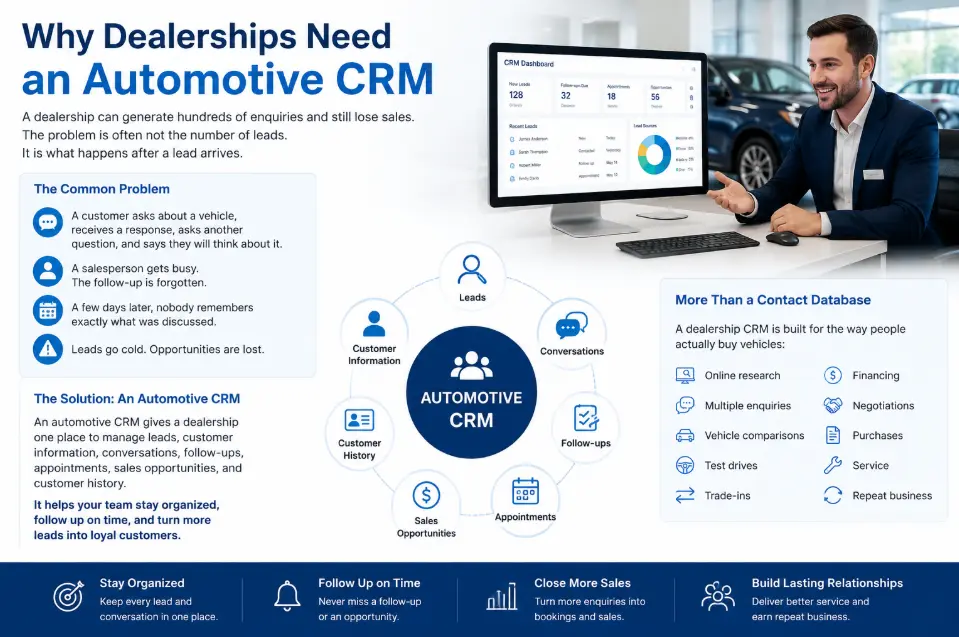
A customer asks about a vehicle, receives a response, asks another question, and says they will think about it. A salesperson gets busy. The follow-up is forgotten. A few days later, nobody remembers exactly what was discussed.
That is the kind of problem an automotive CRM is designed to solve.
An automotive CRM gives a dealership one place to manage leads, customer information, conversations, follow-ups, appointments, sales opportunities, and customer history.
But a dealership CRM is more than a contact database.
It needs to fit the way people actually buy vehicles: online research, multiple enquiries, vehicle comparisons, test drives, trade-ins, financing, negotiations, purchases, and eventually service and repeat business.
This guide explains what an automotive CRM does, how it differs from a DMS, which features matter, how integrations work, what AI can realistically do, and how dealerships can evaluate CRM software before signing a contract.
Quick Answer: What Is an Automotive CRM?
An automotive CRM is customer relationship management software built for the needs of car dealerships and automotive businesses.
It helps dealership teams:
- Capture and organize leads
- Track customer and vehicle interests
- Assign leads to salespeople
- Manage follow-ups
- Record calls, messages, emails, and notes
- Track appointments and test drives
- Manage sales pipelines
- Connect customer activity with dealership systems
- Measure sales activity and lead sources
- Maintain customer relationships after the sale
The main difference from a generic CRM is the automotive context.
A dealership may need to connect customer information with vehicles, inventory, trade-ins, appointments, financing, service activity, lead providers, and a DMS.
That is why choosing a CRM designed around dealership workflows can matter more than simply choosing the CRM with the longest feature list.
Automotive CRM at a Glance
| Area | What an automotive CRM should help with |
|---|---|
| Lead management | Capture, assign, qualify, and track enquiries |
| Customer records | Keep contact and interaction history together |
| Vehicle interest | Connect prospects with vehicles or inventory |
| Follow-up | Create tasks, reminders, and workflows |
| Sales pipeline | Track opportunities from enquiry to sale |
| Communication | Record calls, texts, emails, and other interactions |
| Appointments | Manage test drives and showroom visits |
| Integrations | Connect CRM with DMS, inventory, websites, and lead sources |
| Reporting | Monitor lead activity, pipeline, appointments, and sales |
| Automation | Reduce repetitive administrative work |
| AI | Assist with summaries, recommendations, communication, and workflows |
| Retention | Support post-sale communication and future opportunities |
The exact capabilities vary by vendor, so dealerships should verify individual features rather than assuming every automotive CRM includes everything above.
Why Is Automotive CRM Different From a Normal CRM?
A generic CRM can manage contacts, deals, tasks, and communication.
That does not necessarily mean it understands dealership workflows.
A vehicle buyer may interact with a dealership several times before purchasing:
Search → Vehicle enquiry → Price question → Trade-in → Financing → Appointment → Test drive → Negotiation → Purchase → Service
The customer may also enquire about more than one vehicle.
A dealership CRM needs to keep this context attached to the customer.
For example:
Customer: Sarah
Vehicle: 2025 Honda CR-V
Interest: Used vehicle
Trade-in: 2020 Toyota Camry
Lead source: Website
Stage: Test drive scheduled
Next action: Confirm appointment
That is much more useful to a salesperson than a contact record containing only a name and phone number.
Salesforce similarly describes automotive CRM as a hub for customer data, interactions, sales opportunities, and relationship management, while its automotive platform connects customer and vehicle information across sales and service interactions.
For a broader explanation of how CRM systems work, see How CRM Works.
How Does an Automotive CRM Work?
A good way to understand dealership CRM software is to follow a lead.
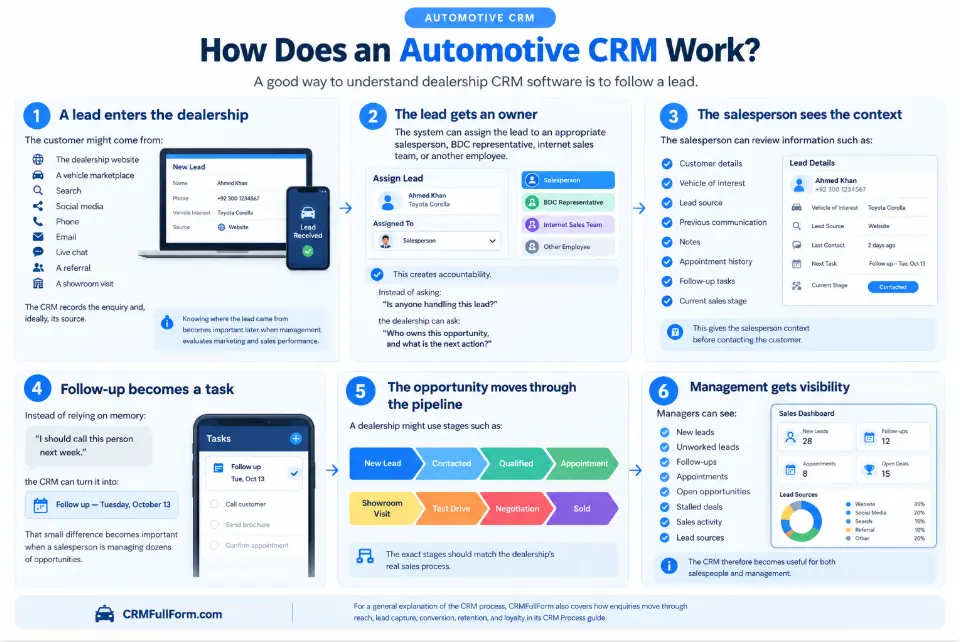
1. A lead enters the dealership
The customer might come from:
- The dealership website
- A vehicle marketplace
- Search
- Social media
- Phone
- Live chat
- A referral
- A showroom visit
The CRM records the enquiry and, ideally, its source.
Knowing where the lead came from becomes important later when management evaluates marketing and sales performance.
2. The lead gets an owner
The system can assign the lead to an appropriate salesperson, BDC representative, internet sales team, or another employee.
This creates accountability.
Instead of asking:
“Is anyone handling this lead?”
the dealership can ask:
“Who owns this opportunity, and what is the next action?”
3. The salesperson sees the context
The salesperson can review information such as:
- Customer details
- Vehicle of interest
- Lead source
- Previous communication
- Notes
- Appointment history
- Follow-up tasks
- Current sales stage
This gives the salesperson context before contacting the customer.
4. Follow-up becomes a task
Instead of relying on memory:
“I should call this person next week.”
the CRM can turn it into:
Follow up — Tuesday, October 13
That small difference becomes important when a salesperson is managing dozens of opportunities.
5. The opportunity moves through the pipeline
A dealership might use stages such as:
New Lead → Contacted → Qualified → Appointment → Showroom Visit → Test Drive → Negotiation → Sold
The exact stages should match the dealership’s real sales process.
6. Management gets visibility
Managers can see:
- New leads
- Unworked leads
- Follow-ups
- Appointments
- Open opportunities
- Stalled deals
- Sales activity
- Lead sources
The CRM therefore becomes useful for both salespeople and management.
For a general explanation of the CRM process, CRMFullForm also covers how enquiries move through reach, lead capture, conversion, retention, and loyalty in its CRM Process guide.
Automotive CRM vs. DMS: What’s the Difference?
This is one of the most important questions when evaluating dealership software.
CRM and DMS are related, but they are not the same system.
A CRM (Customer Relationship Management) focuses primarily on customer relationships, leads, sales activity, communication, and follow-up.
A DMS (Dealer Management System) is generally focused on dealership operations and transactional processes.
A simple way to remember the distinction:
CRM manages the customer relationship and sales workflow. DMS manages core dealership operations.
| Automotive CRM | DMS |
|---|---|
| Lead management | Dealership operations |
| Customer records | Accounting |
| Sales pipeline | Transaction processing |
| Follow-up | Inventory and operational data |
| Communication history | Parts/service operations |
| Appointments | Financial processes |
| Sales activity | Other dealership administration |
There can be overlap.
Some dealership platforms combine CRM and DMS functionality, while other systems integrate the two.
That is why dealerships should look at the actual data flow rather than the product labels.
Ask the vendor:
- What data moves from the CRM to the DMS?
- What data moves from the DMS to the CRM?
- Is the integration one-way or two-way?
- How frequently does synchronization occur?
- What happens when information conflicts?
- Are additional integration fees involved?
Current dealership CRM comparisons increasingly emphasize DMS compatibility because the existing technology stack can significantly narrow the practical CRM shortlist.
12 Automotive CRM Features That Actually Matter
Not every dealership needs every feature.
The important question is whether the software solves real problems in the dealership.
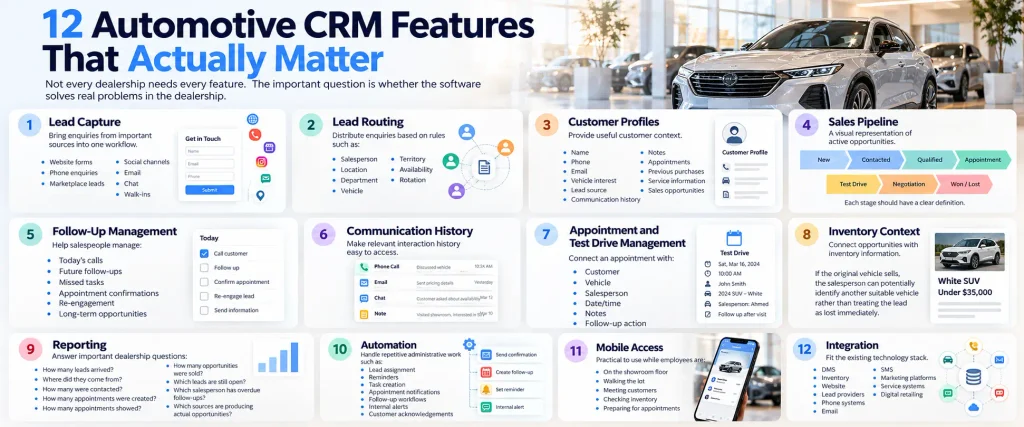
1. Lead Capture
The CRM should make it possible to bring enquiries from important sources into one workflow.
That might include:
- Website forms
- Phone enquiries
- Marketplace leads
- Social channels
- Chat
- Walk-ins
Manual lead entry creates another opportunity for delays and mistakes.
2. Lead Routing
Once a lead arrives, somebody needs to own it.
Lead routing can distribute enquiries based on rules such as:
- Salesperson
- Location
- Department
- Vehicle
- Territory
- Availability
- Rotation
The exact options depend on the CRM.
The important thing is that ownership is clear.
3. Customer Profiles
A dealership CRM should provide useful customer context.
Depending on the platform, a record may contain:
- Name
- Phone
- Vehicle interest
- Lead source
- Communication history
- Notes
- Appointments
- Previous purchases
- Service information
- Sales opportunities
A CRM database is essentially the structured layer underneath this information. CRMFullForm explains this in greater detail in What Is a CRM Database?.
4. Sales Pipeline
A pipeline gives the dealership a visual representation of active opportunities.
For example:
New → Contacted → Qualified → Appointment → Test Drive → Negotiation → Won/Lost
The pipeline should not become a collection of meaningless labels.
Each stage should have a clear definition.
For example:
Appointment Set should mean an actual appointment exists, not simply that a salesperson hopes the customer will visit.
5. Follow-Up Management
This is one of the most practical CRM capabilities.
A dealership may have hundreds of customers who are interested but not ready to buy immediately.
A CRM can help salespeople manage:
- Today’s calls
- Future follow-ups
- Missed tasks
- Appointment confirmations
- Re-engagement
- Long-term opportunities
The goal is not to contact customers endlessly.
The goal is to make sure legitimate opportunities do not disappear because someone forgot the next step.
6. Communication History
Customers can speak to dealerships through several channels.
The CRM should make relevant interaction history easy to access.
A salesperson should ideally be able to understand:
What did we discuss last time?
without searching through several disconnected systems.
7. Appointment and Test Drive Management
Vehicle sales often include physical appointments.
The CRM can connect an appointment with:
- Customer
- Vehicle
- Salesperson
- Date/time
- Notes
- Follow-up action
This creates continuity between the online enquiry and the showroom experience.
8. Inventory Context
Vehicle interest matters.
A CRM that connects customer opportunities with inventory information can give salespeople better context.
For example:
Customer wants a white SUV under $35,000.
If the original vehicle sells, the salesperson can potentially identify another suitable vehicle rather than treating the lead as lost immediately.
The precise capability depends on the CRM’s inventory integration.
9. Reporting
A dealership should be able to answer questions such as:
- How many leads arrived?
- Where did they come from?
- How many were contacted?
- How many appointments were created?
- How many appointments showed?
- How many opportunities were sold?
- Which leads are still open?
- Which salesperson has overdue follow-ups?
- Which sources are producing actual opportunities?
A dashboard is useful only when it answers questions management actually has.
10. Automation
Automation can handle repetitive administrative work such as:
- Lead assignment
- Reminders
- Task creation
- Appointment notifications
- Follow-up workflows
- Internal alerts
- Customer acknowledgements
But automation should not mean sending the same generic message to every customer.
The system should remove repetitive work while preserving room for human judgment.
11. Mobile Access
Salespeople are not always sitting at a desk.
A CRM should be practical to use while employees are:
- On the showroom floor
- Walking the lot
- Meeting customers
- Checking inventory
- Preparing for appointments
A feature-rich CRM that is frustrating on mobile may suffer from poor adoption.
12. Integration
The CRM should fit the existing technology stack.
Potential integrations may include:
- DMS
- Inventory
- Website
- Lead providers
- Phone systems
- SMS
- Marketing platforms
- Service systems
- Digital retailing
Do not judge integrations by logos alone.
Ask exactly what information moves between the systems.
Automotive CRM and Speed-to-Lead
A lead that arrives at 10:00 AM should not still be sitting untouched at 3:00 PM.
But speed is only one part of the equation.
The better objective is:
Fast + relevant + accountable follow-up.
Consider the difference.
Generic response
Thanks for your enquiry. Are you still interested?
Contextual response
Hi Sarah, I saw your enquiry about the 2025 Honda CR-V. I can confirm the vehicle details for you and help arrange a test drive. Would tomorrow afternoon work?
The second response uses the information already associated with the opportunity.
The CRM’s job is not simply to send messages faster.
Its job is to give the salesperson the context needed to make the next interaction useful.
Automotive CRM Automation: What Should Be Automated?
Not everything.
A useful rule is:
Automate repetitive administration. Keep important customer judgment human.
Good candidates for automation
- Lead assignment
- Reminder creation
- Internal notifications
- Appointment confirmations
- Task escalation
- Basic acknowledgements
- Data synchronization
- Reporting
Things that still need human judgment
- Negotiation
- Complex financing questions
- Complaints
- Vehicle-specific recommendations
- Sensitive customer situations
- High-value opportunities
- Unusual requests
The best CRM workflow reduces administrative friction without turning every customer interaction into a robot conversation.
AI in Automotive CRM
AI is becoming a larger part of dealership CRM software.
Current automotive CRM platforms are adding AI-assisted capabilities around areas such as customer information, workflows, communication, and sales activity. Salesforce positions its automotive CRM around AI-assisted customer and vehicle data, while Cox Automotive announced new AI-powered VinSolutions functionality in August 2026.
Depending on the platform, AI may help with:
- Summarizing conversations
- Drafting responses
- Prioritizing opportunities
- Identifying follow-up tasks
- Analyzing customer activity
- Supporting sales workflows
- Automating repetitive actions
- Surfacing relevant customer or vehicle information
But dealerships should ask an important question:
What does the AI actually have access to?
AI is only as useful as the data and workflow around it.
If the customer record is incomplete, duplicate, or outdated, an intelligent system can still produce poor recommendations.
Customer Data Security Matters in Automotive CRM
This is an area that should not be treated as an afterthought.
Dealerships can hold sensitive customer information, particularly when they arrange financing or leasing.
The U.S. Federal Trade Commission states that the Safeguards Rule applies to most automobile dealers that finance or lease automobiles and requires covered dealers to maintain a comprehensive written information security program for protecting customer information.
That means CRM selection should include questions about:
- Access controls
- Authentication
- Data encryption
- Employee permissions
- Vendor security
- Data retention
- Incident response
- Third-party integrations
- Backup and recovery
The FTC also specifically discusses service-provider oversight and safeguards such as access controls, encryption, multifactor authentication, and monitoring.
For dealerships handling financing information, security is therefore not merely a software feature comparison.
It is part of responsible customer-data management.
Best Automotive CRM Software in 2026
There is no universal winner.
The right automotive CRM depends heavily on the dealership’s existing systems, size, sales model, DMS, lead sources, and required integrations.
Current 2026 comparisons commonly evaluate platforms such as:
| CRM | Potential fit |
|---|---|
| VinSolutions | Dealerships already working within the Cox Automotive ecosystem |
| CDK CRM | Dealership groups using CDK infrastructure |
| DealerSocket | Dealerships looking for a broad automotive technology ecosystem |
| DriveCentric | Dealerships prioritizing CRM workflow and usability |
| AutoRaptor | Independent dealerships and smaller operations |
| Tekion CRM | Organizations evaluating a broader connected dealership platform |
| Reynolds & Reynolds | Dealerships already using its broader ecosystem |
| Salesforce Automotive Cloud | Larger automotive organizations requiring broader enterprise CRM capabilities |
These are fit categories, not universal rankings.
Current independent comparisons also emphasize that the dealership’s DMS can influence which CRM options make practical sense.
Salesforce‘s official automotive product, for example, is positioned for OEMs, retailers, dealers, and other automotive organizations rather than only traditional independent dealerships.
So instead of asking:
“Which CRM is number one?”
ask:
“Which CRM fits our dealership, technology stack, and sales process best?”
How Much Does Automotive CRM Software Cost?
Automotive CRM pricing is difficult to summarize with one number.
Why?
Because dealership CRM contracts can depend on:
- Number of locations
- Number of users
- DMS
- Modules
- Lead volume
- Integrations
- Website services
- Marketing services
- Communication features
- Contract length
- Implementation
Current 2026 dealership CRM comparisons note that many major vendors do not publish complete franchise-dealer pricing publicly and instead provide quotes based on the dealership’s setup.
That means a page claiming that every dealership can get a specific enterprise CRM for one fixed monthly price should be treated carefully.
When comparing quotes, look beyond the monthly software fee.
Ask about:
Setup + migration + training + integrations + communication costs + contract terms + exit costs.
How to Choose an Automotive CRM
Don’t start with the software.
Start with the dealership’s problems.
Step 1: Map the current process
Write down:
Lead → Assignment → Contact → Qualification → Appointment → Test Drive → Negotiation → Sale → Retention
Then identify where leads are currently getting stuck.
Step 2: Identify the most expensive problem
Maybe the dealership has:
- Slow lead response
- Missed follow-ups
- Duplicate customer records
- Poor lead routing
- Weak reporting
- Poor DMS integration
- Low CRM adoption
Solve the biggest problem first.
Step 3: Check DMS compatibility
Your existing DMS may eliminate some CRM choices immediately.
Ask vendors for a detailed integration explanation rather than accepting “DMS integration” as a checkbox.
Step 4: Test the CRM with real workflows
During a demo, don’t just watch the salesperson present slides.
Ask them to demonstrate:
- A new lead arriving
- Lead assignment
- Customer record creation
- Vehicle selection
- Follow-up task
- Appointment creation
- Communication history
- Pipeline movement
- Manager reporting
- Lost-lead reactivation
This tells you far more than a feature list.
Step 5: Let salespeople test it
A CRM can look excellent to management and still fail with the people who use it every day.
Ask your sales team:
- Is it easy to use?
- Can you find a customer quickly?
- Can you update a lead from your phone?
- Can you see today’s tasks?
- Does it save time?
- What feels unnecessarily complicated?
Adoption matters.
What Makes a Good Dealership CRM?
A good automotive CRM should make five things easier:
1. Know who the customer is.
2. Know what they want.
3. Know what has already happened.
4. Know what should happen next.
5. Know whether the dealership is actually improving.
If the software cannot help answer those questions, a long feature list will not make much difference.
Common Automotive CRM Mistakes
Choosing the CRM with the Most Features
More features can mean more complexity.
Buy for the workflow you need, not the feature count you can advertise.
Ignoring Adoption
If salespeople avoid the CRM, the database becomes incomplete.
Incomplete CRM data leads to poor reporting and poor follow-up.
Treating Automation as a Replacement for Salespeople
Automation should remove repetitive work.
It should not remove human judgment from important customer interactions.
Ignoring Data Quality
Duplicate records and inconsistent fields eventually damage reporting.
CRM data needs ownership and maintenance.
Forgetting Integration Costs
A CRM may look affordable until implementation, migration, communication, or integration fees appear.
Look at the total cost.
Treating Security as a Technical Detail
Customer information can be sensitive, especially when financing or leasing information is involved.
Security should be part of the buying decision from day one.
Automotive CRM for Independent vs. Franchise Dealerships
The right CRM can look very different depending on the dealership.
Independent Dealership
An independent dealer may prioritize:
- Simplicity
- Lead management
- SMS and calling
- Follow-up
- Inventory
- Affordable implementation
- Ease of use
The dealer may not need an enormous enterprise platform.
Franchise Dealership
A franchise dealership may need:
- OEM processes
- DMS integration
- Lead routing
- Multiple departments
- Advanced reporting
- Inventory connections
- BDC workflows
- Service integration
- More complex permissions
The larger the organization, the more important system integration becomes.
Automotive CRM and Customer Retention
The CRM journey should not necessarily end when the vehicle is sold.
A dealership has an opportunity to continue the relationship through:
- Service reminders
- Maintenance communication
- Customer satisfaction follow-up
- Renewal opportunities
- Trade-in opportunities
- Future vehicle purchases
- Referral opportunities
This is where CRM becomes more than a sales database.
It becomes a customer relationship system.
CRMFullForm’s guide to Customer Relations explains why the relationship continues beyond the initial transaction.
A Realistic Automotive CRM Example
Imagine a customer named David.
He finds a used SUV online and submits an enquiry.
The CRM creates:
Customer: David
Vehicle: Used SUV
Source: Website
Status: New Lead
Owner: Salesperson A
The salesperson contacts David.
David says he has a trade-in.
The salesperson records the trade-in information.
The CRM creates a follow-up task.
David later books a test drive.
The opportunity moves to:
Appointment Set
After the test drive:
Test Drive Completed
David wants to compare another vehicle.
Instead of closing the opportunity as lost, the salesperson updates the customer’s vehicle preferences.
A week later, the dealership has another suitable vehicle.
The salesperson contacts David.
The conversation continues from the existing customer record.
This is the real value of an automotive CRM.
Not “more software.”
Better continuity.
Automotive CRM Metrics Dealerships Should Watch
A CRM becomes much more valuable when the dealership measures the right things.
Useful metrics can include:
Lead response time
How quickly are new enquiries being handled?
Contact rate
How many leads are actually reached?
Appointment rate
How many leads turn into appointments?
Show rate
How many scheduled appointments actually happen?
Opportunity-to-sale rate
How many qualified opportunities become sales?
Follow-up completion
How many assigned tasks are completed on time?
Lead-source performance
Which sources are producing meaningful opportunities?
Pipeline aging
How long are opportunities remaining in each stage?
Lost-lead reasons
Why are opportunities being lost?
The exact metrics should match the dealership’s goals.
Automotive CRM Implementation Checklist
Before going live, a dealership should have clear answers for:
- Who owns new leads?
- What are the pipeline stages?
- What does each stage mean?
- Which fields are mandatory?
- Which lead sources connect automatically?
- How does the CRM connect to the DMS?
- Who can access customer information?
- What happens when a salesperson leaves?
- How are duplicate records handled?
- Which follow-ups are automated?
- Which communications are logged?
- Which reports does management need?
- How will employees be trained?
- How will CRM adoption be measured?
The implementation process matters almost as much as the software selection.
A CRM that is badly configured can create a highly organized version of the same old problems.
Is an Automotive CRM Worth It?
For many dealerships, the value comes down to one question:
How much opportunity is being lost because the current process is unreliable?
If leads are being missed, follow-ups forgotten, customer information scattered, or management unable to see what is happening, an automotive CRM can provide the structure needed to fix those gaps.
But a CRM is not automatically valuable simply because it is expensive or sophisticated.
A small dealership may need a relatively simple system.
A large dealer group may need complex integrations, reporting, permissions, and multi-location workflows.
The right CRM is the one that matches the business.
Final Verdict: What Should an Automotive CRM Actually Do?
The best automotive CRM is not necessarily the one with the longest feature list.
It is the system that helps the dealership answer five questions at any moment:
Who is this customer?
What vehicle are they interested in?
What happened last time we spoke?
What needs to happen next?
Did that opportunity eventually become a sale?
If the CRM makes those answers easy to find, connects properly with the dealership’s technology stack, and is simple enough for employees to use consistently, it is doing its job.
The future of automotive CRM is likely to involve more connected customer and vehicle data, automation, analytics, and AI-assisted workflows. But the fundamentals remain the same:
Capture the lead.
Understand the customer.
Follow up consistently.
Keep the context.
Measure the process.
Build the relationship beyond the sale.
That is what turns automotive CRM software from another dealership system into a useful part of the sales operation.
Frequently Asked Questions About Automotive CRM
What is an automotive CRM?
An automotive CRM is software designed to help car dealerships manage leads, customer relationships, communication, follow-ups, appointments, sales opportunities, and customer history.
What is the difference between CRM and DMS in automotive?
A CRM generally focuses on customer relationships, lead management, sales activity, and follow-up. A DMS generally focuses on core dealership operations and transactional processes. The two systems can integrate, and some platforms combine parts of both.
What is the best automotive CRM in 2026?
There is no single best automotive CRM for every dealership. The right option depends on the dealership’s DMS, size, lead sources, sales process, integrations, budget, and employee adoption.
What features should a car dealership CRM have?
Important capabilities can include lead capture, lead routing, customer records, sales pipelines, follow-up tasks, communication history, appointment management, inventory connections, reporting, automation, mobile access, and integrations.
Can automotive CRM software integrate with a DMS?
Many automotive CRM platforms support DMS integrations, but the exact functionality varies. Dealerships should confirm which data is exchanged and whether the connection is one-way or two-way.
Does automotive CRM include AI?
Some modern automotive CRM platforms include AI-assisted features. Depending on the vendor, these can help with customer-data analysis, communication, summaries, recommendations, and workflow automation.
How much does automotive CRM software cost?
There is no universal price. Dealership CRM pricing can depend on users, locations, modules, integrations, communication volume, implementation, and contract terms. Many dealership-focused platforms provide custom quotes rather than complete public pricing.
Is automotive CRM useful for independent dealerships?
Yes. Independent dealerships can use CRM software to organize leads, manage follow-ups, track customer interactions, and maintain a sales pipeline. The important thing is choosing a system that matches the dealership’s size and workflow.
Can a CRM replace a DMS?
Usually not completely. CRM and DMS systems generally perform different jobs, although some dealership technology platforms combine overlapping functionality.
Why is CRM important for car dealerships?
A CRM gives the dealership a structured way to manage customer information, leads, communication, follow-up, sales opportunities, and retention instead of relying on disconnected spreadsheets, inboxes, notes, and personal memory.
What should I check before buying automotive CRM software?
Check DMS compatibility, integrations, lead routing, communication tools, reporting, mobile usability, security, data migration, implementation, training, contract terms, and whether your sales team can actually use the system comfortably.