
Running a small business usually means doing a lot with a small team.
One person may handle sales, another may manage customer support, and the owner may still be checking spreadsheets to find out which leads need a follow-up.
That works for a while.
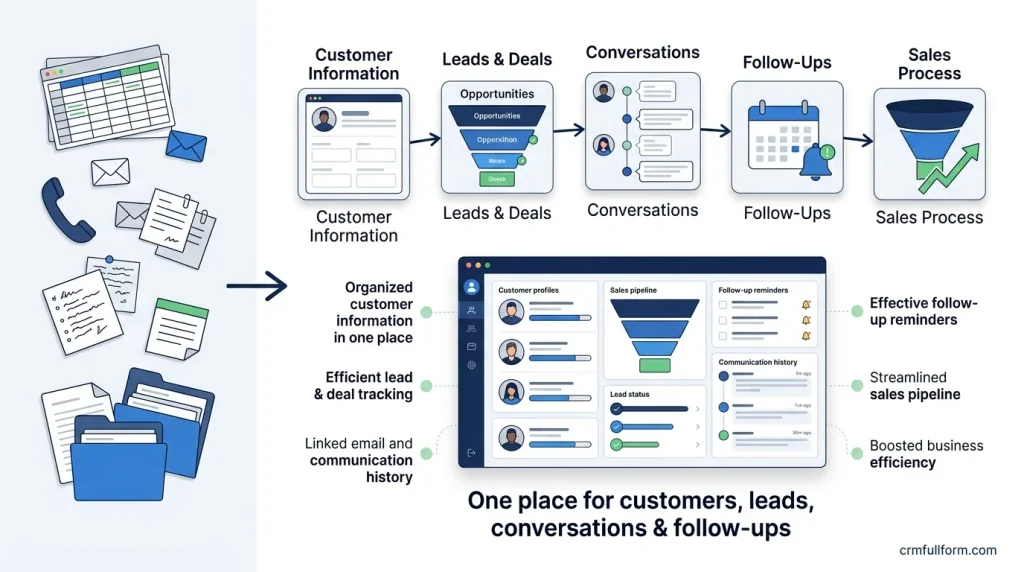
Then the business grows.
More enquiries come in. Customers contact you through different channels. Sales opportunities start getting missed. Customer information ends up in spreadsheets, email inboxes, WhatsApp conversations, notebooks, and individual employees’ phones.
This is where CRM software for small business can make a real difference.
A CRM gives your team one place to organize customer information, track leads and deals, record conversations, schedule follow-ups, and understand what is happening across the sales process.
But that doesn’t mean every small business needs an expensive CRM.
In fact, choosing a CRM simply because it has the most features can create a new problem: software nobody actually uses.
This guide explains what small businesses should look for, when a CRM is worth paying for, which features matter, what CRM software can cost, and how to choose a system without overbuying.
What Is CRM Software for Small Business?
CRM software for small business is customer relationship management software designed to help smaller teams organize customer information, sales opportunities, communication, follow-ups, and customer service in one place.
Instead of keeping information across several disconnected tools, a CRM creates a central record for each customer or prospect.
For example, a customer record might contain:
- Name and contact details
- Company information
- Lead source
- Previous conversations
- Emails and calls
- Sales opportunities
- Tasks and reminders
- Quotes or orders
- Support requests
- Notes from previous interactions
The exact information depends on the CRM and the business.
The important part is that the information becomes accessible to the people who need it.
Sales can see what happened before a call.
Customer support can understand the customer’s history.
An owner can see which deals are active.
And the business doesn’t have to depend entirely on one employee remembering everything.
For a broader explanation of the underlying system, see our guide on how CRM works.
Do Small Businesses Really Need a CRM?
Not necessarily.
This is one of the most important things to understand before buying CRM software.
A small business with a few customers and very few enquiries might be perfectly fine using email, a spreadsheet, a calendar, or another simple system.
The problem starts when the manual process becomes difficult to control.
You may be ready for a CRM if:
- Leads are being forgotten
- Follow-ups are inconsistent
- Customer information is spread across different places
- Several employees communicate with the same customers
- You don’t know which deals are close to being won
- Sales reporting takes hours
- Customers have to repeat information to different employees
- Important customer history is stored on an employee’s personal device
- You are using multiple spreadsheets to track sales
- The owner constantly has to ask employees for updates
A CRM isn’t valuable because it is called a CRM.
It is valuable when it solves a real operational problem.
CRM vs. Spreadsheet: When Should You Make the Switch?
A spreadsheet isn’t automatically a bad way to manage customers.
For a very small operation, it can be cheap, flexible, and easy to understand.
The problem is that spreadsheets aren’t specifically designed to manage relationships and sales workflows.
Consider a simple example.
You have 150 leads in a spreadsheet.
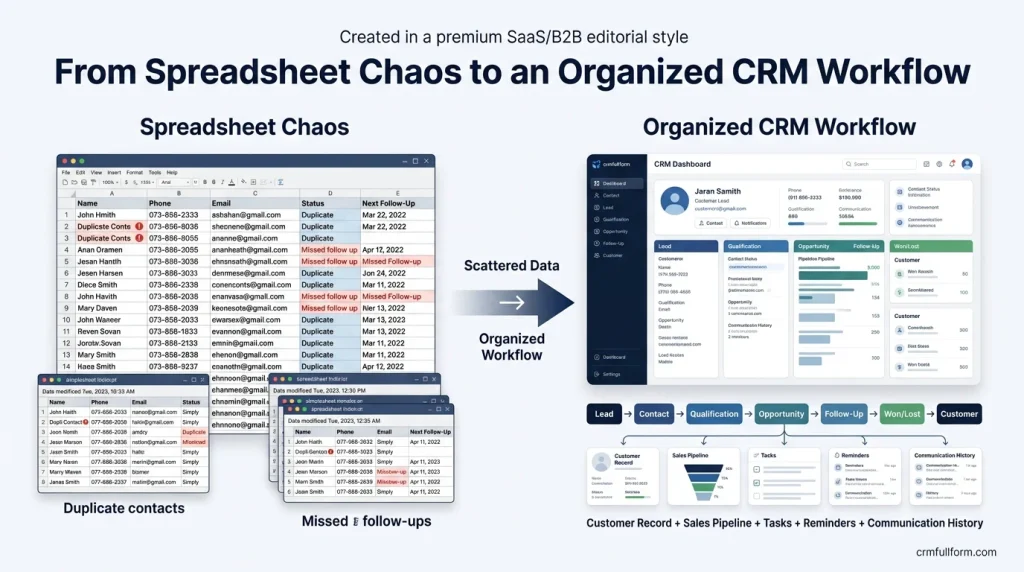
Each row contains:
Name | Phone | Email | Status | Next Follow-Up
That looks manageable.
But now imagine five salespeople are updating it.
Someone forgets to update a status.
Someone creates a duplicate contact.
Someone changes a formula.
Another salesperson keeps their own copy.
A follow-up date passes without anyone noticing.
Now the spreadsheet is no longer the problem by itself.
The problem is that there is no reliable process around it.
A CRM can connect the customer record with activities, tasks, pipeline stages, ownership, reminders, and reporting.
That’s the point where a CRM starts becoming more useful than a basic spreadsheet.
You can also learn more about the role of CRM in the overall business process in our CRM process guide.
How Does CRM Software for Small Business Work?
A CRM usually follows the customer’s journey.
A simplified example looks like this:
Lead → Contact → Qualification → Opportunity → Follow-Up → Won/Lost → Customer
Imagine a small web design agency receives a form submission.
Step 1: A New Lead Arrives
The website sends the person’s information into the CRM.
The record might include:
- Name
- Company
- Website
- Service requested
- Lead source
Step 2: Someone Becomes Responsible for the Lead
The CRM can assign the lead to a salesperson.
This matters because an unassigned lead is essentially everyone’s responsibility and nobody’s responsibility.
Step 3: The Salesperson Follows Up
The salesperson calls or emails the prospect.
The interaction is recorded.
Instead of relying on memory, the CRM now contains a history.
Step 4: The Lead Becomes an Opportunity
If the prospect is genuinely interested, the salesperson can move the opportunity into a sales pipeline.
For example:
New → Contacted → Qualified → Proposal → Negotiation → Won/Lost
Step 5: Follow-Up Continues
If the prospect says:
“Call me next Tuesday.”
That shouldn’t remain in someone’s memory.
It becomes a task.
Step 6: The Deal Is Closed
If the customer buys, the opportunity becomes a won deal.
The business can then continue the relationship through onboarding, support, renewals, upsells, or repeat purchases.
That is the basic idea behind CRM software.
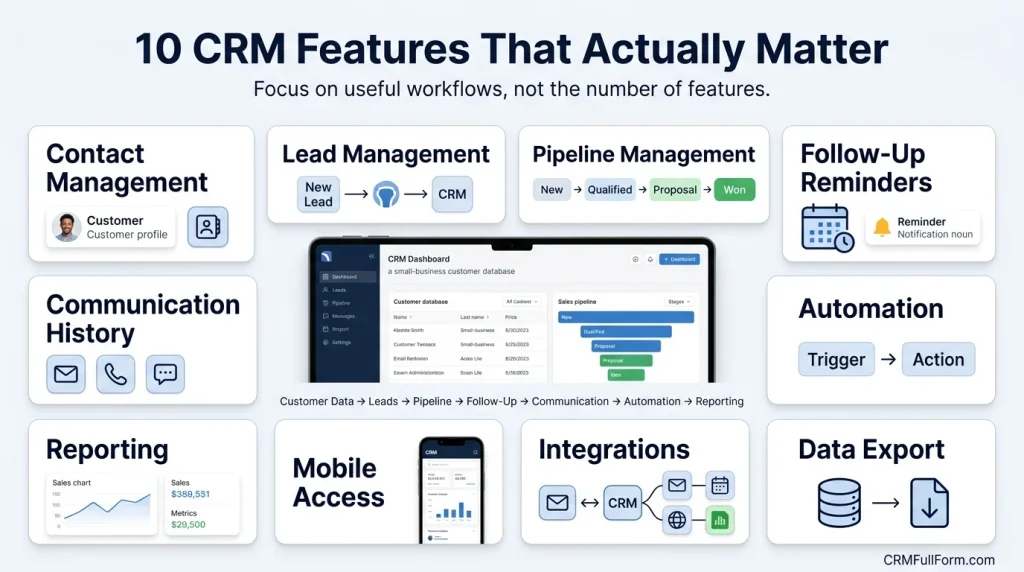
10 CRM Features That Actually Matter for Small Businesses
A common mistake is comparing CRMs by the number of features they advertise.
More features don’t automatically mean more value.
For a small business, these are usually more important.
1. Contact Management
The CRM should make it easy to create, search, update, and organize customer records.
You should be able to answer simple questions quickly:
- Who is this customer?
- What company are they from?
- When did we last contact them?
- What did they ask for?
- Who is handling them?
If finding this information takes several minutes, the CRM isn’t doing its job.
2. Lead Management
A CRM should help you understand what happens to new enquiries.
At minimum, you should be able to track:
Where the lead came from → Who owns it → What happened → What happens next
Lead sources might include:
- Website
- Social media
- Referral
- Phone
- Advertising
- Events
- Marketplace platforms
Source tracking becomes especially useful when you want to understand which marketing channels generate actual customers rather than just enquiries.
3. Pipeline Management
A pipeline gives your team a visual representation of active opportunities.
For example:
| Stage | Purpose |
|---|---|
| New | New enquiry |
| Contacted | Initial conversation completed |
| Qualified | Genuine opportunity |
| Proposal | Offer or quotation sent |
| Negotiation | Terms being discussed |
| Won | Customer purchased |
| Lost | Opportunity closed without a sale |
The exact stages should match your business.
A software company might have a much longer sales cycle than a local service business.
Don’t copy another company’s pipeline simply because it looks professional.
4. Follow-Up Reminders
This might be one of the most valuable CRM features for a small team.
A CRM should make it difficult for important follow-ups to disappear.
You should be able to create tasks such as:
- Call tomorrow
- Send quotation Friday
- Follow up in seven days
- Check renewal next month
- Contact inactive customer
The goal isn’t to automate every human interaction.
The goal is to make sure important actions don’t depend on someone’s memory.
5. Email and Communication History
A useful CRM should help your team understand previous communication.
Imagine a customer calls while the salesperson who originally handled them is unavailable.
The next employee should not have to say:
“I don’t know what happened. Let me ask someone.”
A shared history can show previous emails, notes, calls, meetings, and other activities.
That creates continuity.
6. Automation
Automation becomes useful when a task happens repeatedly.
For example:
New lead received → assign salesperson → create follow-up task → send acknowledgement
Or:
Deal inactive for 7 days → notify salesperson
Good automation removes repetitive work.
Bad automation creates a complicated system nobody understands.
For a small business, start with a few workflows that solve obvious problems.
7. Reporting
A CRM should help answer business questions.
For example:
- How many leads did we receive?
- Where did they come from?
- How many became opportunities?
- How many deals were won?
- What is the average sales cycle?
- Which salesperson has the most active opportunities?
- Why are we losing deals?
- How much revenue is currently in the pipeline?
You don’t need 50 dashboards.
You need the numbers that help you make decisions.
8. Mobile Access
Small business owners and salespeople aren’t always sitting at a desk.
A mobile CRM can be useful when employees need to:
- Check customer information
- Update an opportunity
- Add notes
- Schedule a follow-up
- Check tasks
- Review the pipeline
But mobile access should support the workflow, not become another reason to buy software you don’t need.
9. Integrations
Your CRM shouldn’t create another isolated data island.
Depending on the business, useful integrations might include:
- Calendar
- Website forms
- Accounting software
- Marketing tools
- Customer support software
- Communication platforms
- E-commerce systems
The goal is simple:
Enter information once whenever possible.
10. Data Export
This feature is easy to overlook.
Before choosing CRM software, find out how you can get your data back out.
Your customer information belongs to your business.
A CRM should not become a place where your customer database gets trapped.
Check:
- What can be exported?
- In what format?
- Can all important fields be exported?
- Are attachments included?
- Can you export activities and notes?
- Are there limits on exports?
This becomes particularly important when changing CRM systems later.
What Is the Most Important CRM Feature for a Small Business?
There isn’t one universal answer.
For a sales-heavy company, pipeline management may matter most.
For a service business, customer history and task management may matter more.
For an e-commerce company, integrations and customer segmentation may be more important.
For a consulting business, contact management, communication history, proposals, and follow-up may be the priority.
So instead of asking:
“What is the CRM with the most features?”
Ask:
“What is the problem I need this CRM to solve?”
That question usually produces a much better buying decision.
How Much Does CRM Software for Small Business Cost?
CRM pricing varies significantly.
Some platforms have free plans.
Others charge per user.
Some charge according to features, contacts, automation limits, storage, or additional products.
For example, HubSpot’s small-business CRM currently offers a free CRM option and paid functionality for businesses that need additional capabilities.
Zoho CRM also offers different editions and feature levels rather than one universal price for every business.
The important point is that the subscription price isn’t always the total cost.
You may also spend money on:
- Data migration
- Setup
- Customization
- Training
- Integrations
- Additional users
- Marketing automation
- Support
So don’t ask only:
“How much does this CRM cost per month?”
Ask:
“How much will it cost my business to actually use this CRM properly?”
Free CRM vs. Paid CRM: Which Is Better?
A free CRM can be an excellent starting point.
It allows a small business to learn:
- How a CRM works
- Whether the team will use it
- Which fields are needed
- Which pipeline stages make sense
- Which reports are useful
- Which automations are actually necessary
You don’t necessarily need to pay from day one.
But free doesn’t mean automatically better.
A free plan may have limitations around:
- Number of users
- Automation
- Reporting
- Storage
- Integrations
- Email features
- Customization
- Support
The right question is not:
“Is free enough?”
It is:
“Does the free plan support the workflow we actually need?”
How to Choose CRM Software for Small Business
Instead of opening 30 CRM websites and comparing feature checkboxes, use a simple process.
Step 1: Write Down Your Current Problem
For example:
“We receive leads from our website, email and referrals, but follow-ups are inconsistent.”
That’s more useful than:
“We need a CRM.”
Step 2: Map Your Current Process
Write down what happens from the first enquiry to the final sale.
For example:
Enquiry → Qualification → Quote → Follow-Up → Negotiation → Sale → Support
Now you know what the CRM needs to support.
Step 3: Identify Your Must-Have Features
Keep the list short.
Maybe you need:
- Contact management
- Pipeline
- Tasks
- Email integration
- Reporting
- Mobile access
Everything else can be evaluated later.
Step 4: Test the CRM With Real Work
Don’t just watch a product demo.
Create a few real or sample records.
Try to:
- Add a contact
- Create a lead
- Assign an owner
- Move the deal through the pipeline
- Schedule a follow-up
- Record an interaction
- Generate a report
- Export the data
If basic work feels complicated, your team may struggle with the CRM later.
Step 5: Check the Total Cost
Look beyond the headline subscription.
Ask about:
- User limits
- Add-ons
- Integrations
- Setup fees
- Migration
- Automation limits
- Support
- Annual contracts
Step 6: Consider Future Growth
A CRM should not only work today.
Think about where the business could be in two or three years.
But don’t buy enterprise software today just because you might become a large company.
Buy for the business you have, with a reasonable path to grow.
Best CRM Software for Small Business
There is no single CRM that is objectively best for every small business.
Different products make sense for different situations.
HubSpot CRM
HubSpot is worth considering if you want to start with a free CRM and potentially expand into broader sales, marketing, and service functionality. Its current small-business offering focuses on centralizing customer information, sales activity, automation, reporting, and integrations.
Zoho CRM
Zoho can make sense for businesses looking for a broad feature set across different pricing tiers. Its CRM platform includes capabilities for contacts, leads, deals, tasks, reporting, automation, and other functions depending on the plan.
Pipedrive
Pipedrive is worth considering for sales-focused teams that want a visual pipeline and a workflow centered around managing opportunities.
Salesforce
Salesforce offers a much deeper ecosystem and customization options. That can be valuable for growing organizations, but a small business should still ask whether it actually needs that level of complexity before choosing it.
The right choice depends on your workflow, team size, budget, technical requirements, and how much customization you actually need.
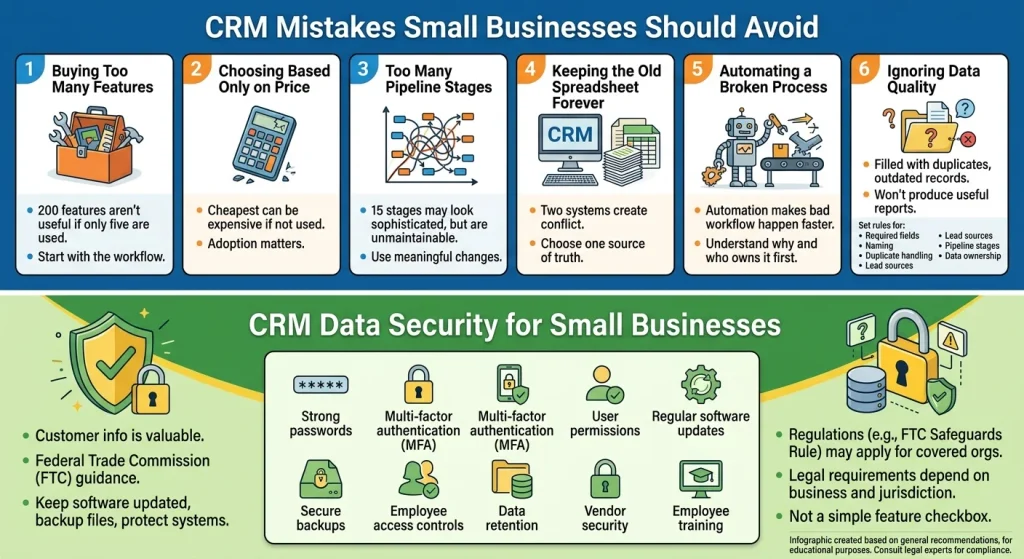
CRM Mistakes Small Businesses Should Avoid
1. Buying Too Many Features
A CRM with 200 features isn’t useful if your team only uses five.
Start with the workflow.
2. Choosing Based Only on Price
The cheapest CRM can become expensive if employees don’t use it.
Adoption matters.
3. Creating Too Many Pipeline Stages
A pipeline with 15 stages might look sophisticated.
It can also become impossible to maintain.
Use stages that represent meaningful changes in the buying process.
4. Keeping the Old Spreadsheet Forever
If the CRM becomes the new system but everyone continues using the spreadsheet, you now have two systems.
That creates conflicting information.
Choose one source of truth.
5. Automating a Broken Process
Automation doesn’t fix a bad workflow.
It makes the bad workflow happen faster.
Before automating something, understand why it needs to happen and who should own it.
6. Ignoring Data Quality
A CRM filled with duplicate, outdated, or incomplete records won’t produce useful reports.
Set basic rules for:
- Required fields
- Naming
- Duplicate handling
- Lead sources
- Pipeline stages
- Data ownership
CRM Data Security for Small Businesses
Customer information is valuable, which makes CRM security important even for a small company.
The Federal Trade Commission’s small-business cybersecurity guidance recommends basic practices such as keeping software updated, backing up important files, and protecting business systems and customer information.
Businesses should consider:
- Strong passwords
- Multi-factor authentication
- User permissions
- Regular software updates
- Secure backups
- Employee access controls
- Data retention
- Vendor security
- Employee training
For businesses covered by specific regulations, additional requirements may apply.
For example, the FTC’s Safeguards Rule requires covered organizations to maintain an information-security program designed to protect customer information.
The exact legal requirements depend on the business and jurisdiction, so security and compliance shouldn’t be treated as a simple CRM feature checkbox.
How to Get Your Team to Actually Use a CRM
Buying CRM software is easy.
Getting people to use it consistently is harder.
A simple approach works better than overwhelming employees with training.
Start With the Essentials
Teach the team how to:
- Create records
- Update information
- Move deals
- Record interactions
- Create follow-up tasks
- Find customer history
Then introduce advanced features later.
Make the CRM Part of the Workflow
If managers ask for pipeline updates outside the CRM, employees will naturally maintain a separate system.
If the CRM is where the team actually manages work, adoption becomes much easier.
Keep the System Simple
If employees have to complete 20 fields every time they create a lead, they’ll look for shortcuts.
Only collect information that serves a real purpose.
How to Measure Whether Your CRM Is Working
Don’t measure success by how many people logged in.
Measure the business process.
Useful metrics can include:
Lead Response Time
How long does it take for someone to respond to a new enquiry?
Lead-to-Opportunity Conversion
How many leads become genuine sales opportunities?
Opportunity-to-Customer Conversion
How many opportunities actually become customers?
Sales Cycle
How long does it take to move from qualified opportunity to closed deal?
Follow-Up Completion
How many scheduled follow-ups actually happen?
Lost-Deal Reasons
Why are customers choosing not to buy?
Customer Retention
How many customers continue buying or renewing?
These numbers tell you whether the CRM is improving the process rather than simply existing as another piece of software.
A Simple CRM Setup for a 5-Person Business
Let’s make this practical.
Imagine a five-person service company.
They currently use:
- Gmail
- Excel
- Phone calls
- Google Calendar
Their CRM doesn’t need to replace every tool immediately.
A simple setup could be:
Lead Capture
Website → CRM
Lead Assignment
CRM → Salesperson
Pipeline
New → Qualified → Proposal → Negotiation → Won/Lost
Follow-Up
CRM → Tasks + reminders
Communication
Email/calls → Customer record
Reporting
CRM → Weekly pipeline review
That’s enough to create structure without turning a small company into a complicated software project.
When a CRM Is Not the Right Solution
This is worth saying because CRM software is often presented as something every business must have.
That’s not true.
You may not need a dedicated CRM if:
- You have very few customers
- One person handles all relationships
- Your sales process is extremely simple
- You rarely have follow-ups
- Your current system is reliable
- You don’t need pipeline reporting
- The cost and complexity outweigh the benefit
A CRM should solve a problem.
If there isn’t a problem to solve, buying one simply because other businesses use one doesn’t create value.
The Real Value of CRM Software for Small Business
The biggest benefit of CRM software isn’t the dashboard.
It isn’t the number of integrations.
It isn’t even automation.
The real benefit is continuity.
A customer shouldn’t disappear because the employee who handled them is on vacation.
A lead shouldn’t be forgotten because someone was busy.
A sales manager shouldn’t need five conversations to understand the pipeline.
A customer shouldn’t have to explain their history every time they speak to someone new.
A good CRM makes that information part of the business rather than part of one person’s memory.
That’s why the best CRM for a small business isn’t necessarily the most powerful one.
It’s the one your team can understand, afford, maintain, and actually use.
Final Takeaway
CRM software for small business can bring structure to sales, customer management, follow-ups, and reporting without requiring an enterprise-sized team.
But choosing the right system starts with understanding your business process.
Before buying, ask:
- What problem are we trying to solve?
- Where is customer information currently stored?
- Where are leads being lost?
- What follow-ups are being missed?
- Which features do we actually need?
- Will our team use the system?
- What will the total cost be?
- Can we export our data later?
- Does the CRM fit our current workflow?
- Can it grow with the business without becoming unnecessarily complicated?
If you can answer those questions, choosing CRM software becomes much easier.
The goal isn’t to have the most sophisticated CRM.
The goal is to build a customer-management process that your business can actually run every day.
FAQs
What is CRM software for small business?
CRM software for small business is a system used to organize customer information, leads, sales opportunities, communication, follow-ups, and customer service in one place.
Is CRM software worth it for a small business?
It can be, especially when a business starts losing track of leads, customer information, follow-ups, or sales opportunities. A very small business with a simple workflow may not need one yet.
What is the best CRM for a small business?
There is no single best CRM for every small business. The right choice depends on team size, workflow, budget, required features, integrations, and future growth.
Can a small business use a free CRM?
Yes. Free CRM plans can be useful for small teams that need basic contact, lead, pipeline, and task management. However, free plans often have limits on advanced features.
Is CRM better than Excel?
Not automatically. Excel can work for simple customer tracking. A CRM becomes more useful when you need shared customer records, follow-up reminders, pipeline management, automation, activity history, and reporting.
How many people does a business need before using a CRM?
There is no fixed number. Even a solo business can benefit from CRM software if it manages many leads or customers. A larger team may need one much sooner because information becomes harder to coordinate.
How much does small business CRM software cost?
It ranges from free plans to paid subscriptions that vary by provider, users, features, and usage. The total cost can also include setup, migration, integrations, training, and additional services.
What CRM features should a small business prioritize?
Start with contact management, lead tracking, pipeline management, follow-up tasks, communication history, reporting, integrations, and mobile access. Add advanced automation or AI when there is a clear use case.
How long does it take to implement a CRM?
It depends on the size and complexity of the business. A small team with a simple workflow can get started relatively quickly, while businesses with large databases, integrations, multiple teams, or complex processes may need more preparation.
Should a small business use CRM automation?
Yes, when automation removes repetitive work or prevents important tasks from being forgotten. Start with simple workflows rather than automating everything at once.
What should I do before buying a CRM?
Document your current customer and sales process, identify the problems you want to solve, list your must-have features, test shortlisted CRMs with realistic workflows, and calculate the total cost before committing.