
No, Google does not currently offer its own standalone CRM program. Google provides several tools that can help with customer management, including Gmail, Google Contacts, Calendar, Sheets, Drive, Forms, and Tasks. But these tools are not packaged as a dedicated Google customer relationship management system.
That does not mean you cannot use Google for CRM-related work.
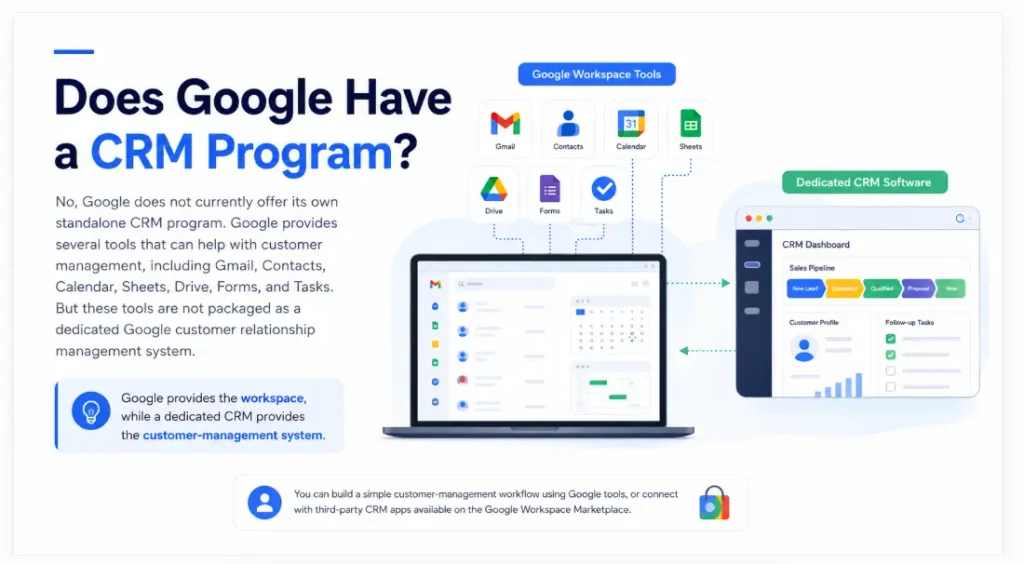
A freelancer, consultant, small business owner, or sales professional can combine Gmail, Contacts, Calendar, and Sheets to create a simple customer-management workflow. Google also supports third-party CRM applications through the Google Workspace Marketplace.
The important distinction is that Google provides the workspace, while a dedicated CRM provides the customer-management system .
Does Google have a CRM?
Google does not currently have a native CRM application comparable to dedicated CRM platforms.
Google Workspace is built around productivity and collaboration tools such as Gmail, Drive, Docs, Sheets, Meet, Calendar, Chat, and Tasks. Google’s own Workspace Learning Center lists these products separately rather than providing a standalone CRM product.
However, several Google products can perform individual CRM-related tasks.
For example:
- Google Contacts stores customer and prospect information.
- Gmail handles customer communication.
- Google Calendar manages appointments and meetings.
- Google Sheets can track leads and sales stages.
- Google Forms can collect lead information.
- Google Drive can store proposals and customer documents.
- Google Tasks can be used for follow-up reminders.
Put together, these tools can create a basic customer-management process.
But that is different from having a dedicated CRM.
Why Doesn’t Google Have a Traditional CRM?
Google has built a large ecosystem around communication, collaboration, productivity, data, and cloud services.
A CRM has a different primary purpose.
Dedicated CRM software is designed around the complete customer journey. It typically gives businesses a central place to manage contacts, leads, opportunities, sales stages, activities, follow-ups, and reporting.
Google’s individual apps can handle many of those activities, but users generally have to connect the pieces themselves.
For example, a sales representative might:
- Receive a lead through Gmail.
- Save the person’s details in Google Contacts.
- Add the opportunity to a Google Sheet.
- Schedule a meeting in Calendar.
- Create a follow-up in Google Tasks.
- Store the proposal in Drive.
Everything works, but the information is spread across multiple applications.
A CRM is designed to bring much of that information together.
Can Google Workspace Be Used as a CRM?
Yes, but only as a basic or customized CRM system.
Google Workspace can support a simple customer-management workflow if your business does not have a complicated sales process.
For example, you could create a Google Sheet with columns for:
| Customer | Company | Lead Source | Stage | Last Contact | Next Follow-Up | |
|---|---|---|---|---|---|---|
| Sarah Miller | ABC Solutions | sarah@example.com | Website | Qualified | Aug. 24 | Aug. 30 |
| James Lee | Lee Consulting | james@example.com | Referral | Proposal | Aug. 26 | Sep. 2 |
| Maria Khan | MK Services | maria@example.com | New Lead | Aug. 28 | Sep. 1 |
This gives you a simple lead database.
You can then use Gmail for communication and Calendar for appointments.
For a small operation, that may be enough.
Google Sheets as a DIY CRM
Google Sheets is particularly useful because you can customize the structure around your business.
A freelancer could create these stages:
New Lead → Contacted → Discovery Call → Proposal → Won/Lost
A real estate agent could use:
New Inquiry → Qualified → Viewing → Offer → Under Contract → Closed
A marketing agency might use:
Prospect → Outreach → Meeting → Proposal → Negotiation → Client
You can also use formulas, filters, data validation, conditional formatting, and other spreadsheet functions to make the system more useful.
The downside is that you are building the CRM yourself.
As your sales process becomes more complicated, maintaining the spreadsheet can become a job in itself.
Is Google Contacts a CRM?
Google Contacts is a contact-management tool, not a full CRM.
Google Contacts allows you to organize people and businesses using labels. You can create groups such as “Sales,” “Customers,” or “Prospects” and use those groups when communicating through Gmail.
You can also maintain useful contact information, including names, email addresses, phone numbers, organizations, addresses, and other details.
That makes Contacts useful for keeping your address book organized.
But a contact database is only one part of CRM software.
A typical CRM also needs to answer questions such as:
- What stage is this lead in?
- When was the last conversation?
- What is the next action?
- How much is the opportunity worth?
- Which salesperson owns the lead?
- How many opportunities are currently open?
- Which deals are likely to close?
- Which leads have not been followed up?
Google Contacts alone is not designed to answer all of those questions.
Can Gmail be used as a CRM?
Gmail can support CRM activities, but Gmail itself is not a CRM.
Gmail provides useful organization features. You can create labels for different types of emails, including customer messages, follow-ups, projects, or sales conversations.
Google Tasks also works directly with Gmail, allowing you to turn an email into a task and track its due date. Google says Tasks can be used across Gmail, Calendar, Chat, and Docs.
That makes Gmail surprisingly useful for a simple sales workflow.
For example:
New inquiry → Gmail label → Reply → Calendar meeting → Google Task for follow-up
The problem appears when you have a large number of leads.
Your inbox can tell you what people emailed you about, but it is not necessarily a complete picture of every opportunity in your sales pipeline.
Gmail vs. Dedicated CRM
| Gmail | Dedicated CRM |
|---|---|
| Primarily an email platform | Built specifically for customer management |
| Email labels | Customer records |
| Email search | Customer and deal search |
| Basic task integration | Structured follow-up workflows |
| Conversations | Activity history |
| Manual sales tracking | Sales pipeline |
| Limited sales reporting | CRM dashboards and reporting |
| Multiple apps needed | Customer information is more centralized |
Gmail is excellent for email.
It was simply not designed to replace an entire CRM.
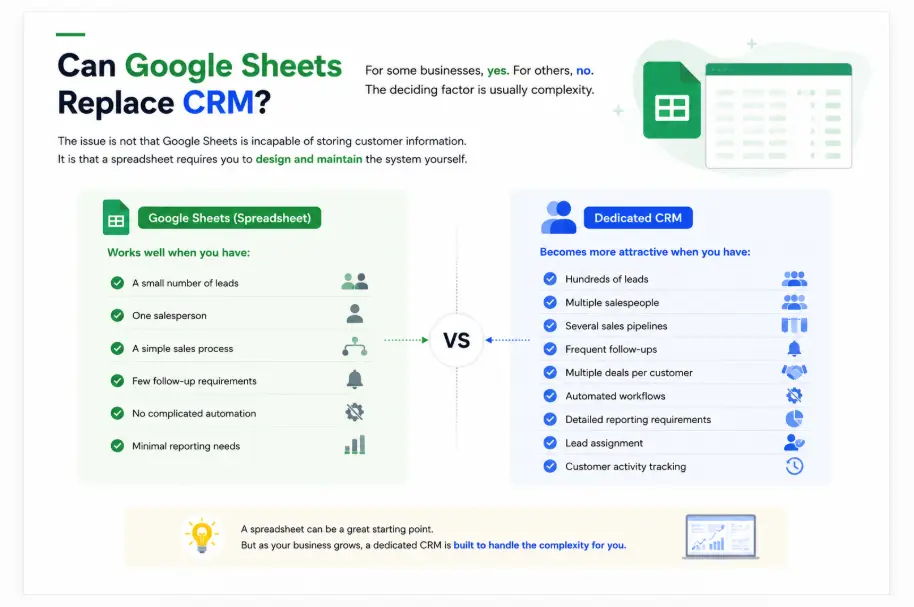
Can Google Sheets Replace CRM?
For some businesses, yes.
For others, no.
The deciding factor is usually complexity.
A simple spreadsheet may work well when you have:
- A small number of leads
- One salesperson
- A simple sales process
- Few follow-up requirements
- No complicated automation
- Minimal reporting needs
A dedicated CRM becomes more attractive when you have:
- Hundreds of leads
- Multiple salespeople
- Several sales pipelines
- Frequent follow-ups
- Multiple deals per customer
- Automated workflows
- Detailed reporting requirements
- Lead assignment
- Customer activity tracking
The issue is not that Google Sheets is incapable of storing customer information. It is that a spreadsheet requires you to design and maintain the system yourself.
Does Google have a free CRM?
Google does not provide its own standalone free CRM.
But there are two practical ways to get CRM functionality while using Google’s ecosystem.
Use Google Tools Together
You can combine:
Google Contacts + Gmail + Calendar + Sheets + Tasks
This costs less than subscribing to a dedicated CRM if you already have access to the necessary Google tools.
It works best for lightweight customer management.
Use a Third-Party CRM With Google Workspace
Google Workspace Marketplace provides a dedicated Sales & CRM category containing third-party applications that connect with Google Workspace. The marketplace currently includes CRM products and integrations from companies such as Insightly, Zoho, Pipedrive, and others.
This is an important distinction:
A CRM available through Google Workspace Marketplace does not mean Google created that CRM.
The Marketplace is an app ecosystem. Google allows third-party developers to create applications and add-ons that extend Google Workspace. Google’s Marketplace documentation describes these apps as tools that can extend Workspace functionality and connect with other products.
So if you see a “CRM for Google Workspace,” it generally means a third-party CRM that works with Google’s ecosystem.
What Is a CRM for Google Workspace?
A CRM for Google Workspace is software designed to work with tools such as Gmail, Calendar, Contacts, Drive, or Sheets.
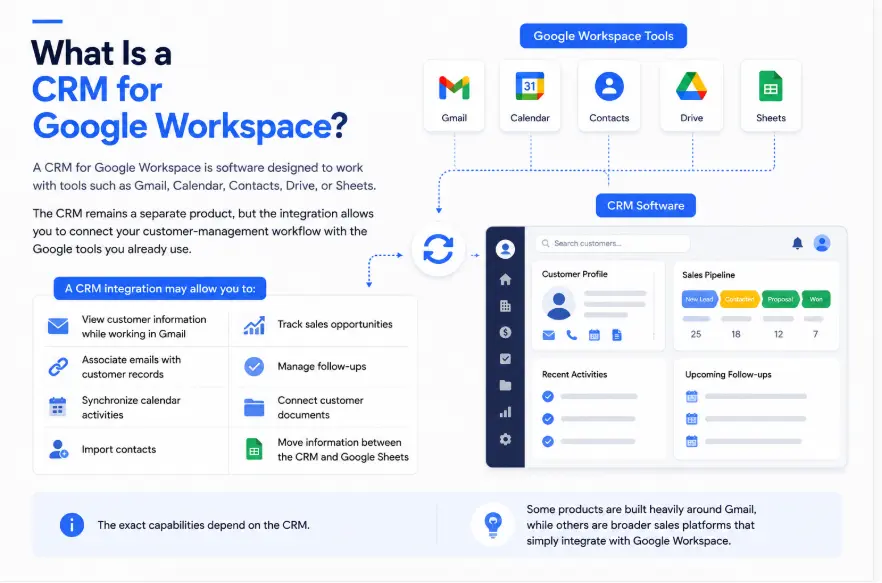
The CRM remains a separate product, but the integration allows you to connect your customer-management workflow with the Google tools you already use.
For example, a CRM integration may allow you to:
- View customer information while working in Gmail
- Associate emails with customer records
- Synchronize calendar activities
- Import contacts
- Track sales opportunities
- Manage follow-ups
- Connect customer documents
- Move information between the CRM and Google Sheets
The exact capabilities depend on the CRM.
Some products are built heavily around Gmail, while others are broader sales platforms that simply integrate with Google Workspace.
What Should You Look for in a Google-Compatible CRM?
If your business already depends on Gmail and Google Workspace, integration quality should be one of your first considerations.
Gmail Integration
The CRM should make it easy to connect customer communication with the appropriate contact or deal.
For example, if a prospect emails you about a proposal, you should not have to manually copy the entire conversation into another system.
Google Calendar Integration
Calendar integration can help keep meetings and appointments connected to the customer relationship.
This is particularly useful for sales teams with many calls and meetings.
Contact Synchronization
If your contacts are already stored in Google, check how the CRM handles importing or synchronizing them.
Poor contact management can create duplicate records and unnecessary cleanup.
Google Sheets Support
Sheets can remain useful for custom analysis, data exports, imports, or reporting.
A CRM that integrates well with Sheets gives you flexibility without forcing the spreadsheet to become your entire CRM.
Automation
If you have to manually update every lead after every interaction, you may eventually stop maintaining the CRM.
Look for automation that reduces repetitive work where appropriate.
Google Workspace vs. CRM Software
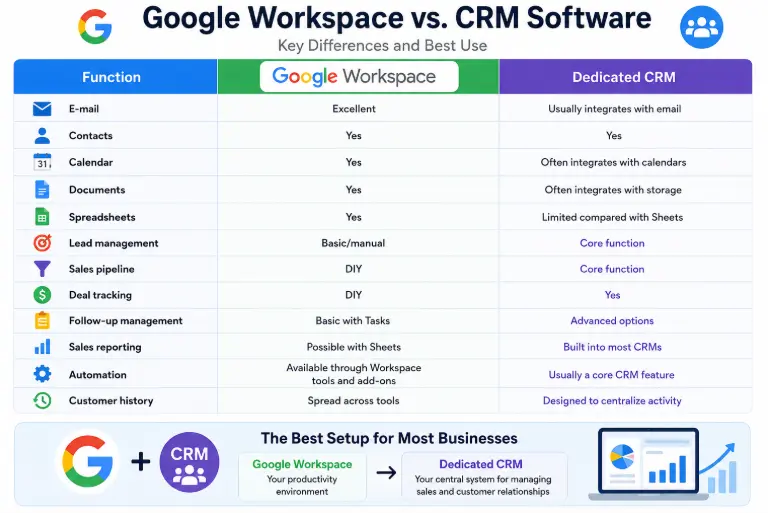
The easiest way to understand the difference is to look at what each system is designed to manage.
| Function | Google Workspace | Dedicated CRM |
|---|---|---|
| Excellent | Usually integrates with email | |
| Contacts | Yes | Yes |
| Calendar | Yes | Often integrates with calendars |
| Documents | Yes | Often integrates with storage |
| Spreadsheets | Yes | Limited compared with Sheets |
| Lead management | Basic/manual | Core function |
| Sales pipeline | DIY | Core function |
| Deal tracking | DIY | Yes |
| Follow-up management | Basic with Tasks | Advanced options |
| Sales reporting | Possible with Sheets | Built into most CRMs |
| Automation | Available through Workspace tools and add-ons | Usually a core CRM feature |
| Customer history | Spread across tools | Designed to centralize activity |
The choice is therefore not necessarily Google or CRM .
For many businesses, the best setup is:
Google Workspace + Dedicated CRM
Google remains the productivity environment while the CRM becomes the central system for managing sales and customer relationships.
Can Google Gemini Help With CRM Tasks?
Google is also adding AI-assisted workflows to Workspace.
Google’s official Workspace Learning Center provides sales-related examples for Gemini, including drafting customer emails, preparing customer research, and creating a customer contact tracker in Google Sheets.
That is useful, but it does not turn Google Workspace into a traditional CRM.
For example, Gemini can help create a customer tracker in Sheets, but a generated spreadsheet is still different from a dedicated CRM containing structured customer records, pipelines, activities, permissions, automation, and reporting.
AI can make Google’s existing tools more useful for customer management without changing what those products are designed to be.
When Is Google’s Built-In Approach Enough?
You may not need a dedicated CRM if your business is relatively simple.
Google’s tools can be enough when:
- You manage a small number of customers
- You work independently
- Most communication happens through email
- You only need basic contact organization
- Your sales process has few stages
- You do not need complex automation
- A spreadsheet is easy for you to maintain
- You rarely need detailed sales reports
For example, a freelance writer managing 15 recurring clients may have little reason to introduce a complex CRM.
The situation changes when there are hundreds of prospects and multiple opportunities moving through different stages.
Signs You Need a Dedicated CRM
A CRM becomes worth considering when your Google-based workflow starts breaking down.
Watch for these signs:
You Keep Forgetting Follow-Ups
If important prospects are sitting in your inbox without a clear next action, your current system is not giving you enough structure.
Your Spreadsheet Keeps Getting More Complicated
If your Google Sheet has dozens of columns, multiple tabs, formulas, filters, scripts, and manual processes just to track customers, you may already be building a CRM from scratch.
More Than One Person Handles Leads
Once multiple team members are involved, you need clear ownership and visibility.
Otherwise, two people might contact the same prospect while another lead receives no response.
You Need a Sales Pipeline
If you regularly ask questions such as “How many deals are at the proposal stage?” or “Which opportunities are most likely to close?”, a dedicated CRM can make those answers much easier to obtain.
You Need Automated Workflows
Manual follow-up becomes increasingly difficult as your lead volume grows.
A CRM can provide structured automation for appropriate tasks, depending on the platform and plan.
Common Mistakes When Using Google as a CRM
Treating Contacts as a Complete CRM
Contacts are useful, but storing someone’s email address and phone number does not tell you where they are in your sales process.
Building an Overly Complicated Spreadsheet
A spreadsheet should simplify your workflow.
If maintaining it takes longer than actually following up with customers, it may be time to consider a dedicated system.
Keeping Everything in Gmail
Email is not a substitute for a customer database.
Important information can become buried inside conversations, especially when several employees communicate with the same prospect.
Ignoring Data Consistency
If one employee records “Qualified” while another uses “Hot Lead” and someone else writes “Potential Customer,” your reporting becomes difficult.
Even a simple CRM spreadsheet needs consistent naming and processes.
Choosing a CRM Without Checking Google Integration
If your team lives in Gmail and Calendar, a CRM that does not work well with those tools can create unnecessary friction.
Integration should be evaluated before moving your customer data.
What Is the Best CRM for Google Workspace?
There is no single CRM that is best for every Google Workspace user.
The right choice depends on what you actually need.
Only professionals may prefer a lightweight CRM that works directly with Gmail.
A growing sales team may need pipelines, reporting, automation, and lead assignment.
A larger organization may need advanced permissions, multiple integrations, detailed analytics, and more complex workflows.
The Google Workspace Marketplace currently offers a wide range of CRM and sales applications, so businesses can choose a third-party system rather than trying to force Google Workspace itself to function as a complete CRM.
The better question is therefore not simply “Which CRM is connected to Google?”
Ask:
Which CRM handles my sales process well while fitting naturally into the Google tools my team already uses?
Frequently Asked Questions
Does Google have a CRM program?
No. Google does not currently offer a standalone native CRM product. Google Workspace provides tools such as Gmail, Contacts, Calendar, Sheets, Drive, and Tasks that can support customer-management workflows.
Does Google have a free CRM?
Google does not provide its own dedicated free CRM. You can use Google tools such as Sheets, Contacts, Gmail, and Tasks for basic CRM-style management, or use a third-party CRM that offers a free plan and integrates with Google Workspace.
Can I use Google Sheets as a CRM?
Yes. Google Sheets can work as a basic CRM for tracking contacts, leads, sales stages, follow-ups, and other customer information. It is most practical for small and relatively simple workflows.
Is Google Contacts the same as a CRM?
No. Google Contacts is primarily a contact-management system. It can organize people and businesses using labels and store contact details, but it does not provide the complete sales and relationship-management functionality of a dedicated CRM.
Can Gmail work with a CRM?
Yes. Many third-party CRMs integrate with Gmail. Google Workspace Marketplace includes CRM applications designed to work with Gmail and other Workspace products.
What is the difference between Google Workspace and a CRM?
Google Workspace is a productivity and collaboration ecosystem containing tools such as Gmail, Calendar, Drive, Docs, Sheets, and Meet. A CRM is specifically designed to manage customer relationships, leads, sales opportunities, activities, pipelines, and related business processes.
Final Answer: Does Google Have a CRM Program?
No, Google does not have its own standalone CRM program.
Google does, however, provide enough tools to create a basic customer-management workflow. Gmail can handle communication, Google Contacts can organize people and businesses, Calendar can manage meetings, Sheets can track leads, and Tasks can handle follow-ups.
For a small business with a simple sales process, that combination may be perfectly adequate.
Once your customer list, sales pipeline, team, or follow-up process becomes more complicated, a dedicated CRM usually makes more sense.
The most practical approach for many businesses is not to replace Google Workspace, but to connect a dedicated CRM to the Google tools they already use .
So the answer to “Does Google have a CRM program?” is simple: not as a native Google product, but Google Workspace can support CRM workflows and connect with a wide range of third-party CRM platforms.
For current CRM integrations and apps available for Google Workspace, the Google Workspace Marketplaceis the most direct place to explore available options.