
A pharmaceutical sales representative visits a doctor to discuss a new medicine. Later, another team member sends the doctor an email with approved product information. A few days later, the company wants to follow up.
Without a proper system, keeping track of these interactions can become difficult. The team may not know when the doctor was last contacted, what information was shared, or what action is needed next.
This is where HCP CRM can help.
HCP CRM software helps pharmaceutical companies, biotechnology businesses, and medical device manufacturers manage their relationships with healthcare professionals. It keeps important contact details, communication history, visit plans, and follow-up activities organized in one place.
In this guide, you will learn what HCP CRM means, how it works, its main features, its benefits, and what to consider when choosing a system.
What Is HCP CRM?
HCP CRM stands for Healthcare Professional Customer Relationship Management.
It is a type of CRM software designed to help life sciences companies manage their professional relationships with doctors, pharmacists, nurses, and other healthcare professionals.
Unlike a basic CRM that mainly manages sales leads and customer accounts, an HCP CRM is built around the needs of pharmaceutical and healthcare-related businesses.
It can help teams:
- Store and update healthcare professional information.
- Plan visits and manage appointments.
- Record conversations and follow-up tasks.
- Share approved medical and product information.
- Manage communication across different channels.
- Review engagement activities and team performance.
For example, a pharmaceutical company may have hundreds of sales representatives working across different cities. An HCP CRM helps the company organize professional contact information and understand which interactions have taken place.
The exact features depend on the software and how the company configures it.
What Does HCP Mean in Healthcare?
HCP stands for Healthcare Professional.
In the pharmaceutical and life sciences industry, the term usually refers to qualified professionals involved in healthcare, such as:
- Doctors and physicians
- Pharmacists
- Nurses
- Specialists
- Other eligible healthcare providers
The term is often used when pharmaceutical companies communicate with healthcare professionals about medicines, medical devices, scientific information, or treatment developments.
HCP does not mean the same thing in every context. Its exact meaning can depend on the industry and the organization using it.
How Does HCP CRM Work?
HCP CRM brings important information and daily activities into one system. Instead of relying on separate spreadsheets, emails, calendars, and handwritten notes, teams can work from a shared record.
Here is a simple example of how it works.
1. Create a Healthcare Professional Profile
The company creates a profile for a healthcare professional. Depending on the system and permitted data, this profile may include their name, specialty, workplace, professional contact information, and communication preferences.
2. Plan a Visit or Meeting
A sales representative uses the CRM to plan visits, organize a schedule, and prepare relevant information before meeting a healthcare professional.
3. Record the Interaction
After a meeting or call, the representative records useful details, such as the date, discussion topic, questions raised, and any agreed next steps.
4. Schedule Follow-Ups
If the healthcare professional requests additional information, the representative can create a follow-up task. This helps the team avoid missed commitments.
5. Review the Results
Managers can review reports to understand completed visits, outstanding tasks, communication activity, and other relevant performance measures.
This process gives teams a clearer picture of their professional relationships and helps them coordinate their work.
Key Features of HCP CRM Software
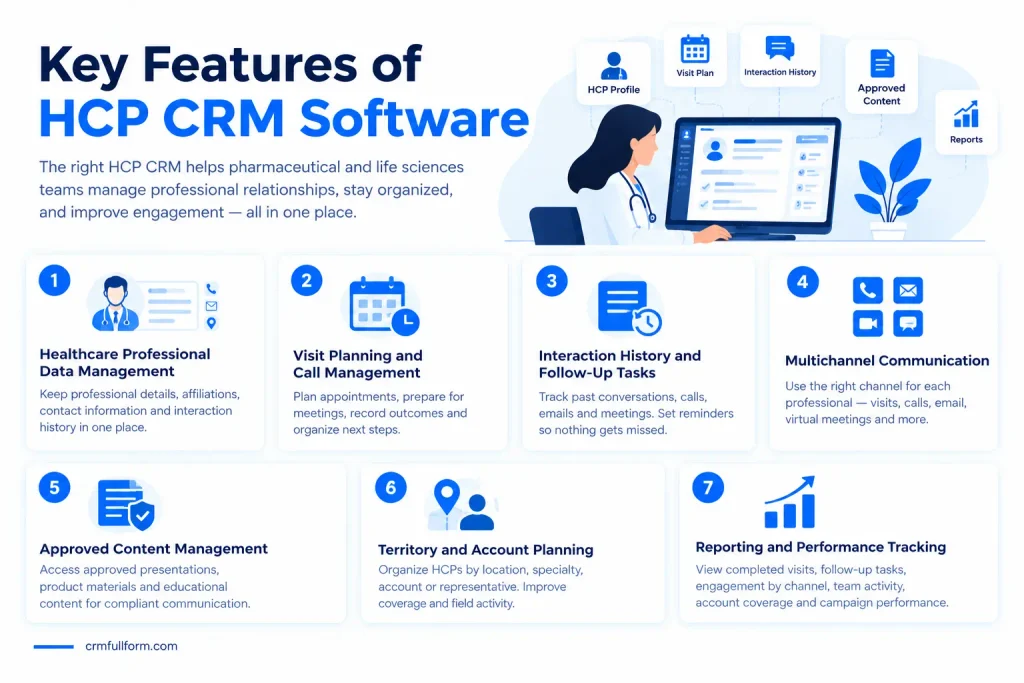
Not every HCP CRM offers the same tools. However, the following features are useful for many pharmaceutical and life sciences teams.
1. Healthcare Professional Data Management
An HCP CRM keeps professional information organized in individual profiles.
Depending on the system, a profile may include:
- Name and professional specialty
- Workplace or healthcare organization
- Verified professional contact details
- Relevant affiliations
- Communication preferences
- Previous interactions
Keeping this information accurate helps teams avoid duplicate records and outdated contact details.
Companies should also check where the information comes from, how often it is updated, and whether they have permission to use it.
2. Visit Planning and Call Management
Pharmaceutical representatives often need to manage visits across different locations and healthcare organizations.
HCP CRM software can help them plan appointments, prepare for meetings, record outcomes, and organize their next steps.
For example, a representative can review the last meeting before visiting a doctor again. This makes the conversation more informed and reduces repeated discussions.
3. Interaction History and Follow-Up Tasks
A healthcare professional may interact with different members of the same company.
Without a shared record, one team member may not know what another person has already discussed.
An HCP CRM can maintain a history of recorded interactions, including visits, calls, emails, and virtual meetings where supported.
Teams can also create reminders and follow-up tasks so important requests do not get forgotten.
4. Multichannel Communication
Healthcare professionals have busy schedules and may prefer different ways to communicate.
Depending on the platform and company policies, an HCP CRM may support:
- In-person visits
- Phone calls
- Email communication
- Virtual meetings
- Approved digital messages
- Educational content sharing
The benefit is not simply having more communication channels. It is being able to coordinate them and respect each professional’s communication preferences.
5. Approved Content Management
Pharmaceutical and medical device companies must take care when sharing product and medical information.
Some HCP CRM platforms help representatives access approved presentations, product materials, and educational content.
This makes it easier for teams to use the correct materials during professional interactions.
Companies still need appropriate review processes and controls to make sure the information they share is accurate and suitable for its intended use.
6. Territory and Account Planning
Many pharmaceutical companies divide their sales teams into territories.
An HCP CRM may help managers organize healthcare professionals by location, specialty, account, or assigned representative.
This can make it easier to plan field activities, review coverage, and identify areas where the team needs better coordination.
7. Reporting and Performance Tracking
Managers need to understand whether their teams are completing planned activities and following up on important conversations.
HCP CRM reports may show:
- Completed and planned visits
- Follow-up tasks
- Engagement by channel
- Team activity
- Account coverage
- Campaign performance, where supported
These reports help managers identify gaps and make better decisions. However, more recorded activity does not automatically mean better relationships or business results.
What Are the Benefits of HCP CRM?
The main benefit of HCP CRM is that it helps life sciences companies organize professional engagement more effectively.
Better Organization
Contact information, interaction history, and follow-up tasks can be managed in one system rather than scattered across different tools.
More Consistent Communication
Team members can review previous interactions before contacting a healthcare professional. This reduces repeated questions and helps maintain continuity.
Fewer Missed Follow-Ups
Reminders and task management help representatives remember requests and complete agreed actions on time.
More Efficient Field Teams
Representatives can spend less time searching for information and organizing records manually. They can use that time to prepare for meaningful professional conversations.
Clearer Management Reports
Managers can review team activities and identify missed tasks, gaps in territory coverage, or areas that need attention.
Better Coordination Between Teams
Depending on access permissions and integrations, sales, marketing, and medical affairs teams can work with more consistent information about their interactions.
The aim is to make communication more useful and organized, not simply to increase the number of messages sent.
HCP CRM vs. General CRM: What Is the Difference?
A general CRM can manage customer contacts, sales opportunities, communication, and follow-up tasks. An HCP CRM adds features designed for the pharmaceutical and life sciences environment.
| Feature | General CRM | HCP CRM |
|---|---|---|
| Contact management | General customer records | Healthcare professional profiles |
| Sales tracking | Sales leads and opportunities | Professional engagement and relevant commercial activities |
| Visit planning | General meetings and tasks | Field visits and healthcare-focused call planning |
| Content management | General sales and marketing content | May support approved medical and product materials |
| Compliance support | Depends on the system and setup | May include life sciences-specific controls |
| Reporting | Sales and customer reports | HCP engagement and field activity reports |
A general CRM may still work for some healthcare businesses. However, pharmaceutical companies with specialized field teams, medical content requirements, and industry-specific processes may need a purpose-built solution.
For a broader explanation, read our guide on how CRM works.
Popular HCP CRM Software Examples
Several platforms offer CRM capabilities for pharmaceutical and life sciences organizations. The right choice depends on the company’s size, workflows, existing technology, and compliance needs.
Salesforce Life Sciences Cloud
Salesforce offers life sciences solutions designed to help commercial and medical teams manage engagement with healthcare professionals and healthcare organizations.
Depending on the selected products and configuration, its capabilities can include engagement planning, visit management, digital communication, content delivery, and reporting.
Official resource: Salesforce HCP CRM
Veeva Vault CRM
Veeva Vault CRM is designed specifically for the life sciences industry. Its capabilities include customer profiles, territory planning, field engagement, content management, and other industry-focused workflows.
Its suitability depends on the organization’s requirements, implementation, and regional needs.
Official resource: Veeva Vault CRM
How Should You Compare These Platforms?
Do not choose an HCP CRM based only on the number of features listed on a vendor’s website.
Instead, compare how well each system supports your actual daily work. Ask vendors to demonstrate the tasks your team performs, explain available integrations, and clarify the costs of implementation, training, and ongoing use.
Is HCP CRM the Same as Healthcare CRM?
No. The terms are related, but they can describe different needs.
HCP CRM generally focuses on professional relationships between life sciences companies and healthcare professionals.
Healthcare CRM is a broader term. Depending on the provider and product, it may refer to systems used by hospitals, clinics, healthcare networks, and other organizations to manage patient communication, appointments, service interactions, or relationships.
For example, a pharmaceutical company managing visits with doctors may need an HCP CRM. A clinic managing appointment reminders and patient inquiries may need a different type of healthcare CRM.
The most suitable system depends on who the organization communicates with and what information it needs to manage.
HCP CRM and Compliance: What Should Companies Know?
Compliance is an important part of choosing and using an HCP CRM.
Healthcare-related information can be sensitive, and pharmaceutical companies may need to follow data protection laws, industry rules, company policies, and requirements that apply to specific types of communication.
Before choosing a platform, consider the following:
- Access controls: Can the company limit access to authorized users?
- Data security: What security measures protect stored information?
- Audit records: Can relevant activities and changes be reviewed?
- Consent and preferences: Can the system record and respect communication preferences where required?
- Content approval: Can teams control which materials are available to representatives?
- Regional requirements: Does the implementation support the rules that apply in the countries where the company operates?
An HCP CRM may provide tools that support compliance, but buying CRM software does not automatically make a company compliant.
Requirements depend on the data involved, the organization’s activities, and the applicable laws. For example, HIPAA applies to covered entities and business associates in relevant circumstances; it does not automatically apply to every company that uses an HCP CRM.
For more information, consult the official U.S. Department of Health and Human Services HIPAA guidance.
How to Choose the Right HCP CRM
Before selecting software, understand what your team needs to improve.
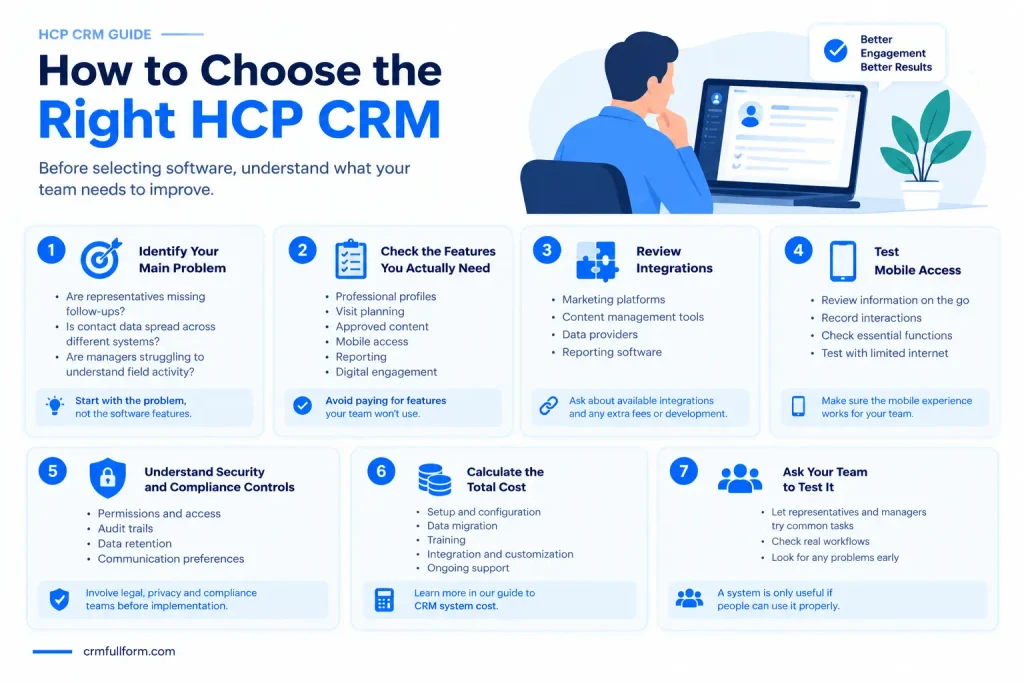
1. Identify Your Main Problem
Are representatives missing follow-ups? Is professional contact data spread across different systems? Are managers struggling to understand field activity?
Start with the problem rather than the software features.
2. Check the Features You Actually Need
Make a list of essential features, such as professional profiles, visit planning, approved content, mobile access, reporting, or digital engagement.
Avoid paying for features your team is unlikely to use.
3. Review Integrations
Check whether the CRM can work with your existing systems, such as marketing platforms, content management tools, data providers, and reporting software.
Ask vendors which integrations are available and whether additional development or fees are required.
4. Test Mobile Access
Field representatives may need to review information and record interactions while away from the office.
Test the mobile experience and check whether essential functions remain available when internet access is limited.
5. Understand Security and Compliance Controls
Ask how the platform manages permissions, audit trails, data retention, communication preferences, and other requirements relevant to your business.
Have the appropriate legal, privacy, and compliance teams review the system before implementation.
6. Calculate the Total Cost
The subscription price is only one part of the total cost.
Consider setup, data migration, training, integration, customization, and ongoing support.
Our guide to CRM system cost explains the main costs businesses should consider when evaluating CRM software.
7. Ask Your Team to Test It
A system is only useful if people can use it properly.
Let representatives and managers test common tasks before making a final decision. Their feedback can reveal problems that may not be obvious during a sales demonstration.
Common HCP CRM Mistakes to Avoid
Even a capable CRM may fail to deliver value if the company does not use it properly.
Common mistakes include:
- Keeping inaccurate data: Outdated or duplicate profiles can lead to wasted time and poor communication.
- Recording incomplete interactions: Missing notes make it harder for colleagues to understand previous conversations.
- Ignoring training: Employees may avoid the system if they do not understand how to use it.
- Choosing too many features: A complicated setup can make everyday work harder.
- Sending irrelevant messages: Frequent communication is not helpful when the content does not meet a healthcare professional’s needs.
- Overlooking compliance: Security, permissions, and approved communication processes should be considered from the beginning.
The best approach is to keep data accurate, make everyday tasks simple, train users properly, and review whether the system is solving the original business problem.
Frequently Asked Questions About HCP CRM
What does HCP CRM stand for?
HCP CRM refers to Healthcare Professional Customer Relationship Management. It is software used to organize professional information, interactions, and engagement activities involving healthcare professionals.
Who uses HCP CRM software?
Pharmaceutical companies, biotechnology businesses, medical device manufacturers, and other life sciences organizations may use HCP CRM software. Common users include field representatives, sales managers, marketing teams, and medical affairs teams.
What is the main purpose of HCP CRM?
Its main purpose is to help organizations manage healthcare professional information and coordinate communication, visits, follow-ups, and related activities in one system.
Is HCP CRM only for pharmaceutical companies?
No. Although pharmaceutical companies are common users, biotechnology and medical device companies may also use HCP CRM solutions. The right system depends on the organization’s professional engagement needs.
What is the difference between HCP CRM and patient CRM?
HCP CRM generally focuses on professional relationships with doctors, pharmacists, and other healthcare professionals. Patient-focused CRM tools may support patient communication, appointment reminders, care coordination, or patient service programs. Their features and compliance requirements can differ.
Is HCP CRM software HIPAA-compliant?
There is no single answer for every platform or implementation. HIPAA applies to specific covered entities and business associates in relevant circumstances. Organizations should verify the vendor’s capabilities, configuration, contracts, and actual legal obligations rather than assuming that any CRM is automatically HIPAA-compliant.
What are examples of HCP CRM software?
Salesforce Life Sciences Cloud and Veeva Vault CRM are examples of platforms offering CRM capabilities for life sciences organizations. Compare their current features, pricing, implementation needs, and suitability before choosing one.
Final Thoughts
HCP CRM helps pharmaceutical and life sciences companies organize healthcare professional information, plan visits, record interactions, and manage follow-ups.
The right system can make daily work easier and help teams maintain more consistent, relevant communication. However, results depend on data quality, employee training, system configuration, and the way the company uses the software.
Before choosing a platform, identify your team’s main problems, compare the features that matter, check integrations and compliance needs, and test the system with real workflows.
A good HCP CRM should do more than store contact details. It should help the team work in a more organized, informed, and responsible way.