
Yes, there are free CRM options for real estate agents. The better question is whether a free CRM gives you enough of the features you actually need to manage buyers, sellers, property leads, follow ups, and active deals.
For a solo agent or a small real estate business, a free CRM can be enough to replace spreadsheets, scattered notes, and a crowded inbox. You can organize contacts, track where each prospect is in the sales process, schedule follow ups, and keep a record of previous conversations without adding another monthly software bill.
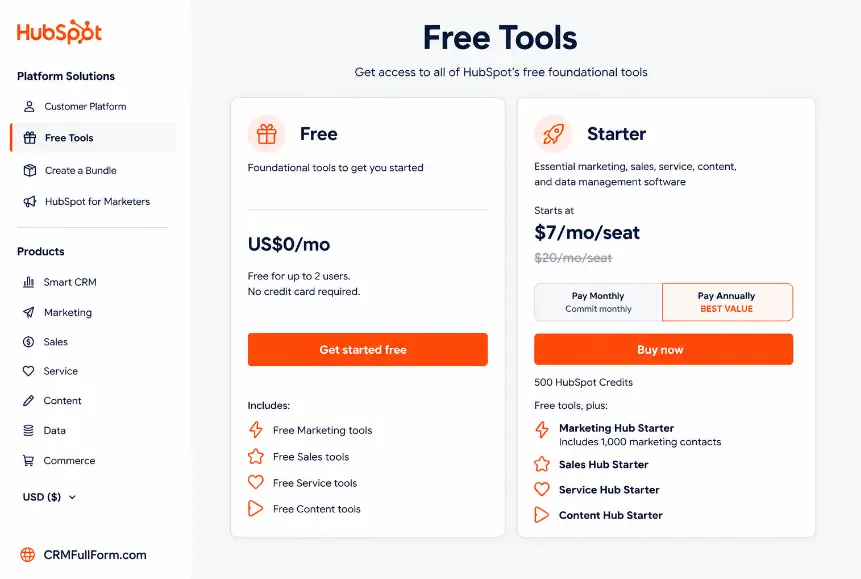
Two particularly useful starting points are HubSpot’s free CRM and Bitrix24’s free plan. Both offer core CRM functionality, but they approach the job differently. HubSpot is particularly attractive for agents who want a straightforward customer and sales management system, while Bitrix24 combines CRM with broader team, task, communication, and business management tools.
The right choice depends less on finding the CRM with the longest feature list and more on matching the free plan to your workflow.
What Is a CRM for Real Estate Agents?
A CRM, or customer relationship management system, is software that stores and organizes information about prospects and clients and helps you manage interactions with them.
For a real estate agent, that can include:
- Buyer and seller contact information
- Property preferences
- Lead source
- Budget or price range
- Notes from calls and meetings
- Follow up dates
- Viewing or appointment information
- Current deal stage
- Previous emails and communications
- Tasks that still need to be completed
Instead of keeping this information in separate spreadsheets, phone notes, email threads, and messaging apps, a CRM gives you one central place to manage it.
That becomes especially useful when you have dozens or hundreds of leads at different stages. A prospect who is not ready to buy this week may still become a serious buyer several months from now. Without a system for follow up, those opportunities are easy to forget.
Is There a Free CRM for Real Estate Agents?
Yes. Several general purpose CRM platforms offer free plans that can be used by real estate professionals.
However, “free CRM” does not necessarily mean “free real estate software with every feature an agent could want.”
Most free CRM plans focus on the fundamentals:
- Contact management
- Lead and deal tracking
- Sales pipelines
- Tasks and reminders
- Basic reporting
- Email related features
- Mobile access
- Data import
Features such as advanced automation, sophisticated marketing campaigns, extensive team permissions, advanced reporting, telephony, or specialized property management functions may require a paid plan.
For many individual agents, that is not necessarily a problem. If your immediate goal is simply to stop losing track of leads and follow ups, a free CRM can provide most of the structure you need.
Best Free CRM Options for Real Estate Agents?
1. HubSpot Free CRM
HubSpot is one of the strongest options for an individual real estate agent who wants a polished, general purpose CRM without paying for a subscription.
HubSpot currently offers free CRM tools with no expiration date. Its free offering includes contact management, deal pipelines, CRM import, task and activity management, reporting, meeting scheduling, email related tools, and a mobile app. HubSpot states that its free CRM is available for up to two users and includes up to 1,000 contacts.
For a real estate agent, the biggest advantage is the ability to create a structured sales pipeline.
You could create stages such as:
New Lead → Contacted → Qualified → Property Viewing → Offer Made → Under Contract → Closed
The exact stages should reflect your business. A rental focused agent might use a completely different pipeline from an agent selling residential properties.
HubSpot also allows agents to keep contact records, log activities, manage tasks, schedule meetings, and view communication history in one place.
Best for: Solo agents and small practices that want a clean, easy to understand CRM.
Potential limitation: The free plan is not designed to provide every advanced sales, marketing, automation, or team management feature available in HubSpot’s paid products.
2. Bitrix24 Free CRM
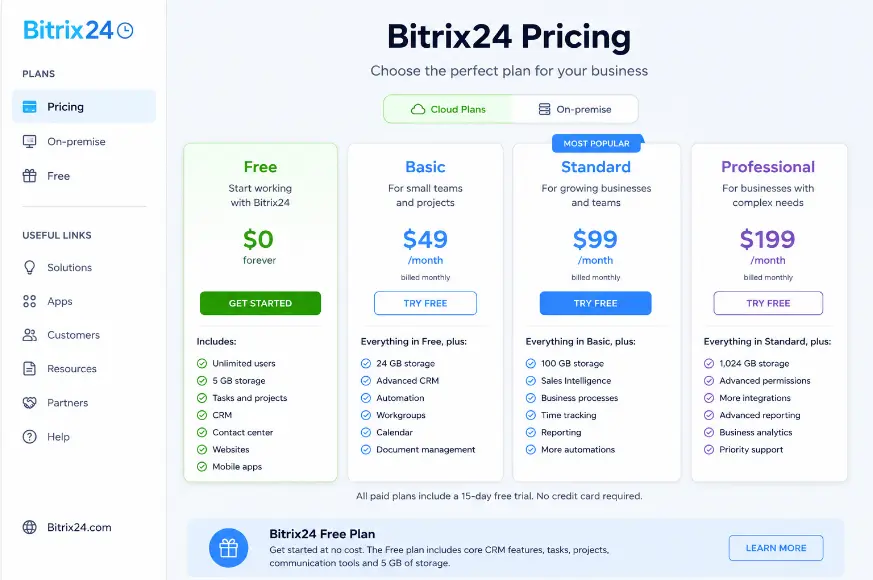
Bitrix24 takes a broader approach. Its free plan combines CRM functionality with tasks, calendars, communication, file storage, and collaboration tools.
The current free plan includes core CRM features such as contact and deal management, along with other business tools. Bitrix24’s official pricing information also identifies 5 GB of storage and basic CRM functionality on the free plan.
Bitrix24 pricing and free plan
For real estate teams, this broader approach can be useful because an agent’s workflow is not limited to maintaining contacts. You may also need to manage tasks, appointments, documents, internal communication, and sales activity.
Bitrix24 also has a real estate specific solution that supports property related workflows and integrations, although the availability of individual features can depend on the plan and configuration.
Best for: Agents or small teams that want CRM plus project, task, calendar, and collaboration features.
Potential limitation: Its large feature set can feel more complicated than necessary if you only need a simple lead database and follow up system.
Free CRM Comparison for Real Estate Agents
| Feature | HubSpot Free CRM | Bitrix24 Free |
|---|---|---|
| Contact management | Yes | Yes |
| Lead/deal tracking | Yes | Yes |
| Sales pipeline | Yes | Yes |
| Tasks and activities | Yes | Yes |
| Mobile access | Yes | Yes |
| CRM data import | Yes | Yes |
| Reporting | Yes | Basic options |
| Team collaboration | Limited on free setup | Yes |
| Calendar tools | Yes | Yes |
| Broader business tools | Limited | Extensive |
| Best suited to | Solo agents and small practices | Agents and small teams wanting an all in one workspace |
Feature availability and limits can change, so check the provider’s current plan details before making a purchasing decision.
What Should a Free Real Estate CRM Actually Do?
A free CRM does not need to contain every possible feature. It needs to solve the problems that cause leads and deals to slip through the cracks.
Here are the features worth prioritizing.
1. Contact Management
Every lead should have a proper record.
At minimum, you should be able to store:
- Name
- Phone number
- Buyer or seller status
- Property interest
- Location
- Budget
- Lead source
- Notes
- Next follow up date
A CRM becomes much more useful when you can quickly see the history of a relationship rather than starting from scratch every time the person contacts you.
2. Lead Pipeline Management
A pipeline shows where each opportunity currently stands.
For example:
New inquiry → First contact → Qualified → Viewing scheduled → Negotiation → Closed
This simple visual system can tell you what needs attention today.
If 30 people are sitting in “New inquiry” because nobody followed up, you have an obvious problem. If several qualified buyers have not been contacted for two weeks, the pipeline exposes that gap as well.
3. Tasks and Follow Up Reminders
Real estate sales often depend on consistent follow up.
A good free CRM should let you create tasks such as:
- Call buyer tomorrow
- Send property details
- Follow up after viewing
- Contact seller Friday
- Check whether client is still interested
- Schedule second property tour
The purpose is simple: stop relying on memory.
4. Communication History
When you speak with a prospect several times, the details can become difficult to remember.
A useful CRM should give you a record of relevant activities and notes so you can understand the relationship before your next conversation.
This is particularly valuable for leads with long buying cycles.
5. Mobile Access
Real estate agents rarely spend the entire working day at a desk.
You may be visiting properties, meeting clients, attending viewings, or traveling between appointments. Mobile access allows you to update a lead or check a task without waiting until you return to your computer.
How to Set Up a Free CRM for Real Estate
Choosing software is only half the job. A poorly organized CRM can become another messy database.
Use a simple setup.
Step 1: Define Your Lead Types
Start by separating your main categories.
For example:
- Buyer
- Seller
- Investor
- Tenant
- Landlord
- Referral partner
You may not need every category. Use only those that match your business.
Step 2: Create a Simple Pipeline
Do not create 15 stages just because your CRM allows it.
Start with five or six meaningful stages.
For a residential sales agent, that might be:
- New Lead
- Contacted
- Qualified
- Viewing
- Offer/Negotiation
- Closed
You can refine the pipeline later.
Step 3: Import Existing Contacts
If you currently use a spreadsheet, export it and import the relevant contacts into your CRM.
Before importing, remove obvious duplicates and outdated records. A clean database is easier to maintain than a large database filled with unnecessary information.
Step 4: Add Lead Source
Track where each lead came from.
Possible sources include:
- Website
- Property portal
- Referral
- Open house
- Phone inquiry
- Previous client
Knowing the source helps you understand which channels are producing worthwhile prospects.
Step 5: Create a Follow Up System
Every active lead should have a next action.
Instead of leaving a contact with a note saying “Interested in 3 bedroom house,” create a specific task such as:
Call on Tuesday to confirm preferred locations and arrange viewing.
That small change turns the CRM from a contact list into an actual sales management system.
What a Free CRM Usually Does Not Replace
This is where many agents misunderstand free CRM software.
A CRM is not automatically a replacement for every real estate tool.
You may still need separate software or services for:
- Property listing management
- MLS access
- Property valuation
- Accounting
- Electronic signatures
- Advanced marketing automation
- Bulk SMS
- Dedicated calling systems
- Transaction management
- Commission management
- Document storage
- Advertising
Some CRMs offer integrations for these functions, but availability varies by product, country, and subscription level.
A CRM should therefore be viewed as the central system for managing relationships and sales activity, not necessarily the entire technology stack.
Free CRM vs. Spreadsheet for Real Estate
A spreadsheet can work when you have only a handful of leads.
The problem appears when your database grows.
| Spreadsheet | CRM |
|---|---|
| Contact information in rows | Individual contact records |
| Manual sorting | Searchable database |
| Follow ups easily forgotten | Tasks and reminders |
| Basic sales tracking | Visual pipeline |
| Limited interaction history | Activity history |
| Difficult to manage as volume grows | Designed for ongoing relationship management |
| Easy to start | Requires initial setup |
A spreadsheet is not inherently bad. For a new agent with five or ten prospects, it may be perfectly adequate.
But once you are handling multiple active buyers, sellers, referrals, and follow ups, a CRM generally provides a more structured workflow.
How to Choose the Right Free CRM
Before signing up, answer these questions.
How many contacts do you have?
If your database is small, almost any reasonable free CRM may be sufficient.
If you already have hundreds or thousands of contacts, pay close attention to the free plan’s record limits.
Are you working alone?
A solo agent has different requirements from a brokerage with several agents.
If you need individual permissions, lead assignment, team reporting, or sophisticated collaboration, a free plan may become restrictive sooner.
Do you need property specific features?
A general CRM can manage buyer and seller relationships very well, but it may not understand your local property portals, MLS workflow, commission process, or listing requirements.
If those functions are essential, look for a real estate specific platform rather than choosing a generic CRM simply because it is free.
How important is automation?
If your main requirement is contact management and reminders, free CRM software can be more than enough.
If you want sophisticated lead scoring, automated nurture campaigns, advanced workflows, SMS automation, or complex marketing sequences, you will probably need to examine paid plans carefully.
Can you export your data?
This is an easy question to overlook.
Before investing significant time in a CRM, understand how your contacts and other important information can be exported. Your CRM should help you manage your business without making your data unnecessarily difficult to move.
Common Mistakes When Using a Free Real Estate CRM
Trying to track everything
A CRM becomes difficult to use when every possible detail is turned into a mandatory field.
Only record information that helps you qualify, serve, or follow up with a prospect.
Creating too many pipeline stages
A complicated pipeline can make sales activity harder to understand.
Keep the stages meaningful and easy to update.
Treating the CRM as a contact dump
Adding 500 contacts and never creating tasks does not create a sales system.
The value comes from consistently recording the next action.
Ignoring old leads
A lead that was not ready six months ago may have a different situation today.
Use your CRM to identify older prospects who deserve another follow up.
Assuming free means unlimited
Free plans almost always have boundaries, even when the core CRM itself is free.
Limits may involve users, contacts, storage, automation, reporting, integrations, emails, or other advanced functionality.
Always check the current plan details before moving your entire business into a platform.
Is a Free CRM Good Enough for a Solo Real Estate Agent?
For many solo agents, yes.
If your main needs are:
- Organizing leads
- Keeping contact information together
- Tracking active opportunities
- Setting reminders
- Managing follow ups
- Recording conversations
- Viewing your sales pipeline
then a free CRM can be a sensible starting point.
You do not need enterprise software just because you work in real estate.
Start with the workflow you actually use. If the free CRM handles it reliably, keep using it. Upgrade only when a real limitation is affecting your work.
When Should a Real Estate Agent Upgrade?
Consider a paid CRM when the limitations of the free plan start creating operational problems.
For example, an upgrade may make sense when you need:
- More users
- More advanced automation
- Multiple sales pipelines
- Detailed reporting
- Advanced lead scoring
- Marketing automation
- More integrations
- Advanced permissions
- Higher communication limits
- Specialized real estate functionality
The goal should not be to buy the most expensive CRM available. The goal is to pay for a capability that solves a real business problem.
Frequently Asked Questions
Is there a free CRM for real estate agents with no time limit?
Yes. Some CRM providers offer free plans rather than short term trials. For example, HubSpot states that its free CRM has no expiration date.
Always distinguish a genuinely free tier from a 14 day or 30 day trial.
What is the best free CRM for a solo real estate agent?
For many solo agents, HubSpot is a strong starting point because its free CRM covers core contact, deal, task, pipeline, and reporting functions without requiring a paid subscription.
The best option ultimately depends on your workflow and the features you need.
Can I use a free CRM to manage both buyers and sellers?
Yes. A CRM can be configured to manage different types of contacts and opportunities. You can use fields, tags, lists, or separate pipeline stages to distinguish buyers, sellers, investors, tenants, and other prospects.
Is a free CRM better than Excel for real estate leads?
It depends on your workload. Excel can be sufficient for a small number of leads, but a CRM is generally better suited to managing ongoing interactions, sales stages, tasks, reminders, and communication history.
Do free CRMs include MLS integration?
Not necessarily. MLS access and integrations depend on the CRM, the integration provider, your market, and the plan you choose. Do not assume that a free CRM includes MLS connectivity simply because it supports real estate workflows.
Final Answer: Yes, You Can Start With a Free CRM
So, is there a free CRM for real estate agents?
Yes.
For an individual agent, a free CRM can provide enough functionality to organize contacts, manage leads, track deals, schedule follow ups, and build a repeatable sales process without paying a monthly software fee.
HubSpot is a strong choice if you want a straightforward CRM focused on contacts, deals, tasks, and sales management. Bitrix24 is worth considering if you want CRM functionality alongside broader collaboration and business management tools.
The smartest approach is to start with your actual workflow rather than the longest feature list. Set up a simple pipeline, import your active leads, assign a next action to every serious prospect, and use the system consistently.
A free CRM is valuable when it helps you remember the right person, at the right time, with the right next step. That’s the part of real estate lead management that directly affects how well your opportunities are handled.