
If you have ever managed a lot of leads, you already know how quickly sales information can become messy.
One prospect is in your email. Another is in a spreadsheet. Someone else needs a follow-up next week, but the reminder is sitting in your notes. Then a customer calls and you have to search through old messages to remember what was discussed.
This is one of the problems a CRM for sales is designed to solve.
A sales CRM gives you one place to store customer information, manage leads, track conversations, schedule follow-ups, and see where each deal stands.
But what is CRM for sales, exactly? And how is it different from simply keeping a list of contacts?
Let’s look at it in simple terms.
What Is CRM for Sales?
CRM for sales is software that helps salespeople and sales teams manage leads, customer relationships, sales activities, opportunities, and deals from one place.
CRM stands for Customer Relationship Management.
In a sales environment, CRM software is mainly used to keep track of potential and existing customers throughout the sales process.
For example, a salesperson might use a CRM to store:
- Customer name and contact details
- Company information
- Emails and calls
- Meeting notes
- Lead source
- Follow-up dates
- Sales opportunities
- Deal value
- Sales stage
- Tasks and reminders
Instead of keeping this information in several different places, the salesperson can access it from a single customer record.
Salesforce describes a sales CRM as a system that helps sales teams manage customer interactions and simplify pipeline management.
For a broader explanation of CRM, you can also read what CRM means and how it works on CRMFullForm.
How Does a CRM Work in Sales?
A sales CRM usually follows the journey of a lead from the first contact to the final sale.
A simple example might look like this:
New Lead → Qualified → Contacted → Meeting → Proposal → Negotiation → Won/Lost
When a new lead comes in, the salesperson adds the lead to the CRM.
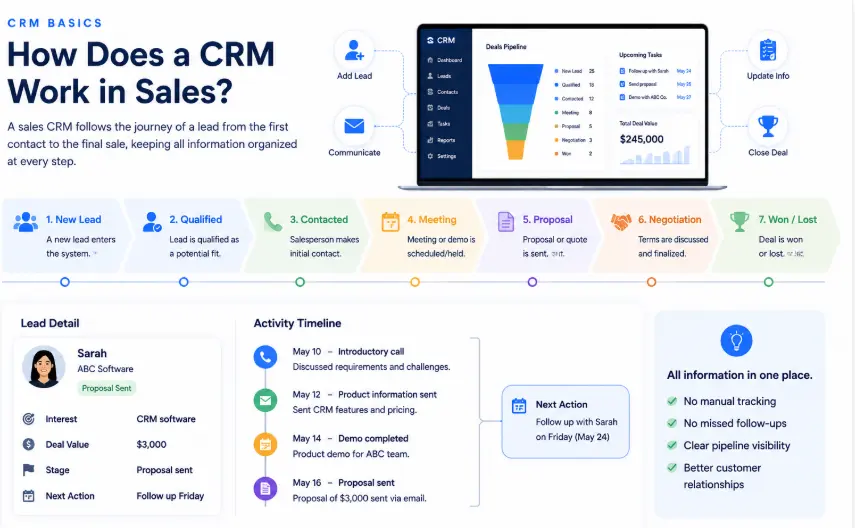
As communication continues, the salesperson updates the record and moves the opportunity to the appropriate stage.
For example:
Lead: Sarah from ABC Software
Interest: CRM software
Deal value: $3,000
Stage: Proposal sent
Next action: Follow up Friday
Now the salesperson doesn’t have to remember all of this.
They can simply open the opportunity in the CRM and see what has already happened and what needs to happen next.
That is the practical value of CRM in sales.
What Does a Sales CRM Do?
A sales CRM can handle many of the everyday activities that salespeople deal with.
1. It Keeps Leads Organized
Lead management is one of the most important jobs of a sales CRM.
Leads can come from websites, forms, advertising, referrals, social media, email campaigns, or other sources.
Without a proper system, some of those leads can easily be forgotten.
A CRM lets the sales team keep track of:
- New leads
- Lead source
- Contact information
- Lead status
- Previous conversations
- Follow-up dates
- Potential deal value
This makes it easier to decide which leads need attention.
2. It Stores Customer Information
A CRM works as a central place for customer and prospect information.
For example, instead of checking your email to find an old conversation and then opening a spreadsheet to find the customer’s phone number, you can usually find both inside the CRM record.
A customer profile may contain:
| Information | Example |
|---|---|
| Name | Sarah Khan |
| Company | ABC Software |
| sarah@example.com | |
| Phone | +1 555 123 4567 |
| Lead Source | Website |
| Interest | CRM Software |
| Deal Value | $3,000 |
| Sales Stage | Proposal |
| Next Follow-Up | Friday |
The exact information depends on the CRM, but the basic idea is the same: keep useful customer information together.
3. It Tracks the Sales Pipeline
The sales pipeline shows where your deals currently stand.
For example:
New Lead → Qualified → Demo → Proposal → Negotiation → Closed
This gives salespeople a quick overview of their active opportunities.
Suppose you have 30 leads but only five have reached the proposal stage.
Those five opportunities may need more immediate attention than leads that have just entered the system.
A CRM makes this easier to see.
If you want to understand the broader role of CRM in a business, our guide to the CRM process explains how customer relationships move through different stages.
4. It Helps With Follow-Ups
A lot of sales are lost simply because someone didn’t follow up at the right time.
A prospect might say:
“Send me the details and contact me next week.”
If that request stays in someone’s memory, there is a good chance it will eventually be forgotten.
With a CRM, the salesperson can create a task:
Follow up with Sarah — Friday
The CRM can then show the task when it is due.
This is particularly useful when a salesperson is handling dozens or hundreds of prospects.
5. It Records Customer Interactions
Salespeople don’t just send emails. They have calls, meetings, demos, messages, and other conversations with prospects.
A CRM can keep a record of these activities.
For example:
- Monday — Introductory call
- Tuesday — Product information sent
- Thursday — Demo completed
- Friday — Proposal sent
- Next Tuesday — Follow-up scheduled
When someone opens the customer record, they can quickly understand the history of the relationship.
That becomes even more useful when more than one salesperson works with the same account.
Why Is CRM Important for Sales?
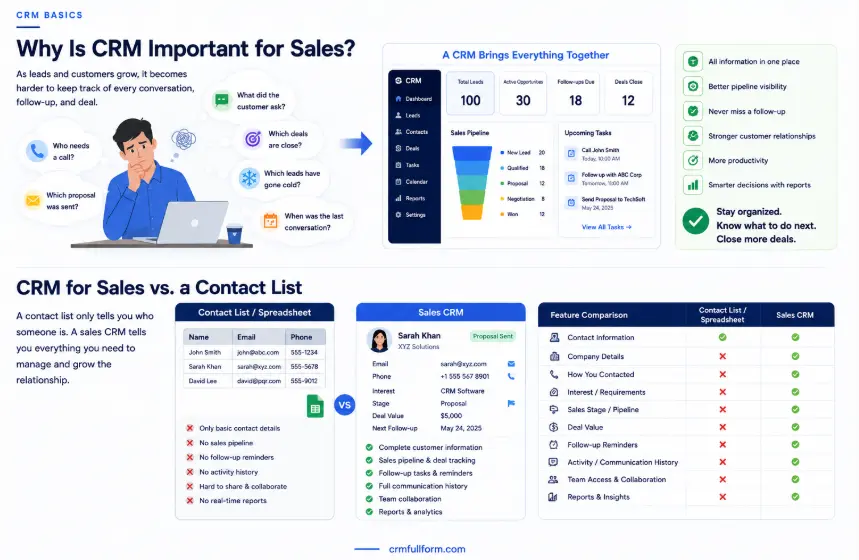
Sales information becomes harder to manage as the number of leads and customers increases.
A salesperson may be able to remember a few prospects without a CRM.
But imagine managing 100 leads, 30 active opportunities, and dozens of follow-ups every month.
It becomes difficult to remember:
- Who needs a call
- Which proposal was sent
- What the customer asked for
- Which deals are close to closing
- Which leads have gone cold
- When the last conversation happened
A CRM provides a structured way to manage all of this.
Microsoft also describes sales CRM tools as systems that support the sales cycle, improve pipeline visibility, help manage customer information, and support sales productivity.
The important point is that a CRM doesn’t replace the salesperson.
It helps the salesperson stay organized and know what to do next.
CRM for Sales vs. a Contact List
A common question is: “Why can’t I just use my phone contacts or a spreadsheet?”
You can, especially if you only have a small number of customers.
But a contact list mainly tells you who someone is.
A sales CRM can tell you:
- Who the person is
- What company they work for
- How you contacted them
- What they are interested in
- What stage the deal is in
- How much the opportunity may be worth
- When you need to follow up
- What happened during previous conversations
That’s a big difference.
A spreadsheet can also be customized to track some of this information, but a CRM is specifically built around customer relationships and sales workflows.
What Are the Main Features of a Sales CRM?
Different CRM platforms have different features, but these are some of the most useful ones for sales teams.
Contact Management
Stores customer and prospect information in organized records.
Lead Management
Helps salespeople capture, organize, qualify, and track potential customers.
Pipeline Management
Shows where opportunities are within the sales process.
Deal Management
Allows salespeople to track individual opportunities, values, stages, and expected closing dates.
Task Management
Helps salespeople remember calls, meetings, emails, and follow-ups.
Activity Tracking
Keeps a history of interactions with leads and customers.
Reporting
Provides information about sales activities, opportunities, and performance.
Automation
Some CRM systems can automate repetitive activities such as reminders, lead assignment, data updates, and parts of the follow-up process.
You can see more of these capabilities in our detailed guide to CRM features.
How Does CRM Help Salespeople Close More Deals?
A CRM doesn’t convince a customer to buy.
What it can do is make the sales process easier to manage.
For example, imagine a salesperson has 50 active leads.
Without a CRM, they may have to check different spreadsheets, emails, and notes to figure out what needs attention.
With a CRM, they can open the sales pipeline and immediately see which opportunities are:
- New
- Waiting for a response
- Ready for a demo
- Waiting for a proposal
- In negotiation
- Close to closing
This makes it easier to focus on the right opportunities instead of spending time looking for information.
A well-managed CRM can also help salespeople personalize conversations because they can review previous interactions before contacting a prospect.
How CRM Helps Sales Managers
CRM software isn’t only useful for individual salespeople.
Sales managers can use it to get a clearer view of the team’s pipeline.
For example, a manager may want to know:
- How many active opportunities are there?
- How much potential revenue is in the pipeline?
- Which deals are close to closing?
- Which leads need attention?
- How many deals were won this month?
- Which opportunities have been sitting in one stage for too long?
Instead of collecting separate updates from every salesperson, the manager can use CRM reports and pipeline information to review the team’s activity.
This can make sales meetings more focused as well.
What Is the Difference Between CRM and Sales CRM?
CRM is the broader term.
Customer relationship management can be used by sales, marketing, customer service, and other teams.
Sales CRM focuses more specifically on the sales side of customer relationship management.
A sales CRM usually puts more emphasis on:
- Leads
- Prospects
- Opportunities
- Sales pipeline
- Deals
- Follow-ups
- Sales activities
- Forecasting
So, a sales CRM is essentially CRM software used and configured around the sales process.
Modern CRM platforms can also connect sales with marketing and customer service, so teams can work from the same customer information.
Is a Sales CRM Useful for Small Businesses?
Yes.
You don’t need a huge sales department to benefit from a CRM.
A small business may start with only a few basic needs:
- Contact management
- Lead tracking
- Follow-up reminders
- Simple sales pipeline
- Basic reports
As the business grows, it may need automation, integrations, advanced reporting, and other features.
The important thing is not to buy the most complicated CRM available.
Choose a system that your team will actually use.
A simple CRM with clean, updated information is often more useful than a powerful CRM that nobody wants to maintain.
For more examples of how CRM software can be used, check out CRM examples.
What Should You Look for in a Sales CRM?
If you’re comparing sales CRM software, focus on your actual sales process rather than the number of features advertised on the pricing page.
Here are a few things worth checking.
Easy to Use
Your sales team should be able to add and find information without constantly needing help.
Flexible Pipeline
The CRM should let you create sales stages that match the way your business actually sells.
Good Lead Management
It should be easy to add leads, update their status, and see what needs attention.
Follow-Up Tools
Tasks, reminders, and notifications can make a big difference for busy salespeople.
Useful Reports
Managers should be able to understand pipeline activity and sales performance without spending hours preparing spreadsheets.
Integrations
Check whether the CRM works with the tools your team already uses, such as email, calendars, forms, communication platforms, or marketing software.
Room to Grow
If your business is growing, make sure the CRM can handle more customers, users, and opportunities later.
CRM Example for a Sales Team
Let’s take a simple example.
A digital marketing agency gets a new inquiry through its website.
The salesperson adds the prospect to the CRM:
Company: XYZ Ltd.
Service: SEO
Lead Source: Website
Potential Value: $2,500
Stage: New Lead
The salesperson contacts the prospect and schedules a meeting.
The CRM is updated:
Stage: Meeting Scheduled
After the meeting, the agency sends a proposal.
Stage: Proposal Sent
The prospect asks for a few changes, so the salesperson updates the opportunity:
Stage: Negotiation
Finally, the client agrees.
Stage: Closed Won
The entire journey is visible in the CRM.
If the prospect doesn’t respond after the proposal, the salesperson can create a follow-up task instead of relying on memory.
This is how CRM fits into real sales work.
CRM vs. Spreadsheet for Sales
A spreadsheet isn’t automatically a bad choice.
For a very small operation with a handful of leads, it may be enough.
But as sales activity increases, a spreadsheet can become harder to maintain.
| Sales Need | Spreadsheet | CRM |
|---|---|---|
| Store contacts | Yes | Yes |
| Track leads | Yes | Yes |
| Sales pipeline | Manual setup | Built for it |
| Follow-up reminders | Limited/manual | Common feature |
| Interaction history | Manual | Usually built in |
| Automation | Limited | Available |
| Sales reporting | Often manual | Built-in options |
| Team collaboration | Possible | Designed for it |
The right choice depends on the size and complexity of the sales process.
When Does a Business Need a Sales CRM?
There isn’t one specific number of leads that tells you it’s time to get a CRM.
You may need one when you start noticing problems such as:
- Leads are being forgotten
- Follow-ups are being missed
- Customer information is spread across different files
- Multiple salespeople are contacting the same prospects
- Managers don’t have a clear view of the pipeline
- Sales reports take too long to prepare
- Nobody knows the current status of important deals
If these problems sound familiar, a CRM may be worth considering.
Frequently Asked Questions
What is CRM for sales in simple words?
CRM for sales is software that helps salespeople organize leads, customer information, follow-ups, opportunities, and deals in one place.
What is a sales CRM used for?
A sales CRM is used to manage leads, contacts, sales pipelines, customer interactions, follow-ups, opportunities, and deals.
Can CRM help with sales follow-ups?
Yes. Many CRM systems allow salespeople to create tasks and reminders so they know when they need to contact a prospect again.
Is CRM only for large companies?
No. Small businesses and individual salespeople can also use CRM software. The key is choosing a CRM that matches the size and needs of the business.
What is the difference between CRM and a sales pipeline?
A sales pipeline shows the stages through which a deal moves. A CRM is the broader system that stores customer information and manages leads, activities, opportunities, follow-ups, and the pipeline.
Can a CRM replace a spreadsheet?
It can, but it doesn’t always have to. A spreadsheet may be enough for a very small sales operation. A CRM becomes more useful when you need structured pipeline management, reminders, activity history, automation, and team collaboration.
Final Thoughts
So, what is CRM for sales?
It is a system that helps salespeople manage the details that come with selling—from the first lead to the final deal.
Instead of keeping customer information in separate spreadsheets, emails, notes, and personal reminders, a sales CRM brings that information together.
The biggest benefit isn’t simply having another piece of software.
It’s having a clearer answer to questions like:
Who should I contact today?
Which deals need attention?
What happened during the last conversation?
Which opportunities are close to closing?
When a CRM is properly set up and regularly updated, it can make the sales process easier to manage and give the whole team a better view of its customer relationships.