
An accountancy firm can have experienced accountants, loyal clients, and a strong reputation but still struggle to manage client communication and business development.
One client may need a reminder about an upcoming service, another may be interested in additional accounting support, and a potential client may be waiting for a follow-up after an initial conversation.
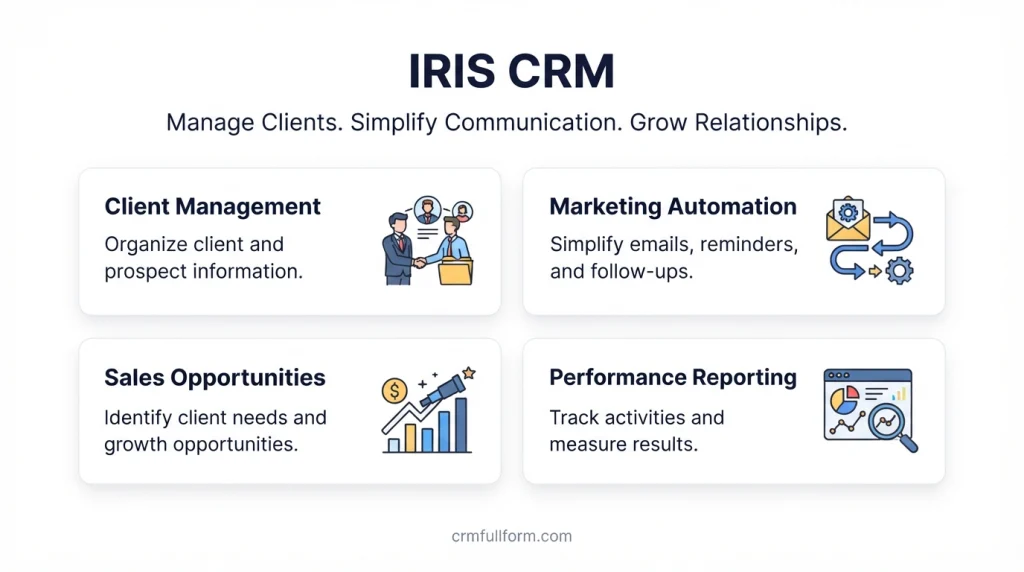
When this information is scattered across spreadsheets, emails, and individual records, it becomes difficult to maintain consistent communication.
IRIS CRM is a customer relationship management solution designed to help accountancy practices organize client information, manage business development activities, and improve client communication. It is associated with IRIS Software Group and is powered by FibreCRM, according to IRIS’s published product information. Its documented capabilities include centralized client and prospect information, marketing workflows, email and SMS communication, and reporting. Learn more from IRIS.
In this guide, we’ll explain what IRIS CRM is, its key features and benefits, how it works, and what to consider before deciding whether it is suitable for your business.
What Is IRIS CRM?
IRIS CRM is a customer relationship management system developed for accountancy practices that want to manage client relationships and business development activities more effectively.
CRM stands for Customer Relationship Management. It refers to the processes and software businesses use to organize customer information, track interactions, and maintain relationships with existing and prospective clients.
Unlike a basic contact list, a CRM can help a firm understand the wider history of a relationship, including previous communication, potential service requirements, marketing activities, and planned follow-ups.
IRIS’s published documentation describes its CRM as a sales and marketing solution that brings together information about clients, prospects, and referrers. It also describes connections with IRIS Practice Management and other tools used by accountancy practices. Read the IRIS CRM product information.
For example, an accounting firm may already provide bookkeeping services to a small business. During a conversation, the accountant discovers that the client may also need payroll support.
Instead of relying on memory, the firm can record the opportunity, plan a follow-up, and coordinate communication with the appropriate team member.
This is the practical purpose of CRM software: helping businesses use the information they already have to manage relationships more consistently.
It is important to distinguish IRIS CRM from other products that use similar names. This article focuses on the accountancy-focused IRIS CRM described by IRIS Software Group, not every software product branded IRIS.
Why Do Accountancy Practices Need CRM Software?
Many firms begin by managing client relationships through email, spreadsheets, calendars, and personal contact lists. This approach can work when the client base is small.
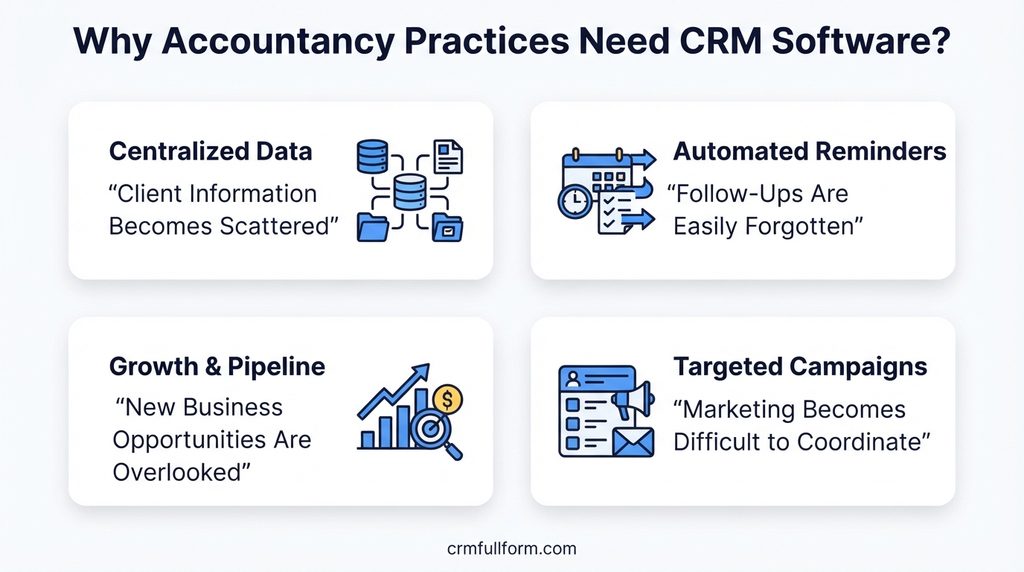
As a firm grows, however, managing communication manually becomes more difficult.
1. Client Information Becomes Scattered
Client information may exist across different spreadsheets, email accounts, practice management systems, and staff records.
When information is not connected, employees may spend unnecessary time finding contact details or reviewing previous conversations.
A CRM can bring relevant client, prospect, and relationship information together, depending on its integrations and configuration.
2. Follow-Ups Are Easily Forgotten
Accountancy practices often need to contact clients about upcoming services, outstanding information, new opportunities, or routine reminders.
Without a reliable process, follow-ups may depend on individual employees remembering what needs to happen next.
CRM workflows and reminders can help teams plan these activities and maintain a more consistent communication process.
3. New Business Opportunities Are Overlooked
An existing client may need services beyond the work they currently purchase. A prospective client may also be interested in the firm’s services but require further communication before making a decision.
A CRM helps firms record these opportunities and organize follow-up activities.
4. Marketing Becomes Difficult to Coordinate
Sending relevant information to the right clients requires accurate contact records and a clear understanding of client needs.
CRM software can help organize contact lists and support targeted marketing campaigns, provided the necessary features and integrations are available.
5. Client Relationships Depend Too Much on Individuals
If one employee manages most client communication, other team members may have limited visibility into the relationship.
Centralized records can help authorized colleagues understand previous interactions and maintain continuity when responsibilities change.
Key Features of IRIS CRM
The available features depend on the product configuration, integrations, and current offering. IRIS’s published CRM documentation describes several capabilities relevant to accountancy practices.
| Feature | How It Helps |
|---|---|
| Client and prospect management | Keeps relevant relationship information organized |
| Centralized data | Helps teams access client, prospect, and referrer information |
| Email and SMS workflows | Supports planned client communication and reminders |
| Marketing management | Helps organize targeted campaigns and business development activities |
| Follow-up tracking | Helps teams identify who needs attention and when |
| Reporting and analytics | Provides information to support business and marketing decisions |
| Cross-selling opportunities | Helps identify clients who may benefit from additional services |
| Integration with practice systems | Reduces the need to manage disconnected information manually |
| Mobile access | Can help staff review relevant client information away from the office |
| Contact list management | Supports more organized marketing data and communication |
These capabilities are based on IRIS’s published CRM documentation and should not be interpreted as a guarantee that every feature is available in every current plan or configuration. Source: IRIS CRM datasheet.
Before choosing the software, ask the provider to demonstrate the specific workflows your firm needs.
How Does IRIS CRM Work?
A CRM helps organize the process of maintaining client relationships, from identifying a potential opportunity to following up after a conversation.
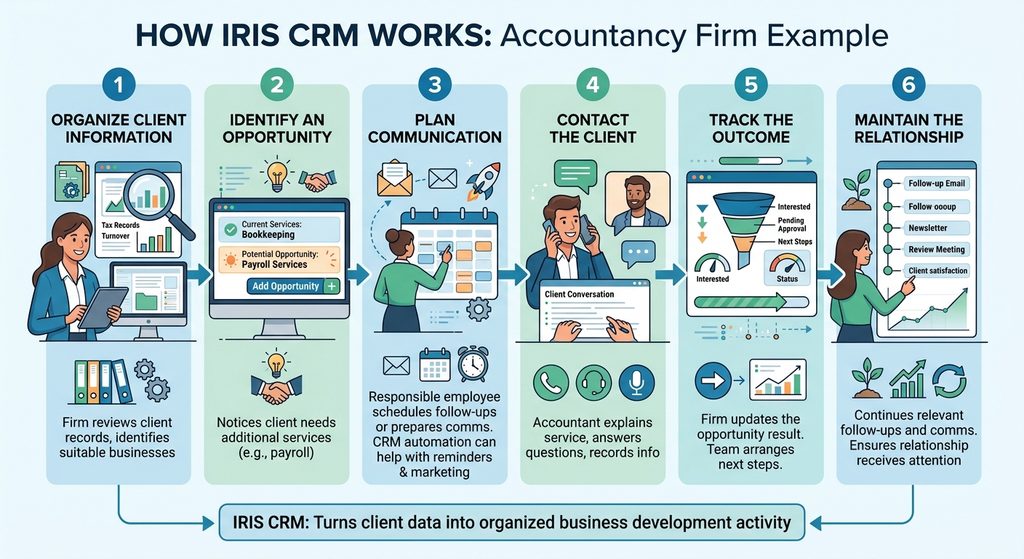
Consider an accountancy practice that wants to offer additional services to existing clients.
Step 1: Organize client information
The firm reviews relevant client records and identifies which businesses may be suitable for a particular service.
Step 2: Identify an opportunity
An accountant notices that a client currently receives bookkeeping support but may also need payroll services.
The potential opportunity is recorded so the team can discuss it at an appropriate time.
Step 3: Plan communication
The responsible employee schedules a follow-up or prepares a communication based on the firm’s workflow.
Depending on the configuration, CRM automation may help with reminders and marketing communication.
Step 4: Contact the client
The accountant explains the additional service, answers questions, and records relevant information about the conversation.
Step 5: Track the outcome
The firm updates the opportunity according to the result. If the client is interested, the team can arrange the next steps.
Step 6: Maintain the relationship
The firm continues to manage relevant follow-ups and communication, helping ensure that the client relationship receives appropriate attention.
This process helps turn client information into organized business development activity rather than leaving opportunities buried in emails or spreadsheets.
For a broader explanation of the underlying process, see our guide on how CRM works.
Benefits of Using IRIS CRM
A CRM is valuable when it improves the way a firm manages relationships and coordinates work. Here are some potential benefits of using IRIS CRM in an accountancy practice.
Better Visibility Into Client Relationships
When client and prospect information is organized, employees can spend less time searching for records and more time understanding what each client needs.
The level of visibility depends on the information available and the systems connected to the CRM.
More Consistent Client Communication
Email and SMS workflows can help firms plan appropriate reminders and follow-ups.
This can make communication more organized, although the firm still needs to ensure that messages are accurate, relevant, and sent at suitable times.
Improved Business Development
A firm may already have opportunities within its existing client base but lack a consistent way to identify them.
CRM records can help the team recognize potential demand for additional services and manage conversations about those opportunities.
More Organized Marketing Activities
Accurate contact information makes it easier to organize marketing lists and communicate with relevant groups.
A well-managed CRM can also reduce problems associated with duplicate records and outdated contact information.
More Informed Decisions
Reporting can help managers review business development activity and identify areas that require attention.
Useful reports depend on the quality of the underlying data and the metrics the firm chooses to monitor.
Better Team Coordination
When relevant information is accessible to authorized employees, teams can coordinate client communication more effectively.
This is particularly useful when multiple accountants or business development employees work with the same client.
These benefits are potential outcomes rather than guaranteed results. They depend on how well the system fits the firm’s processes and how consistently employees use it.
IRIS CRM vs. General CRM Software
IRIS CRM is associated with accountancy-specific workflows, while general CRM platforms are designed to support customer relationships across different industries.
The distinction matters because an accounting practice may need to connect client information with existing practice management systems and coordinate services throughout the year.
| Requirement | IRIS CRM for Accountancy Practices | General CRM Software |
|---|---|---|
| Client and prospect records | Designed around accountancy practice relationships | Available in most CRM systems |
| Marketing and follow-ups | Documented accountancy-focused workflows | Depends on the product |
| Email and SMS communication | Supported through documented workflows | Depends on the product and integrations |
| Practice management integration | Connections with IRIS practice systems are documented | May require third-party integrations |
| Sales pipeline management | Assess the specific available configuration | Common in many sales-focused CRMs |
| Industry-specific workflows | Focused on accountancy practice needs | May require customization |
| Other industry requirements | Suitability depends on the intended workflow | Some general CRMs support a wider range of industries |
These are broad distinctions, not a substitute for comparing current product specifications.
A general CRM may be sufficient for a small firm that mainly needs contact management and follow-up reminders. A practice seeking closer connections with its accountancy systems may prefer an industry-focused solution.
IRIS CRM vs. Practice Management Software
Although CRM and practice management software can overlap, they serve different primary purposes.
A CRM focuses on relationships, prospects, communication, and business development. Practice management software generally helps an accountancy firm organize the delivery of work, tasks, deadlines, resources, and related operational processes.
For example, a CRM can help an accountant identify a client who may need an additional service. Practice management software can help the firm organize the work involved in delivering that service.
Some software platforms connect these functions, allowing information to move between relationship management and operational workflows.
IRIS offers a broader range of accountancy software, including practice management products. Its current IRIS Practice Management information describes capabilities such as task management, automated workflows, and client communication.
If your firm is considering IRIS CRM, clarify which functions are included in the specific product you are evaluating and which require another module or integration.
How Much Does IRIS CRM Cost?
The cost of IRIS CRM should be confirmed directly with the provider. Publicly available product documentation does not provide enough reliable current pricing information to quote a standard subscription price for every customer.
Pricing may depend on factors such as the number of users, required functionality, integrations, implementation, and support arrangements.
Before requesting a quote, consider the following questions:
- How is the subscription priced?
- Are all required CRM features included?
- Does the software integrate with your existing IRIS products?
- Are there additional costs for email, SMS, or marketing integrations?
- Is implementation or data migration included?
- Does the provider offer employee training?
- What support arrangements are available?
- Can your firm export its client and prospect records if it changes systems?
For a broader overview of CRM expenses, read our guide to CRM system cost.
When comparing software, consider the complete cost of using and maintaining the system rather than looking only at the initial subscription price.
How to Decide Whether IRIS CRM Is Right for Your Firm
Before adopting IRIS CRM, evaluate how closely its capabilities match your firm’s requirements.
1. Identify Your Main Challenge
Start by identifying the problem you want to solve.
Are client records scattered across multiple systems? Are employees forgetting follow-ups? Is your firm struggling to coordinate marketing? Or do you need better visibility into prospective business?
A clear problem statement will make it easier to evaluate the software.
2. Review Your Existing IRIS Systems
If your firm already uses IRIS accountancy software, ask how the CRM connects to your current products and which information can be synchronized.
Do not assume that every integration is available automatically. Confirm the technical requirements with the provider.
3. Evaluate Your Marketing Requirements
Consider whether you need client segmentation, email communication, SMS reminders, campaign management, or reporting.
Check the available workflows and determine whether they support the way your firm communicates with clients.
4. Assess the User Experience
Ask employees who will use the CRM to participate in a demonstration.
They should be able to understand how to find client records, update information, schedule follow-ups, and review relevant communication.
A system that fits naturally into daily work is more likely to be used consistently.
5. Check Data Quality and Security
Before migrating information, review existing records for duplicate contacts, outdated details, and missing information.
Also ask the provider about access controls, data protection, backup arrangements, and data export options.
Accountancy firms often handle confidential financial and business information, so security and appropriate access permissions are important considerations.
6. Compare Alternatives
Evaluate IRIS CRM alongside other suitable CRM options based on your firm’s requirements.
Compare functionality, integrations, implementation effort, support, and total cost. Choose the product that best fits your workflow rather than assuming that an industry-specific system is always the right choice.
Common Mistakes to Avoid When Choosing CRM Software
Choosing software without defining your needs: A CRM may include features your team does not need while failing to solve the problem that prompted the search.
Assuming every integration is automatic: Confirm how client information moves between the CRM, practice management software, and marketing tools.
Ignoring data quality: Duplicate or outdated records can undermine reporting and communication.
Failing to train employees: Staff need clear processes for updating records and managing follow-ups.
Overlooking data protection: Review security arrangements and make sure access to sensitive client information is appropriately controlled.
Expecting immediate business growth: CRM software can support organized communication and business development, but results depend on the firm’s service quality, processes, and client relationships.
Frequently Asked Questions About IRIS CRM
What is IRIS CRM used for?
IRIS CRM is designed to help accountancy practices manage client relationships, prospects, sales and marketing activities, and client communication. Its published documentation describes centralized relationship information, communication workflows, and reporting.
Who is IRIS CRM designed for?
The IRIS CRM product discussed in this article is aimed at accountancy practices that want to organize client information, manage business development, and coordinate marketing activities. Businesses in other industries should verify whether the specific product meets their requirements.
Does IRIS CRM support email and SMS reminders?
IRIS’s published CRM documentation describes automated email and SMS reminders and communication workflows. Confirm the current functionality, configuration requirements, and any additional charges with the provider.
Can IRIS CRM integrate with practice management software?
IRIS’s product documentation describes integration with IRIS Practice Management and connections with selected tools, including Microsoft Outlook, website forms, and Mailchimp. Verify the availability and requirements of each integration before purchasing.
Is IRIS CRM the same as IRIS Practice Management?
No. They serve related purposes but should not automatically be treated as the same product. CRM focuses on managing client relationships and business development, while practice management software supports operational activities such as tasks, workflows, and work coordination.
How much does IRIS CRM cost?
Current pricing should be requested directly from the provider. Ask for a quote based on your firm’s user count, required features, integrations, implementation, and support needs.
Is IRIS CRM suitable for a small accounting firm?
It may be suitable if the firm’s needs align with the product’s capabilities and cost. Smaller firms should compare the system with simpler CRM options and consider whether integration with their existing accountancy software provides sufficient value.
Can IRIS CRM help an accounting firm retain clients?
A CRM can support client retention by helping staff maintain organized records, schedule appropriate communication, and identify opportunities to serve existing clients. Retention also depends on the quality of the firm’s work, responsiveness, pricing, and overall client experience.
Final Thoughts
IRIS CRM is designed to help accountancy practices organize client relationships, coordinate marketing activities, and manage communication with existing and prospective clients.
Its documented capabilities include centralized relationship information, email and SMS workflows, reporting, and connections with accountancy practice systems.
However, the right CRM depends on your firm’s size, existing software, budget, and business development needs.
Before making a decision, identify the problems you want to solve, confirm the product’s current capabilities with the provider, and compare the total cost with suitable alternatives.
The goal is not simply to introduce another software system. It is to make client information easier to manage, help employees follow through on important tasks, and support stronger long-term client relationships.