
A car dealership may receive dozens of enquiries every day, but not every potential buyer is ready to purchase immediately. Some customers want to compare prices, others are exploring financing options, and some may need several follow-ups before making a decision.
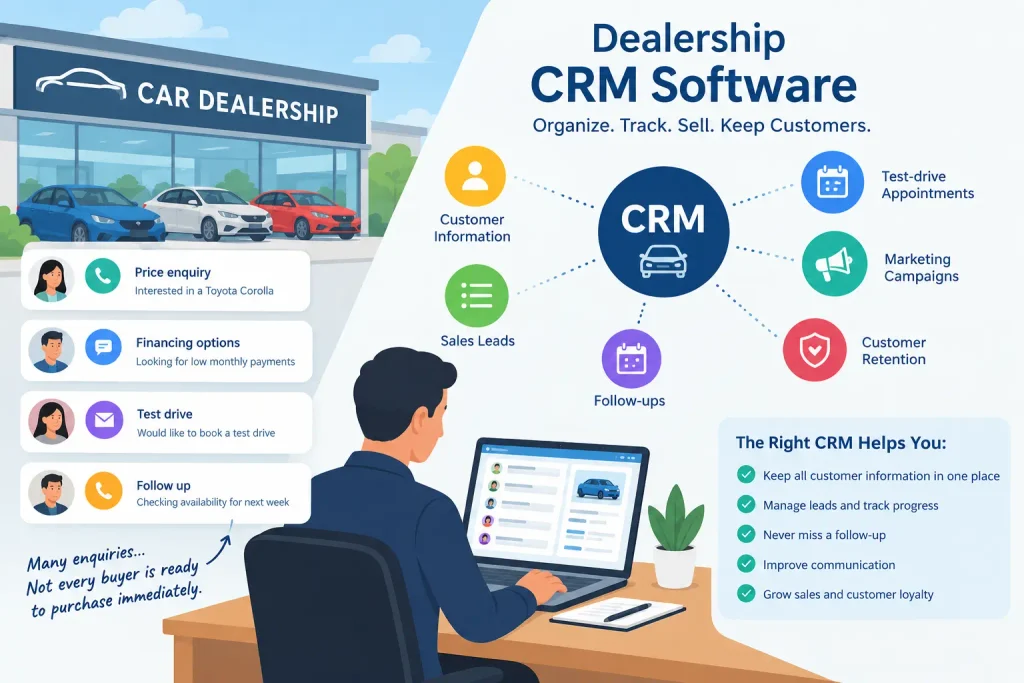
When these enquiries are managed through phone calls, spreadsheets, and separate messaging apps, it becomes difficult to remember who contacted the dealership, which vehicles they are interested in, and when they should be contacted again.
Dealership CRM software helps dealerships organize customer information, manage sales leads, track follow-ups, and maintain communication throughout the buying process. Depending on the platform, it can also support test-drive appointments, sales pipelines, marketing campaigns, and customer retention.
In this guide, we’ll explain what dealership CRM software is, which features matter most, how it benefits dealerships, and how to choose a solution that fits your business.
What Is a Dealership CRM?
A dealership CRM is a customer relationship management system designed to help dealerships manage potential buyers, existing customers, sales enquiries, and customer interactions.
CRM stands for Customer Relationship Management. In an automotive dealership, the software provides a central place to store customer details, track sales opportunities, record conversations, and manage follow-up activities.
For example, imagine a customer submits an online enquiry about a used SUV. The dealership records the customer’s contact information, the vehicle they are interested in, and their preferred budget.
A salesperson contacts the customer, answers questions, and arranges a test drive. If the customer needs more time to decide, the salesperson schedules another follow-up rather than relying on memory.
When the customer eventually purchases the vehicle, the dealership can retain the relevant customer records for future communication and service opportunities.
That is how a dealership CRM helps turn scattered enquiries into a more organized sales process.
Some CRM systems focus mainly on customer relationships and sales activities. Automotive dealership platforms may also include inventory integrations, lead distribution, service department workflows, and other industry-specific tools. The available features depend on the provider and subscription plan.
Why Do Dealerships Need CRM Software?
Managing customer relationships is an important part of selling vehicles. A dealership might have an attractive inventory and competitive prices, but poor follow-up can still cause potential sales opportunities to be missed.
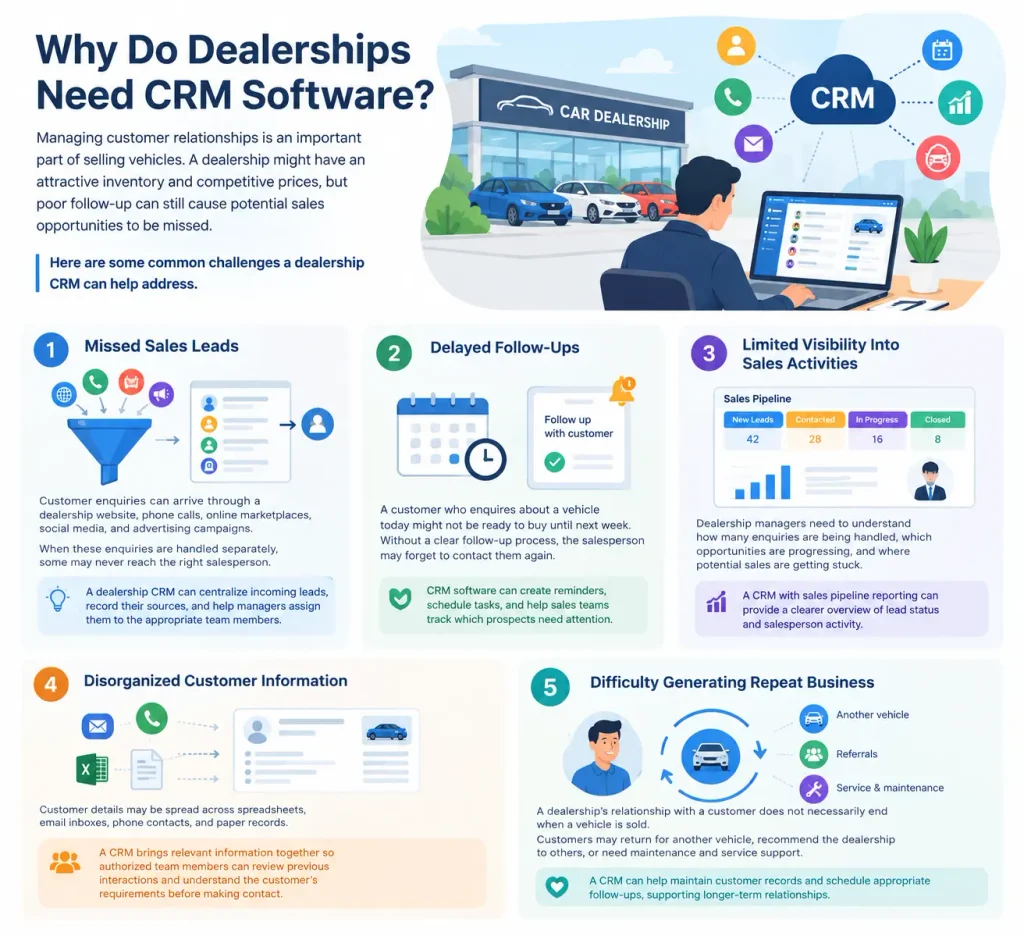
Here are some common challenges a dealership CRM can help address.
1. Missed Sales Leads
Customer enquiries can arrive through a dealership website, phone calls, online marketplaces, social media, and advertising campaigns.
When these enquiries are handled separately, some may never reach the right salesperson.
A dealership CRM can centralize incoming leads, record their sources, and help managers assign them to the appropriate team members.
2. Delayed Follow-Ups
A customer who enquires about a vehicle today might not be ready to buy until next week. Without a clear follow-up process, the salesperson may forget to contact them again.
CRM software can create reminders, schedule tasks, and help sales teams track which prospects need attention.
3. Limited Visibility Into Sales Activities
Dealership managers need to understand how many enquiries are being handled, which opportunities are progressing, and where potential sales are getting stuck.
A CRM with sales pipeline reporting can provide a clearer overview of lead status and salesperson activity.
4. Disorganized Customer Information
Customer details may be spread across spreadsheets, email inboxes, phone contacts, and paper records.
A CRM brings relevant information together so authorized team members can review previous interactions and understand the customer’s requirements before making contact.
5. Difficulty Generating Repeat Business
A dealership’s relationship with a customer does not necessarily end when a vehicle is sold.
Customers may return for another vehicle, recommend the dealership to others, or need maintenance and service support.
A CRM can help maintain customer records and schedule appropriate follow-ups, supporting longer-term relationships.
Key Features of Dealership CRM Software
Not every CRM offers the same capabilities. Before selecting one, identify the features that address your dealership’s daily challenges.
| Feature | How It Helps a Dealership |
|---|---|
| Lead management | Collects and organizes enquiries from different sources |
| Customer database | Stores contact details and interaction history |
| Sales pipeline | Tracks prospects from initial enquiry to completed sale |
| Follow-up reminders | Helps salespeople contact prospects at the right time |
| Lead assignment | Distributes enquiries among sales representatives |
| Communication tracking | Records relevant customer conversations and activities |
| Test-drive scheduling | Helps coordinate vehicle demonstrations and appointments |
| Inventory integration | Connects customer interest with available vehicles when supported |
| Reporting and analytics | Helps managers monitor leads, conversions, and sales activity |
| Marketing automation | Supports targeted campaigns and customer follow-ups |
| Mobile access | Lets sales staff review and update records away from the office |
| Service and retention tracking | Helps maintain relationships after the sale where supported |
A small independent dealership may primarily need lead management, customer records, and follow-up reminders. A larger automotive group may require multiple locations, lead distribution rules, inventory integrations, and more advanced reporting.
The best dealership CRM is the one that supports your sales process without adding unnecessary complexity.
How Does a Dealership CRM Work?
A dealership CRM can help manage the customer journey from the first enquiry to the sale and subsequent communication.
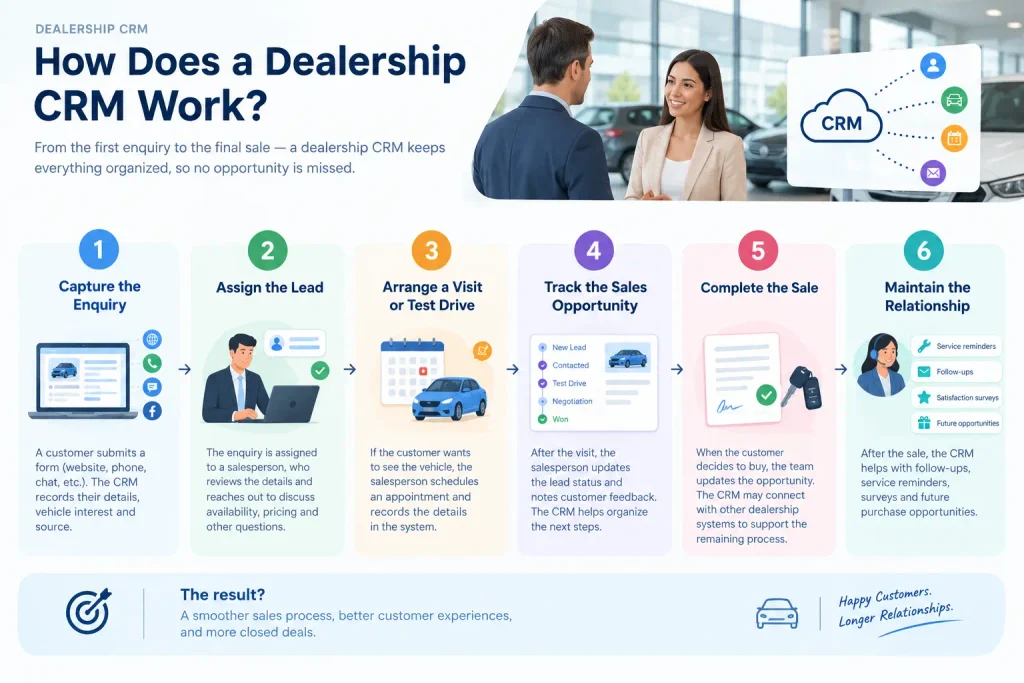
Consider an example involving a customer interested in buying a used car.
Step 1: Capture the enquiry
A customer submits a form asking about a vehicle listed on the dealership’s website. The CRM records the customer’s details, vehicle interest, and enquiry source if the relevant integration is available.
Step 2: Assign the lead
The enquiry is assigned to a salesperson. The salesperson can review the customer’s requirements and contact them to discuss availability, pricing, and other questions.
Step 3: Arrange a visit or test drive
If the customer wants to inspect the vehicle, the salesperson schedules an appointment and records the relevant details in the system.
Step 4: Track the sales opportunity
After the visit, the salesperson updates the lead status and records the customer’s feedback. If the customer is comparing vehicles or discussing financing, the CRM can help organize the next action.
Step 5: Complete the sale
When the customer decides to purchase, the team updates the opportunity status. Depending on the system, the CRM may connect with dealership management, inventory, or transaction software to support the remaining process.
Step 6: Maintain the relationship
After the sale, the dealership can use customer records to support appropriate follow-ups, service reminders, satisfaction surveys, and future purchase opportunities.
This process helps salespeople understand what has happened and what needs to happen next.
For a broader explanation of the underlying process, read our guide on how CRM works.
Dealership CRM vs. Dealership Management System (DMS)
A dealership CRM and a dealership management system serve related but different purposes.
A CRM primarily focuses on customer relationships, lead management, sales activities, and communication. A dealership management system (DMS) generally supports operational activities such as inventory administration, vehicle transactions, accounting, parts, and service operations, depending on the product.
| Requirement | Dealership CRM | Dealership Management System |
|---|---|---|
| Customer and lead management | Core function | May be available |
| Sales follow-ups | Core function | Depends on the product |
| Sales pipeline tracking | Commonly available | Varies |
| Vehicle inventory management | May require integration | Often an important function |
| Accounting and transaction processing | Usually requires integration or another system | Available in some systems |
| Parts and service operations | Depends on the platform | Available in some systems |
| Customer communication | Commonly available | Varies |
| Sales performance reporting | Commonly available | May include operational reporting |
These differences are general rather than universal. Some dealership platforms combine CRM and DMS capabilities, while others integrate with separate systems.
A dealership that mainly struggles with incoming enquiries and sales follow-ups may benefit from a CRM first. A business that needs to coordinate sales, inventory, accounting, and service operations may need a broader dealership management solution.
Before purchasing, check whether the products integrate properly and whether your team can access the information it needs without repeatedly entering the same data.
Popular CRM Software Options for Dealerships
Several platforms are worth evaluating when researching dealership CRM software. Their suitability depends on your dealership type, location, team size, budget, and existing technology.
VinSolutions
VinSolutions is an automotive retail technology provider worth investigating for dealerships looking for industry-specific sales and customer relationship tools.
Evaluate its available CRM capabilities, integrations, implementation requirements, and suitability for your dealership’s sales process.
DealerSocket
DealerSocket is another automotive dealership technology provider to research when comparing dealership-focused CRM solutions.
Before making a decision, confirm the currently available products, supported markets, and whether the particular solution meets your operational requirements.
HubSpot CRM
HubSpot CRM may be worth considering for businesses that need contact management, lead tracking, sales pipelines, and customer communication tools.
However, a general CRM may require integrations or additional software to handle automotive-specific processes such as inventory connections and dealership lead workflows.
Salesforce
Salesforce offers CRM capabilities that businesses can configure around their sales and customer management processes.
It may be suitable for larger dealership groups or organizations with complex workflows, but implementation requirements, customization, and total costs should be assessed carefully.
These options are a starting point for research, not a ranking or endorsement. Confirm current features, availability, pricing, support, and integration requirements directly with each provider.
How Much Does Dealership CRM Software Cost?
The cost of dealership CRM software varies according to the provider, number of users, feature set, dealership size, and implementation requirements.
Some general CRM platforms offer free entry-level plans or relatively affordable subscriptions. Industry-specific dealership systems may have different pricing structures, while larger implementations can involve additional setup, integration, training, and support costs.
Before comparing subscription prices, consider the complete cost of ownership.
Ask these questions:
- Is pricing based on users, locations, inventory size, or dealership volume?
- Are lead management, reporting, and automation included?
- Does the software charge extra for integrations or communication tools?
- Are onboarding and employee training included?
- Can the CRM connect to your existing inventory, website, and dealership management systems?
- Can you export customer records if you switch providers?
- Is the software available in your country, and does it support your business requirements?
For more information about CRM expenses, read our guide to CRM system cost.
A low subscription price may not represent the best value if the system requires several additional tools or extensive customization to support everyday dealership operations.
How to Choose the Right Dealership CRM
Choosing a dealership CRM becomes easier when you start with your business requirements instead of comparing feature lists alone.
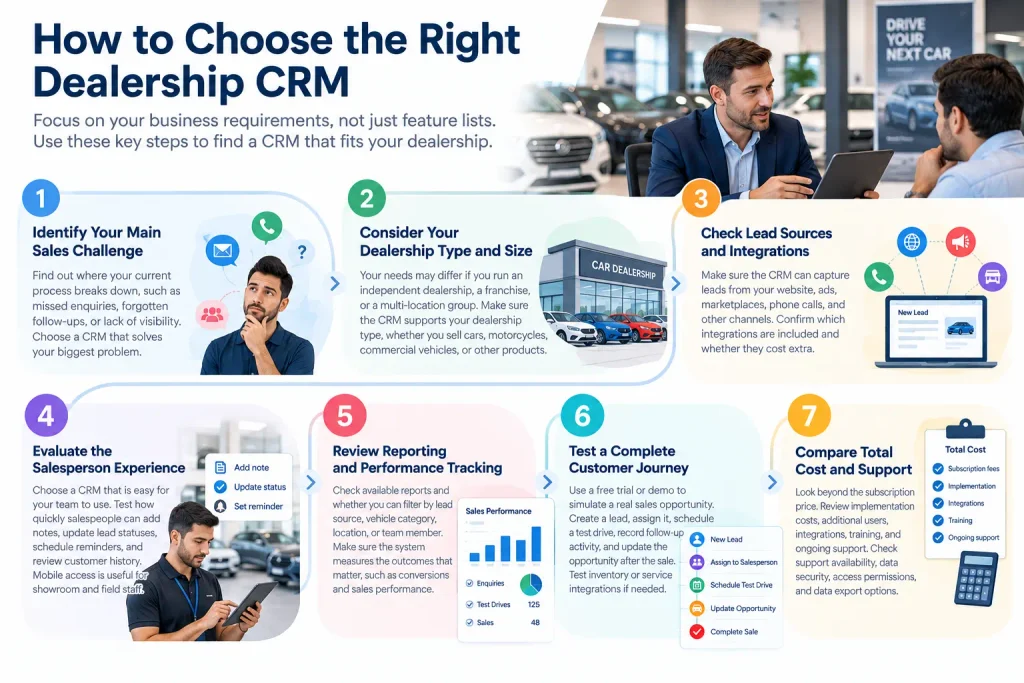
1. Identify Your Main Sales Challenge
Determine where your current process breaks down.
Are enquiries being missed? Are salespeople forgetting follow-ups? Is management unable to track lead performance? Or is customer information scattered across multiple systems?
Choose software that directly addresses your biggest problem.
2. Consider Your Dealership Type and Size
An independent used-car dealership may need a straightforward lead management system, while a franchise dealership or multi-location group may require advanced reporting, role permissions, lead distribution, and integrations.
If you sell motorcycles, commercial vehicles, agricultural equipment, or other products through a dealership model, check that the CRM supports your particular sales process.
3. Check Lead Sources and Integrations
Your leads may come from website forms, advertising campaigns, vehicle marketplaces, phone calls, and other channels.
Confirm that the CRM can capture the sources you use and route enquiries to the right people. Ask whether integrations are included in the subscription or require additional fees.
4. Evaluate the Salesperson Experience
A CRM only provides value when the team keeps its records updated.
Test how easily salespeople can add notes, update lead statuses, schedule reminders, and review customer history. Mobile access may be particularly useful for staff who work on the showroom floor or travel between locations.
5. Review Reporting and Performance Tracking
Managers may need to understand enquiry volume, response times, appointment activity, conversion rates, and salesperson performance.
Check which reports are available and whether they can be filtered by lead source, vehicle category, location, or team member.
Make sure the system measures the outcomes that matter to your dealership rather than simply counting activity.
6. Test a Complete Customer Journey
Use a free trial or product demonstration, where available, to simulate a real sales opportunity.
Create a lead, assign it to a salesperson, schedule a test drive, record follow-up activity, and update the opportunity after the customer makes a decision.
If the dealership also needs inventory or service integrations, test those workflows as well.
7. Compare Total Cost and Support
Review subscription fees, implementation costs, additional users, integrations, training, and ongoing support.
Ask about customer support availability, data security, access permissions, and data export options. A system should be affordable to maintain and practical for your team to use every day.
Common Mistakes to Avoid When Choosing Dealership CRM Software
Choosing software based only on price: A low-cost CRM may lack essential integrations or require expensive add-ons.
Ignoring lead response processes: Software cannot compensate for unclear responsibilities. Decide who handles new enquiries and how quickly the team should respond.
Buying too many features: Advanced automation and extensive reporting may not be necessary for a small dealership. Start with the functions that solve real problems.
Overlooking integration requirements: Separate inventory, website, and customer systems can create duplicate records if they do not communicate properly.
Failing to train employees: Salespeople need to understand how and when to update records. Without consistent use, reports and follow-up reminders become less reliable.
Neglecting customer data security: Dealerships may store personal contact details, communication records, and purchase-related information. Use appropriate access controls and review the provider’s security practices.
Planning these details before implementation can make adoption smoother and help the dealership get more value from its software.
Frequently Asked Questions About Dealership CRM
What is the best CRM for a car dealership?
There is no single best CRM for every dealership. VinSolutions and DealerSocket are automotive-focused options worth researching, while HubSpot CRM and Salesforce may suit businesses with different customer management and customization requirements. Compare features, integrations, costs, and regional availability before deciding.
How does a dealership CRM help increase sales?
A dealership CRM can help organize enquiries, assign leads, schedule follow-ups, and give salespeople a clearer view of customer requirements. These capabilities may reduce missed opportunities, but actual sales results depend on lead quality, pricing, inventory, staff performance, and the overall sales process.
Is dealership CRM software suitable for a small used-car dealership?
Yes. A small used-car dealership can use a CRM to track interested buyers, organize vehicle enquiries, schedule test drives, and manage follow-ups. A simple solution may be sufficient if the business does not need advanced integrations or multi-location reporting.
Can a dealership CRM manage vehicle inventory?
Some dealership CRM platforms offer inventory-related features or integrations with inventory management systems. However, not every CRM maintains complete inventory records. Confirm how the product connects customer enquiries with available vehicles and whether inventory updates synchronize automatically.
What is the difference between automotive CRM and general CRM?
Automotive CRM software is designed around dealership workflows and may support vehicle-related enquiries, test drives, lead distribution, and automotive integrations. General CRM software focuses on broader customer relationship and sales processes and may need additional tools for dealership-specific requirements.
Does a dealership CRM replace a DMS?
Not necessarily. A CRM focuses primarily on customer relationships and sales activities, while a DMS may handle inventory, transactions, accounting, parts, and service operations. Some platforms combine these functions, but others require integrations between separate systems.
Can dealership CRM software improve customer retention?
It can help dealerships maintain organized customer records, schedule relevant follow-ups, and communicate about appropriate service or future purchasing opportunities. Retention still depends on customer experience, product quality, pricing, and the relevance of the communication.
Final Thoughts
Dealership CRM software can help automotive businesses manage enquiries, organize sales activities, maintain customer records, and follow up on potential purchases more consistently.
For a small dealership, a simple CRM with lead tracking and reminders may be enough. Larger operations may need advanced reporting, lead distribution, inventory integrations, and connections with dealership management systems.
Before choosing a platform, identify your biggest sales challenge, test a realistic customer journey, and compare the complete cost of the available options.
The goal is not to purchase the most complicated software. It is to help your team respond to customers, manage opportunities, and build stronger relationships throughout the buying journey.