
A company can have years of experience, hundreds of documents, and highly skilled employees, yet still waste time looking for a simple answer.
The problem is often not a lack of knowledge. It is that the knowledge is scattered.
One answer may be in an old email. Another might be inside a shared folder. A useful process may exist only in an experienced employee’s memory. When that employee leaves, part of the company’s practical knowledge can disappear with them.
This is where knowledge management systems become useful.
A knowledge management system (KMS) helps an organization capture, organize, store, find, share, and maintain the knowledge people need to do their work. IBM describes knowledge management as the process of identifying, organizing, storing, and sharing information within an organization. (IBM)
The important part is not simply storing information.
The real goal is making useful knowledge available when someone needs it.
What Is a Knowledge Management System?
A knowledge management system is a structured system that helps a business manage what it knows.
That knowledge can include:
- Product documentation
- FAQs
- Company policies
- Training material
- Standard operating procedures
- Troubleshooting guides
- Customer service information
- Internal processes
- Lessons learned
Imagine a support employee receives a question about changing a customer’s subscription.
Without a KMS, they might ask another employee, search through emails, check several folders, or rely on memory.
With a well-organized system, they can search for the problem and find the current procedure.
That difference may seem small for one question.
Across hundreds of questions, it can save a significant amount of time.
Knowledge Management System vs. Knowledge Base
A knowledge base and a knowledge management system are closely related, but they are not exactly the same thing.
A knowledge base is mainly a collection of information such as FAQs, guides, manuals, and troubleshooting articles.
A knowledge management system is broader. It includes the tools and processes used to create, organize, maintain, find, share, and use that knowledge.
Think of it this way:
Knowledge base = the information
Knowledge management system = the information + the process around it
Microsoft’s documentation provides a good practical example. Its Dynamics 365 knowledge management features cover creating, reviewing, categorizing, publishing, searching, analyzing, and maintaining knowledge articles. (Microsoft Learn)
So a KMS is not simply a digital filing cabinet.
It is supposed to make knowledge usable.
What Types of Knowledge Does a KMS Manage?
Business knowledge is not always a document.
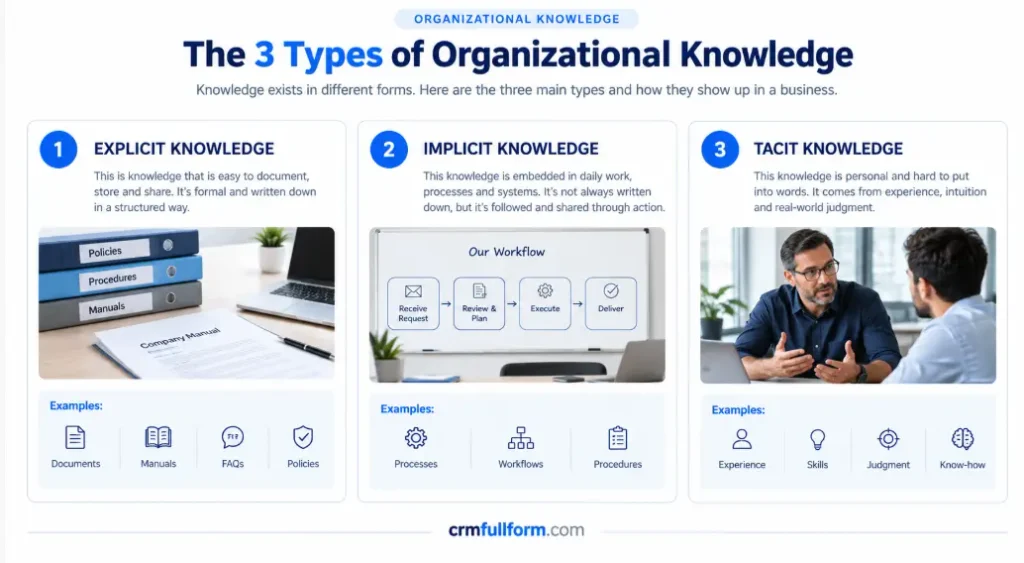
Some of the most valuable knowledge may exist only in the way people work.
Explicit knowledge
This is knowledge that can be documented and shared relatively easily.
Examples include:
- Manuals
- FAQs
- Policies
- Training guides
- SOPs
- Product documentation
- Reports
This is usually the easiest knowledge to put into a KMS.
The harder part is keeping it accurate.
Implicit knowledge
Implicit knowledge is often built into a team’s processes.
For example, a sales team may have a particular way of qualifying leads, or a support team may know which problems should be escalated immediately.
The process exists, but it may never have been properly documented.
A KMS can help turn some of this practical knowledge into something other employees can learn and use.
Tacit knowledge
Tacit knowledge comes mainly from experience and judgment.
An experienced salesperson may recognize that a customer is close to leaving because of subtle changes in a conversation.
That type of knowledge is much harder to capture in a document.
This is why knowledge management is not only a software problem. People, communication, experience, and collaboration still matter.
How Does a Knowledge Management System Work?
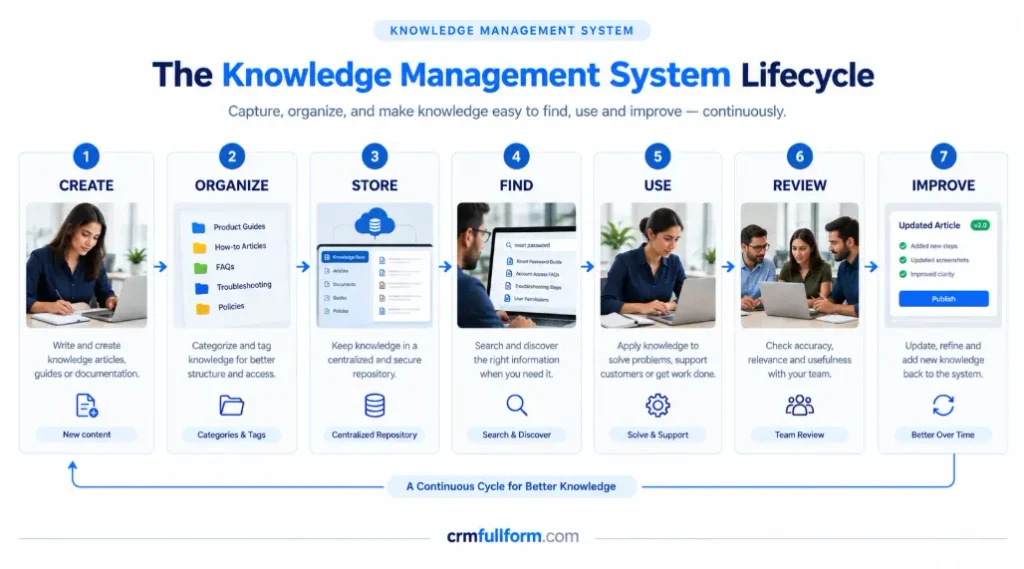
A practical knowledge management process can look like this:
Create → Organize → Store → Find → Use → Review → Improve
The last two steps are easy to overlook.
Suppose a company creates a guide explaining how customers can update their billing information.
Six months later, the billing process changes.
If nobody reviews the article, employees may continue using the old instructions.
So a useful KMS should not only answer:
“Where is the information?”
It should also answer:
“Is this information still correct?”
And ideally:
“Who is responsible for keeping it correct?”
This continuous-improvement approach is also reflected in ISO 30401, the international standard for knowledge management systems. ISO describes requirements for establishing, implementing, maintaining, reviewing, and improving a knowledge management system. The second edition is currently under development. (ISO)
Important Features of Knowledge Management Systems
The exact features vary from one platform to another, but useful KMS implementations commonly include the following.
Search
People should be able to find an answer without remembering the exact title of an article.
As a company’s knowledge grows, search becomes increasingly important.
Categories and tags
Information needs structure.
For example:
Product → Billing → Subscription → Refunds
is easier to navigate than hundreds of unrelated documents in one folder.
Permissions
Not everyone should necessarily have access to every piece of company knowledge.
HR information, confidential customer data, security procedures, and other sensitive material may require restricted access.
Version history
When information changes, teams need to know which version is current.
Version history also helps explain what changed and why.
Ownership
Important knowledge should have an owner.
If everyone is responsible for updating an article, there is a good chance that nobody actually will.
Analytics
This is one of the most useful features of a modern KMS.
Search data can show which information employees or customers are trying to find.
More importantly, it can show what they cannot find.
Microsoft’s knowledge-management documentation describes using search analytics to identify low-success or unsuccessful searches and uncover knowledge gaps. (Microsoft Learn)
That creates a useful feedback loop:
What people cannot find tells you what the business may need to document next.
Why Do Businesses Use Knowledge Management Systems?
Saving time is the obvious benefit.
But preserving organizational knowledge can be even more important.
Imagine an employee who has spent eight years working with the same product.
They know:
- Which problems customers commonly face
- Which processes cause mistakes
- Which workaround actually works
- Which customers need special attention
- Who should be contacted when something goes wrong
If that employee leaves, the company does not simply lose a person.
It may lose years of practical knowledge.
A KMS gives the business a structured way to capture and share at least some of that knowledge.
IBM also points to areas such as organizational learning, collaboration, onboarding, decision-making, and operational efficiency when discussing knowledge management. (IBM)
Knowledge Management and CRM
This is where knowledge management becomes particularly useful for businesses already using CRM software.
A CRM mainly manages customer records, interactions, sales activities, deals, and service information.
If you are new to CRM, our guide on what CRM software is explains what CRM software actually does in everyday business.
But customer information and organizational knowledge are not the same thing.
For example:
CRM record:
Customer reported that the integration stopped working.
Knowledge article:
Common reasons the integration stops working and the steps a support representative should follow.
The CRM tells you:
What happened with this customer?
The knowledge system helps answer:
What does the company know about solving this problem?
That distinction becomes easier to understand when you look at what a CRM database is. A CRM database connects records such as contacts, companies, deals, activities, and tickets, while a knowledge system contains reusable information employees can use while working with those records.
You can also read our guide to how CRM works to see how customer information moves from an enquiry to a record, follow-up, deal, and service history.
In simple terms:
CRM stores the customer story.
KMS stores the company’s reusable knowledge.
Together, they can give an employee both the context and the answer.
A Simple Example: CRM + KMS
Consider a SaaS company.
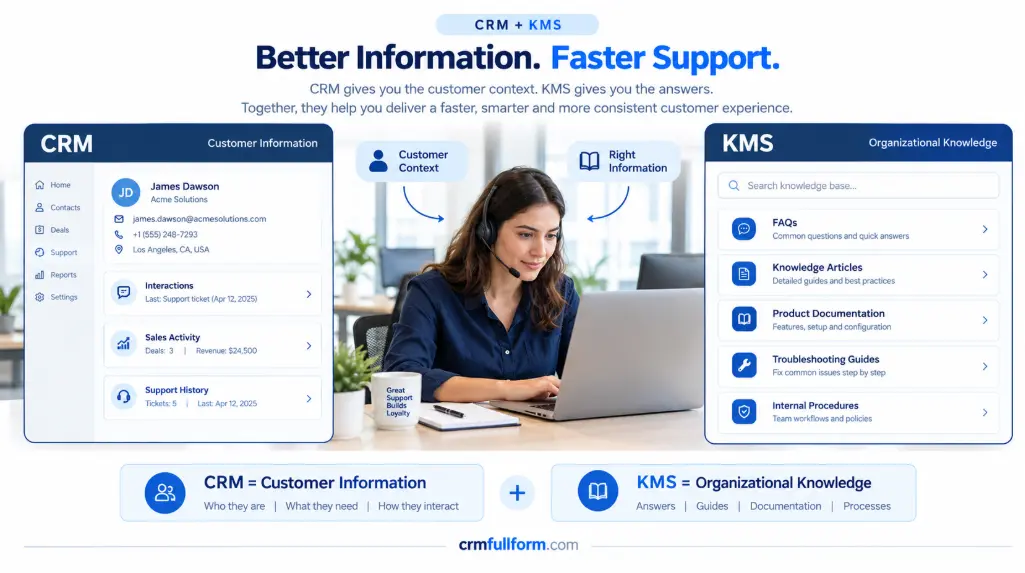
A customer contacts support because an integration has stopped working.
The CRM might show:
- Customer name
- Company
- Subscription
- Previous conversations
- Open tickets
- Account history
The knowledge system might show:
- Common integration errors
- Troubleshooting steps
- Known issues
- Supported configurations
- Escalation procedures
The support employee does not have to start from zero.
They have the customer context from the CRM and the solution knowledge from the KMS.
This is not just a theoretical connection. Microsoft’s Dynamics 365 documentation describes knowledge articles being searched and used while representatives work on customer records, along with features such as article versioning, publishing, analytics, and AI-assisted suggestions. (Microsoft Learn)
If you want to understand the CRM side in more detail, our guide to CRM features covers common capabilities such as contact management, lead management, sales pipelines, communication tracking, and support.
How AI Is Changing Knowledge Management
AI is making knowledge management more useful, but it has also created a new problem.
Some businesses assume that adding an AI assistant will automatically make their internal knowledge better.
It will not.
If the underlying information is outdated, duplicated, incomplete, or poorly organized, AI can simply make those problems easier to access.
The better order is:
Reliable knowledge first. AI assistance second.
AI can help with:
- Finding relevant information
- Summarizing documents
- Suggesting knowledge articles
- Identifying repeated questions
- Creating initial article drafts
- Improving search
Microsoft now documents AI-assisted capabilities within its knowledge-management tools, including suggestions for relevant knowledge articles and assistance with creating knowledge content. (Microsoft Learn)
But people still need to decide which information is authoritative and when an article needs to be updated.
That is why AI does not eliminate the need for knowledge management.
In many businesses, it makes good knowledge management even more important.
How to Build a Useful Knowledge Management System
You do not need to put every document your company has ever created into a KMS.
Start with the information people actually need.
1. Find repeated questions
Look at:
- Support tickets
- Sales questions
- Employee requests
- Onboarding problems
- Internal conversations
If the same question keeps appearing, it is a strong candidate for documentation.
2. Start with high-value knowledge
Prioritize information that:
- Saves employees time
- Affects customers
- Causes repeated mistakes
- Is difficult for new employees to learn
- Exists mainly inside one experienced employee’s head
3. Give important knowledge an owner
Someone should be responsible for reviewing important information.
A simple owner and review date can prevent useful knowledge from quietly becoming outdated.
4. Make articles easy to scan
A knowledge article does not need to be a long essay.
Someone searching for a solution usually wants the answer first.
Use short paragraphs, clear headings, numbered steps, screenshots, and tables when they genuinely help.
5. Study failed searches
This is one of the most useful things a company can do.
If employees repeatedly search for something and cannot find a useful answer, the problem may not be the employee.
It may be a knowledge gap.
That gap tells the team what should be documented next.
What Makes a Knowledge Management System Successful?
Buying KMS software is usually easier than maintaining the knowledge inside it.
A useful system needs four things:
Good information + clear ownership + easy access + regular maintenance
Remove one of these and the system can slowly become less useful.
You can have excellent documentation, but if employees cannot find it, they will go back to asking colleagues.
You can have excellent search, but if the information is outdated, people will stop trusting it.
You can have thousands of articles, but if nobody owns them, the system can become little more than a digital storage room.
This is why knowledge management should be treated as an ongoing business process rather than a one-time software installation.
KMS vs. CRM: What Is the Difference?
A business does not necessarily need to choose between CRM and knowledge management.
They solve different problems.
| System | Main purpose |
|---|---|
| CRM | Manage customer relationships and interactions |
| KMS | Manage and share organizational knowledge |
| Knowledge base | Provide a structured collection of useful information |
A CRM can tell an employee who the customer is and what happened.
A KMS can help tell them what the company knows and what to do next.
For a broader understanding of CRM, you can also explore our guides to types of CRM and CRM software.
Final Thought
The value of a knowledge management system is not measured by how many documents a company stores.
It is measured by what people can do with that knowledge.
If an employee can solve a problem in five minutes instead of asking three colleagues, that is useful.
If a new employee can learn a process without sitting beside a senior employee for two weeks, that is useful.
If a customer can find an accurate answer without opening a support ticket, that is useful.
And if an experienced employee leaves without taking years of useful organizational knowledge with them, that may be the biggest benefit of all.
The best KMS is therefore not necessarily the one with the most features.
It is the one that helps the right person find the right knowledge at the moment they need it.
Frequently Asked Questions
What is a knowledge management system?
A knowledge management system is a system used to capture, organize, store, find, share, and maintain an organization’s knowledge.
What is an example of a knowledge management system?
A company knowledge base containing FAQs, product documentation, troubleshooting guides, policies, training material, and internal procedures is a common example. More advanced systems can add search, permissions, analytics, version control, and AI-assisted retrieval.
What is the difference between a KMS and a CRM?
A CRM manages customer-related records and interactions, while a KMS manages reusable organizational knowledge. A CRM can tell an employee what happened with a customer; a KMS can help explain how the company normally handles that type of situation.
What are the main types of organizational knowledge?
Knowledge is commonly discussed in forms such as explicit, implicit, and tacit knowledge.
Explicit knowledge can be documented relatively easily, while implicit and tacit knowledge are more closely connected to processes, experience, and judgment.
Why is knowledge management important?
Knowledge management can help businesses preserve expertise, reduce repeated work, improve access to information, support employee learning, and provide more consistent customer service. (IBM)
Can AI replace a knowledge management system?
AI can make company knowledge easier to search, summarize, and use, but it does not remove the need for accurate, well-organized, and maintained information. AI works best when the underlying knowledge is reliable.