
A dispensary can have a busy store, loyal customers, and a good product selection but still struggle to keep customers coming back.
Sometimes, the problem is not the products. Customer information is scattered across different systems, loyalty programs are difficult to manage, and marketing messages do not reach the right people.
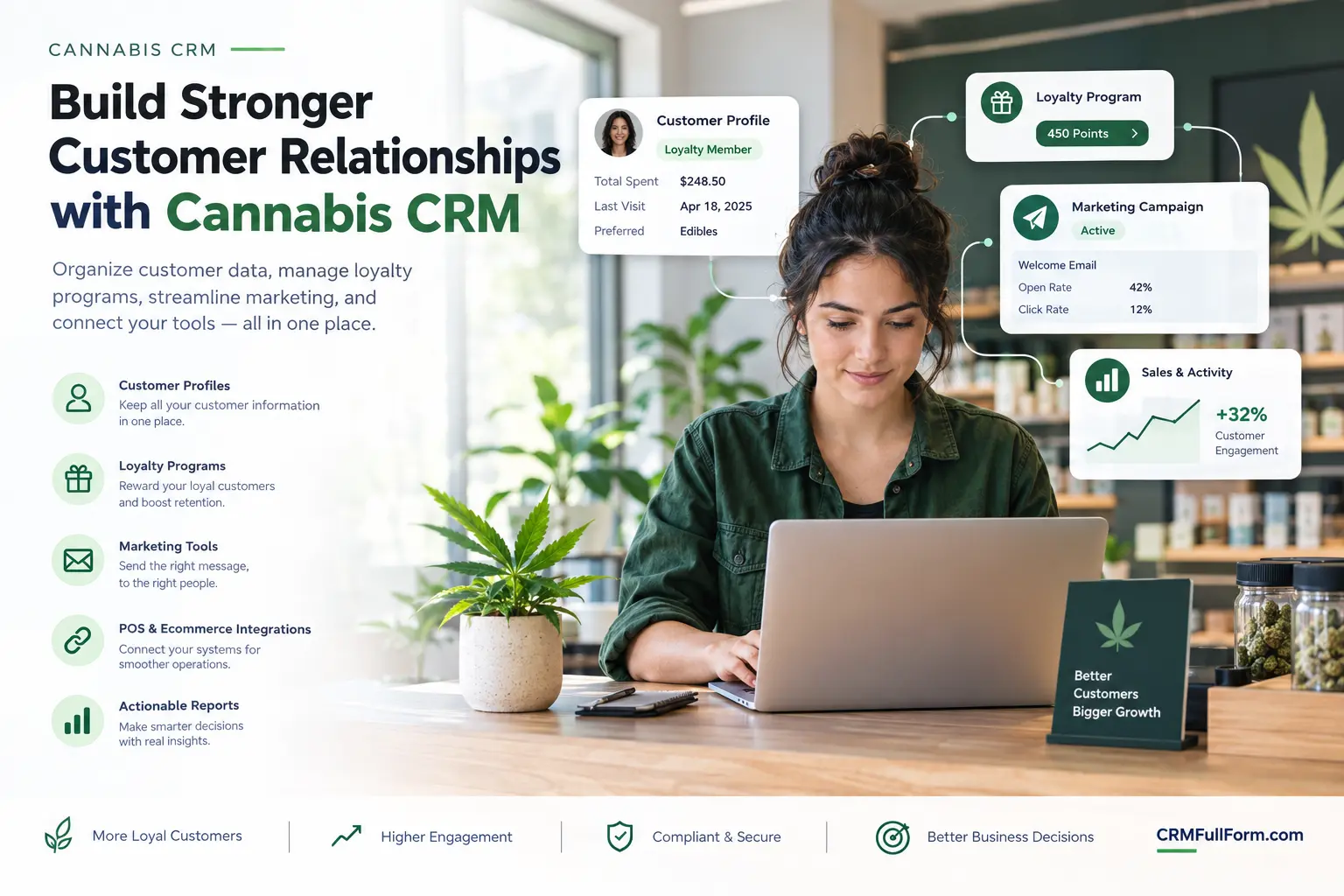
This is where cannabis CRM software can help.
A cannabis CRM helps businesses organize customer information, understand customer interactions, manage loyalty activities, and coordinate marketing. Depending on the platform, it can also connect with a dispensary’s point-of-sale system, ecommerce store, and other business tools.
However, not every cannabis business needs the same software. A dispensary that serves individual customers has different requirements from a cannabis brand selling products to retailers.
In this guide, we explain what cannabis CRM software does, which features matter most, how different platforms compare, and what to consider before choosing one.
What Is Cannabis CRM?
Cannabis CRM stands for cannabis customer relationship management. It refers to software that helps businesses in the cannabis industry manage customer information and relationships.
For a dispensary, this might mean keeping customer profiles organized, managing loyalty memberships, reviewing permitted purchase-related information, and coordinating customer communications.
For a cannabis wholesaler, it may mean tracking retailer accounts, recording sales conversations, managing opportunities, and setting follow-up reminders.
The purpose is to give a business a clearer picture of its customer relationships instead of relying on disconnected spreadsheets, inboxes, and manual notes.
If you are new to CRM software, our guide on what CRM stands for explains the meaning of the term and how businesses use it.
It is also important to understand that cannabis CRM is not necessarily the same as dispensary management software. A CRM focuses on customer relationships. Inventory, checkout, product tracking, and regulatory reporting may be handled by separate systems.
How Does Cannabis CRM Software Work?
Think about a dispensary that serves hundreds of customers every week. Its team needs to manage customer questions, loyalty memberships, and communication without losing track of important information.
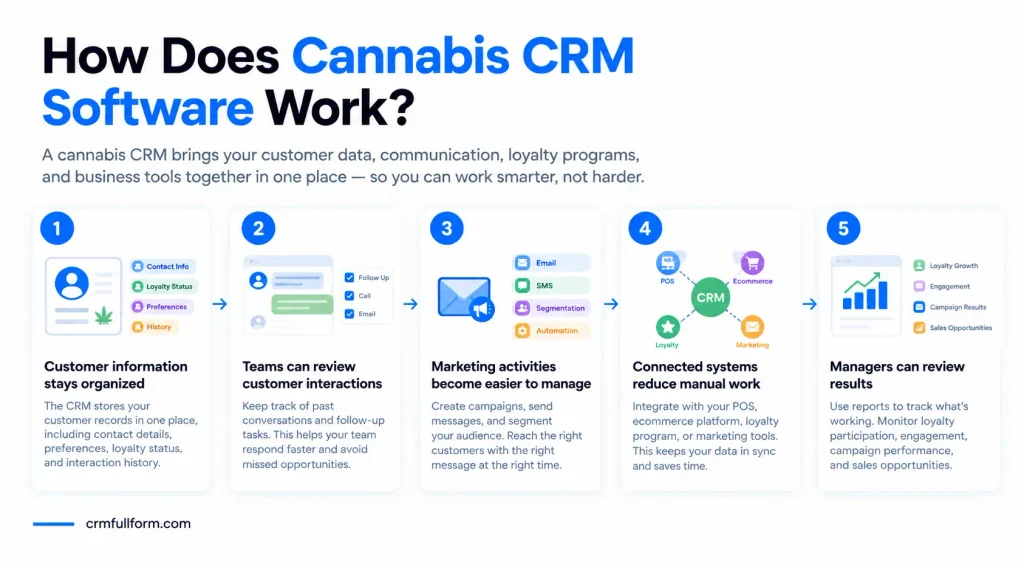
A CRM can help bring these activities together.
1. Customer information stays organized
The software stores relevant customer records in one place. Depending on the product and the information the business is permitted to collect, records may include contact details, communication preferences, loyalty status, and interaction history.
When the system connects with other business tools, it may also receive supported customer data from those platforms.
2. Teams can review customer interactions
A CRM helps employees keep track of previous conversations and follow-up tasks. This can make it easier to respond to customer questions without searching through several different systems.
For a business selling to retailers, the same process helps sales representatives see previous discussions and understand which accounts need attention.
3. Marketing activities become easier to manage
Some platforms support email campaigns, text messages, customer segmentation, and automated follow-ups.
For example, a dispensary might organize its opted-in loyalty members separately from other contacts. The team can then manage communications according to customer preferences and applicable rules.
4. Connected systems reduce manual work
A CRM may connect with a point-of-sale (POS) system, ecommerce platform, loyalty program, or marketing tool.
These integrations can reduce duplicate data entry, but the available connections depend on the provider.
For a simple explanation of the process, see our guide to how CRM works.
5. Managers can review results
Reports help managers understand which activities are producing useful results. Depending on the software, they may review loyalty participation, customer engagement, campaign performance, or sales opportunities.
The important thing is to track information that supports real business decisions rather than collecting data without a clear purpose.
Key Features of Cannabis CRM Software
The right features depend on how your business operates. A small dispensary may need basic customer records and loyalty tools, while a multi-location retailer may need more advanced integrations and reporting.
Customer Data Management
Customer data management keeps relevant records organized and accessible to authorized employees.
Depending on the platform, this may include contact details, customer preferences, loyalty status, and interaction history.
Accurate records help employees find the information they need and reduce the confusion caused by maintaining several separate lists.
Customer Segmentation
Customer segmentation allows businesses to group contacts according to relevant information.
A dispensary might create groups based on loyalty membership or permitted engagement data. A cannabis supplier could group retail accounts by location, account status, or sales stage.
This makes it easier to organize communication around a specific business purpose. Data should only be collected and used in ways that comply with applicable privacy and marketing requirements.
Loyalty Program Management
Loyalty programs are designed to encourage customers to return and engage with a business.
Some cannabis CRM platforms support loyalty memberships, rewards, customer activity tracking, or integrations with dedicated loyalty software.
Before selecting a solution, check whether its loyalty features work with your existing POS system and meet the requirements of your market.
Email and SMS Marketing
Some cannabis CRM systems include email marketing, text messaging, campaign scheduling, and automated communication.
These features can save time when managing large contact lists and help businesses organize campaigns in one place.
However, cannabis marketing has additional restrictions in many locations. Businesses should check consent requirements, age-related rules, advertising restrictions, and messaging platform policies before sending promotional content.
POS and Ecommerce Integration
A POS system handles retail transactions, while an ecommerce platform supports online shopping. A CRM focuses on managing customer relationships.
When these systems connect, the business may be able to manage supported customer information with less manual work.
For example, Cova’s cannabis POS software includes retail, inventory, reporting, and integration capabilities. Cova also lists partner connections across areas such as CRM and loyalty, ecommerce, and other business tools.
This does not mean every CRM feature is included in every POS plan. Always confirm which integrations are available and whether they require an additional subscription.
Sales Pipeline Management
Sales pipeline management is especially useful for cannabis brands, distributors, manufacturers, and wholesalers that sell to other businesses.
It helps sales teams track potential retailers, record conversations, schedule follow-ups, and understand the status of each opportunity.
For these businesses, a sales-focused CRM may be more useful than a system built mainly for dispensary loyalty programs.
Reporting and Analytics
Reporting helps businesses understand what is happening across customer relationships and marketing activities.
Depending on the system, reports may cover loyalty participation, campaign engagement, repeat visits, customer retention, or sales pipeline progress.
Useful reporting should answer practical questions. For example, is the loyalty program attracting participation, or are sales representatives following up on opportunities consistently?
Security and Access Controls
Customer information should only be available to employees who need it for their work.
Look for clear user permissions, secure authentication, audit records, and policies for storing and deleting information.
A vendor’s security features are only one part of the picture. The business must also establish suitable internal processes and follow the rules that apply to the information it collects.
Cannabis CRM Software Examples
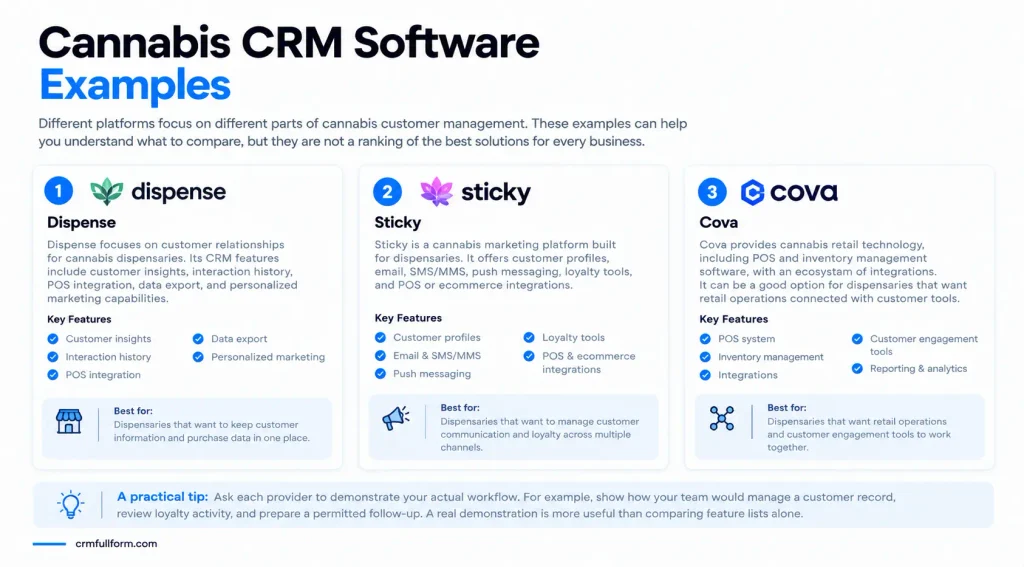
Different platforms focus on different parts of cannabis customer management. These examples can help you understand what to compare, but they are not a ranking of the best solutions for every business.
1. Dispense
Dispense Dispensary CRM focuses on customer relationships for cannabis dispensaries.
Its published CRM features include customer insights, interaction history, POS integration, data export, and personalized marketing capabilities.
It may be worth investigating if your business wants customer information and supported purchase-related data organized in one place.
Before choosing it, confirm compatibility with your current POS system, the features included in your plan, and the availability of the service in your region.
2. Sticky
Sticky presents itself as a cannabis marketing platform built for dispensaries.
Its published offerings include customer profiles, email, SMS/MMS, push messaging, loyalty tools, and POS or ecommerce integrations.
It may be relevant if your main challenge is coordinating customer communication and loyalty activity across different channels.
Check which integrations are supported, what the subscription includes, and how the platform handles marketing compliance requirements.
3. Cova
Cova provides cannabis retail technology, including POS and inventory management software, with an ecosystem of integrations.
It may be relevant to dispensaries that want retail operations connected with customer engagement tools.
When evaluating Cova or a similar provider, clarify which customer relationship features are built into the core product and which require a separate integration.
A practical tip: Ask each provider to demonstrate your actual workflow. For example, show how your team would manage a customer record, review loyalty activity, and prepare a permitted follow-up. A real demonstration is more useful than comparing feature lists alone.
Cannabis CRM vs. POS Software
Cannabis CRM and POS software often work together, but they solve different problems.
| Feature | Cannabis CRM | Cannabis POS |
|---|---|---|
| Customer relationship records | Main focus | May include basic customer profiles |
| Retail checkout | Usually not the main function | Main function |
| Inventory management | May require an integration | Often included |
| Loyalty and customer marketing | Often supported, depending on the product | May be built in or connected |
| Sales follow-ups | Useful for customer and B2B relationships | Usually not the main focus |
| Retail transaction reports | Depends on integrations | Commonly included |
Some platforms combine several functions, while others connect separate products.
Before buying another system, check whether your existing POS already handles the customer management tasks you need. You may only need an integration or an additional tool for specific functions.
Benefits of Using Cannabis CRM Software
Better Customer Organization
Customer records and interaction history are easier to manage when relevant information is stored in a consistent system.
Employees spend less time searching through separate files and can work from more reliable records.
More Consistent Communication
A CRM can help teams manage follow-ups and review previous conversations.
This reduces the chance of missed tasks and helps employees provide more consistent service, although staff still need to maintain accurate records.
Easier Loyalty Management
For dispensaries that use loyalty programs, CRM tools can help organize memberships and review program activity.
Managers can use available information to understand whether the program is meeting its goals and where changes may be useful.
More Organized Marketing
Campaign management and segmentation can reduce repetitive work and make communication easier to coordinate.
Businesses must still respect consent requirements, customer preferences, and applicable cannabis advertising restrictions.
Clearer Sales Tracking
Cannabis wholesalers and brands can use CRM tools to monitor retailer relationships, manage opportunities, and keep follow-up tasks organized.
This helps managers understand where sales conversations stand without relying entirely on individual employees’ notes.
Better Business Decisions
Reports can help businesses identify patterns and measure results. Their value depends on accurate information and choosing metrics that matter to the business.
How to Choose the Right Cannabis CRM
A long list of features does not automatically make a CRM the right choice. Start by identifying the problem you need to solve.
Understand Your Business Model
A dispensary may prioritize customer profiles, loyalty management, and POS integration.
A wholesaler may need account management, sales pipeline tracking, and reminders for retailer follow-ups.
Choose software that matches your actual work rather than choosing a product simply because it uses the word cannabis in its marketing.
Check Existing Integrations
List the systems your business already uses, including POS, ecommerce, loyalty, email, and reporting tools.
Ask the provider which integrations are supported, whether data syncs automatically, and whether extra setup fees apply.
Compare Total Cost
Look beyond the starting subscription price. Ask about implementation, training, additional users, integrations, support, and contract terms.
Our guide to CRM system cost explains the types of expenses businesses should consider when evaluating CRM software.
Review Security and Compliance
Requirements vary depending on the business location and the information being collected.
Ask how the software handles access permissions, data retention, customer consent, and information security. Also review the rules governing cannabis advertising and promotional communication in your market.
For US businesses, the Massachusetts cannabis law provides an example of state-specific requirements concerning marijuana advertising. It is not a nationwide rule, so businesses must check the laws that apply to their own locations.
Test the Software Before Committing
Request a demonstration or trial when available. Ask the people who will use the software to test everyday tasks such as finding a customer record, reviewing loyalty activity, creating a follow-up, and checking a report.
A system that fits the team’s daily routine is more likely to be used consistently.
Common Mistakes to Avoid
Businesses may struggle to get value from CRM software when they choose it without a clear plan.
- Choosing based on features alone: Start with the problems you need to solve.
- Ignoring integration compatibility: Disconnected systems can create more manual work.
- Collecting unnecessary customer information: Keep data collection relevant and lawful.
- Overlooking marketing restrictions: Check the requirements for each channel and market.
- Skipping employee training: Teams need clear processes for keeping records accurate.
- Paying for features nobody uses: Focus on functions that support your current needs.
A CRM should make customer management easier. If it creates more work than it removes, review the setup and the processes around it.
Frequently Asked Questions
What is cannabis CRM software used for?
Cannabis CRM software helps businesses organize customer information, manage interactions, coordinate marketing, and review customer or sales activity. Its features depend on the provider and the type of business using it.
Is cannabis CRM the same as dispensary CRM?
The terms overlap. Cannabis CRM is a broad term that can include dispensaries, cannabis brands, and wholesale businesses. Dispensary CRM usually focuses on managing customer relationships in retail dispensaries.
Does cannabis CRM software include a POS system?
Not always. Some platforms combine customer management with retail software, while others connect with a separate POS system. Check the provider’s features and integration options before buying.
Can a regular CRM work for a cannabis business?
Yes. A general CRM can be suitable for managing business contacts, sales opportunities, and follow-ups. A dispensary may need specialized integrations or loyalty tools. Applicable privacy and marketing rules still need to be followed.
How much does cannabis CRM software cost?
Pricing depends on the provider, features, number of users, integrations, and implementation needs. Some companies offer subscription plans, while others provide custom quotes. Contact providers for current pricing and compare the total cost.
Which cannabis CRM is best for a dispensary?
The best option depends on your needs. Compare customer management, loyalty features, POS compatibility, marketing tools, security, support, and pricing. Test the most important workflows before making a decision.
How can a business measure the results of a cannabis CRM?
Choose metrics that match your goals, such as loyalty program participation, customer retention, campaign engagement, follow-up completion, or sales pipeline progress. Use reliable data and only measure information your business is permitted to collect.
Final Thoughts
Cannabis CRM software can help businesses organize customer relationships, coordinate communication, and reduce the manual work involved in managing customer information.
For dispensaries, loyalty management and POS compatibility may be the main priorities. Cannabis brands and wholesalers may benefit more from account management and sales tracking.
Before choosing a platform, identify your main challenge, compare the available features, and check how the software fits your existing systems. Review the total cost and make sure your planned use follows the rules that apply to your business.
The right CRM is not necessarily the one with the most features. It is the one that helps your team manage customer relationships more clearly and efficiently.